The ASUS ROG Flow Z13 (2025) is a powerful Windows gaming tablet designed for players who want PC gaming performance in a portable device with a detachable keyboard. Its AMD Ryzen AI Max processor, Radeon integrated graphics, and 13.4-inch 180Hz touchscreen make it suitable for gaming, productivity, and creative workloads.
However, the Flow Z13 is a premium device, and its integrated graphics have limitations in demanding games. Buyers who primarily play AAA titles at maximum settings may get better value from a conventional gaming laptop with a dedicated GPU.
This ASUS ROG Flow Z13 gaming tablet review examines its specifications, gaming performance, design, battery, pricing, and limitations to help you decide whether it is worth buying in 2026.
ASUS ROG Flow Z13: Quick Verdict
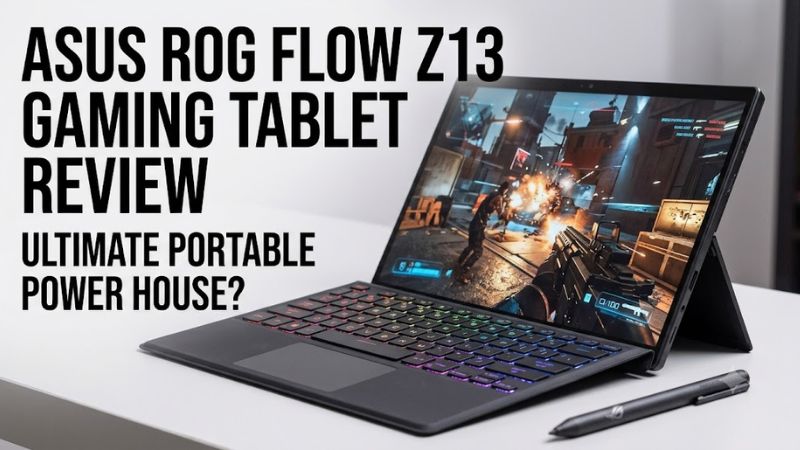
The ASUS ROG Flow Z13 is worth considering if you want a portable Windows PC that combines tablet functionality with capable gaming performance. Its strongest advantages are its flexible design, high-refresh-rate display, and powerful integrated hardware.
Its biggest weaknesses are the premium price, non-upgradeable memory, and graphics limitations in demanding games.
This assessment is based on published specifications and independent reviews, not firsthand testing by Real Gaming News.
ASUS ROG Flow Z13 Specifications
The 2025 ROG Flow Z13 uses AMD’s Ryzen AI Max platform, combining the CPU and GPU in one processor package. Unlike some earlier Flow models, the 2025 GZ302 series relies on integrated Radeon graphics rather than a separate NVIDIA laptop GPU.
| Specification | ASUS ROG Flow Z13 (2025) |
| Model family | GZ302 series |
| Processor | AMD Ryzen AI Max 390 or Ryzen AI Max+ 395 |
| Graphics | Radeon 8050S or Radeon 8060S |
| Display | 13.4-inch IPS-level touchscreen |
| Resolution | 2560 × 1600 |
| Refresh rate | 180Hz |
| Memory | 32GB, 64GB, or 128GB LPDDR5X-8000, depending on configuration |
| Storage | 1TB PCIe 4.0 NVMe SSD in listed configurations |
| Battery | 70Wh |
| Wireless connectivity | Wi-Fi 7 and Bluetooth 5.4 |
| Ports | USB4 Type-C, USB-A, HDMI 2.1, microSD, and 3.5mm audio |
| Operating system | Windows 11 |
| Tablet weight | Approximately 1.2kg (2.65lb), excluding keyboard |
| Power adapter | 200W, depending on configuration and region |
Specifications can vary by model and market. Buyers should confirm the exact configuration before purchasing.
Price and Configurations
The ROG Flow Z13 occupies the premium end of the gaming tablet market. Its price depends on the processor, memory capacity, and current retailer promotions.
ASUS US pricing listed on October 19, 2026, includes the following configurations:
| Configuration | Listed US price | Best for |
| GZ302EA-DS96, Ryzen AI Max 390, 32GB RAM, 1TB SSD | $1,699.99 promotional price | Gaming and everyday productivity |
| GZ302EA-XS96, Ryzen AI Max+ 395, 32GB RAM, 1TB SSD | $2,199.99 promotional price | More demanding workloads |
| GZ302EA-XS99, Ryzen AI Max+ 395, 128GB RAM, 1TB SSD | $3,299.99 promotional price | Memory-intensive creative and AI workloads |
These are listed promotional prices, not guaranteed checkout prices or confirmation of current stock. Availability and discounts can change.
Which configuration offers the best value?
For most gaming-focused buyers, the entry-level Ryzen AI Max 390 configuration is the sensible starting point. Its 32GB of memory should be sufficient for many games and general productivity tasks.
The Ryzen AI Max+ 395 model is worth considering if you regularly run heavily threaded applications or want the more powerful integrated GPU.
The 128GB configuration is difficult to justify for gaming alone. It is better suited to workloads that genuinely benefit from large amounts of system memory, such as certain local AI applications and complex creative projects.
One important limitation applies to every configuration: the memory is soldered onboard. You cannot add RAM later, so choose the capacity carefully.
Design and Build Quality
The Flow Z13 combines a tablet-style chassis, an integrated kickstand, and a detachable keyboard. This design allows it to function as a compact laptop, a touchscreen workstation, or a tablet for compatible applications.
At approximately 1.2kg without the keyboard, it is relatively portable for a high-performance Windows computer. However, it is heavier than many entertainment-focused tablets, and the keyboard and power adapter add to the overall carrying weight.
The kickstand is useful for desk gaming, video playback, and productivity. Detaching the keyboard also makes touchscreen interaction more convenient.
The trade-off is cooling. A tablet chassis has less room for cooling hardware than many conventional gaming laptops. During sustained gaming, fan noise, temperatures, and power limits can influence performance.
The Flow Z13 is best understood as a compact gaming PC with tablet functionality rather than a lightweight tablet designed primarily for casual entertainment.
Display Quality and Gaming Experience
The 13.4-inch display features a 2560 × 1600 resolution, a 16:10 aspect ratio, and a 180Hz refresh rate. ASUS specifies an IPS-level touchscreen with wide color coverage and Adaptive-Sync support.
The high refresh rate benefits competitive games when the hardware can deliver sufficiently high frame rates. The 16:10 aspect ratio also provides additional vertical workspace for coding, browsing, and document editing.
However, the native resolution places considerable demands on integrated graphics. Modern AAA games may require reduced graphics settings or a lower rendering resolution to maintain smooth performance.
Upscaling technologies can help improve performance in supported games. Frame generation may also increase displayed frame rates, but it does not eliminate input latency or replace the underlying rendering capability of the GPU.
The display is a strong feature, but buyers should not assume every game will run at 180 FPS simply because the panel supports 180Hz.
Gaming Performance: How Powerful Is the Radeon Graphics?
The Radeon 8050S and 8060S are key reasons the Flow Z13 is more capable than a typical integrated-graphics laptop. Nevertheless, gaming performance depends on the processor configuration, power profile, game engine, resolution, and graphics settings.
Published benchmark results
Tom’s Guide reported the following results for the Ryzen AI Max 390 configuration in its review:
| Game | Resolution and settings | Reported average FPS |
| Cyberpunk 2077 | 1080p | 28.7 FPS |
| Red Dead Redemption 2 | 1080p, Medium | 59.8 FPS |
These figures are results from Tom’s Guide’s test system, not measurements conducted by Real Gaming News. The published figures should be interpreted within the review’s testing methodology and configuration.
Notebookcheck’s review of a Ryzen AI Max+ 395 configuration also found that the Radeon 8060S could compete with certain laptop RTX 4070 configurations in its gaming comparisons. Results varied with power settings and workload, so this should not be interpreted as universal equivalence between the GPUs.
What games can the Flow Z13 handle?
The tablet is a reasonable option for:
- Competitive games such as Valorant and League of Legends.
- Older PC games and many moderately demanding titles.
- AAA games when graphics settings are adjusted appropriately.
- Emulation and other PC gaming workloads, subject to software compatibility.
Demanding games with extensive ray tracing are less suitable for this integrated GPU. Buyers who want consistently high frame rates at maximum settings should consider a laptop with a dedicated graphics processor.
The Flow Z13 uses shared system memory for graphics rather than a separate pool of dedicated VRAM. Memory allocation and available capacity can affect performance, but a larger RAM configuration does not automatically produce proportionally higher gaming frame rates.
Battery Life, Cooling, and Connectivity
The ROG Flow Z13 has a 70Wh battery. Actual battery life varies with brightness, power settings, wireless activity, and workload.
Light productivity is less demanding than gaming, so buyers should not expect battery performance during intensive gaming to match that of video playback or ordinary browsing. For extended gaming sessions, using the power adapter is the more practical approach.
The 200W adapter supports the system’s high-performance operation, although it reduces portability compared with a tablet that uses a small USB-C charger.
Connectivity includes USB4 Type-C, USB-A, HDMI 2.1, and a microSD reader. These ports support a range of peripherals and external displays, but users with several wired accessories may still need a compatible hub or dock.
The combination of a touchscreen, keyboard, kickstand, and external-display support makes the Flow Z13 suitable for users who switch frequently between portable and desk-based work.
Pros and Cons
Pros
- Powerful processing capability for a compact Windows tablet.
- Radeon integrated graphics capable of running many PC games.
- 13.4-inch, 2560 × 1600 touchscreen with a 180Hz refresh rate.
- Detachable keyboard and integrated kickstand.
- Configurations with up to 128GB of onboard memory.
- USB4 connectivity and a microSD reader.
Cons
- Premium pricing compared with conventional gaming laptops.
- Integrated graphics limitations in demanding ray-traced games.
- Soldered memory cannot be upgraded.
- The 1TB SSD may be insufficient for a large game library.
- Cooling and power limits can affect sustained performance.
- Keyboard and power adapter increase the total carrying weight.
ASUS ROG Flow Z13 vs. a Conventional Gaming Laptop
The Flow Z13 is not automatically the best gaming purchase simply because it combines a tablet design with strong integrated graphics.
| Priority | Better choice |
| Detachable keyboard and tablet functionality | ROG Flow Z13 |
| Portable gaming with touchscreen interaction | ROG Flow Z13 |
| Gaming performance per dollar | Compare conventional gaming laptops |
| Demanding ray-traced games | A suitable laptop with a dedicated NVIDIA RTX GPU |
| Memory-intensive professional workloads | A higher-memory Flow Z13, if software requirements justify it |
| Upgradeable RAM | A laptop with replaceable memory |
Conventional gaming laptops often have more room for cooling and dedicated GPUs. Depending on the model, they can deliver stronger sustained gaming performance for the same budget.
The Flow Z13 offers a different set of benefits: portability, touchscreen interaction, and the ability to switch between tablet and laptop-style use.
If those features are central to your workflow, its higher price may be justified. If you primarily play games at a desk, a conventional gaming laptop is likely the more practical purchase.
Is the ASUS ROG Flow Z13 Worth Buying in 2026?
The ASUS ROG Flow Z13 (2025) is worth considering at its listed promotional price of $1,699.99 if you want a Windows gaming tablet that can also serve as a productivity computer.
The Ryzen AI Max 390 configuration is the most sensible starting point for many buyers. It combines strong processing capability, capable integrated graphics, and 32GB of memory.
The Ryzen AI Max+ 395 version is more appropriate for users who need additional CPU and graphics performance. The 128GB configuration is best reserved for workloads that genuinely require its large memory capacity.
Skip the Flow Z13 if your main goal is maximizing gaming performance per dollar. A conventional gaming laptop with a suitable dedicated GPU may be a better investment for demanding AAA games and ray tracing.
Frequently Asked Questions
1. Is the ASUS ROG Flow Z13 good for gaming?
Yes, the ASUS ROG Flow Z13 can run many PC games, including demanding titles with adjusted graphics settings. Its Radeon 8050S or 8060S integrated graphics are capable, although demanding ray tracing remains a limitation.
2. How much does the ASUS ROG Flow Z13 cost?
The listed US promotional price for the entry-level 2025 GZ302EA-DS96 configuration was $1,699.99 on October 19, 2026. Higher-memory and Ryzen AI Max+ 395 configurations cost more, and prices may change.
3. Can you upgrade the RAM or SSD in the ROG Flow Z13?
The RAM is soldered onboard and cannot be upgraded. SSD replacement may be possible through the M.2 storage slot, but users should verify the exact model’s service documentation and warranty conditions before attempting an upgrade.
4. Is the ROG Flow Z13 better than a gaming laptop?
The ROG Flow Z13 is better for buyers who value tablet functionality, portability, and a detachable keyboard. A conventional gaming laptop may offer better gaming performance per dollar and stronger dedicated-GPU capabilities.
Final verdict
The ROG Flow Z13 is a compelling specialist device for people who want gaming performance and tablet flexibility in one computer. Its value depends less on whether it can run games and more on whether you will actually use its distinctive form factor.