Key takeaways
- Airflow vs. Aesthetics: Mesh front panels move more air and run cooler, while tempered glass and solid wood fronts prioritize looks at a small thermal cost.
- Fan and Radiator Support: Confirm the case supports the number and size of fans you plan to run, plus enough clearance for a 240mm or 360mm AIO if you’re using one.
- GPU and Component Clearance: Modern flagship GPUs are long and heavy; check maximum GPU length and look for a case with built-in anti-sag support.
- Cable Management System: A dedicated cable channel, PSU shroud, and rear cable bar make a massive difference in build cleanliness and airflow behind the motherboard tray.
- Build Size and Compatibility: Match the case to your motherboard form factor and check for reverse-connector or BTF-style motherboard support if you want a fully cable-free front.
Picking a PC case in 2026 means wading through a flood of RGB fans, tempered glass panels, and marketing buzzwords that all promise the same thing: better airflow and a cleaner build. The problem is that most of that noise doesn’t tell you what actually matters — thermal performance, cable management, GPU clearance, and whether the case will still look good three years from now.
This guide breaks down six of the strongest gaming cases available right now, from airflow-focused workhorses to panoramic showpieces, so you can match the right chassis to your build, your budget, and your desk space.
Our top picks




As an Amazon Associate we earn from qualifying purchases at no extra cost to you. Ratings are shown as listed on Amazon.
🎮 Get More From Your Setup — Free
Prime Gaming gives you free PC games every month, in-game loot, and a free Twitch channel sub — plus fast free shipping on all the gear above. New members get a 30-day free trial.
Watch: Best PC Cases For Gaming — Video Review
How to Choose a PC Case For Gaming (2026)
- Airflow vs. Aesthetics: Mesh front panels move more air and run cooler, while tempered glass and solid wood fronts prioritize looks at a small thermal cost.
- Fan and Radiator Support: Confirm the case supports the number and size of fans you plan to run, plus enough clearance for a 240mm or 360mm AIO if you’re using one.
- GPU and Component Clearance: Modern flagship GPUs are long and heavy; check maximum GPU length and look for a case with built-in anti-sag support.
- Cable Management System: A dedicated cable channel, PSU shroud, and rear cable bar make a massive difference in build cleanliness and airflow behind the motherboard tray.
- Build Size and Compatibility: Match the case to your motherboard form factor and check for reverse-connector or BTF-style motherboard support if you want a fully cable-free front.
The Best PC Cases For Gaming (2026)s Reviewed
Lian Li V100-ATX
The V100-ATX pairs four pre-installed ARGB fans with a raised display platform and tempered glass, making it one of the cleanest ways to show off a high-end build without hunting down extra fans or lighting.
CORSAIR 4000D RS ARGB
Built on Corsair’s InfiniRail mounting system, the 4000D RS is a high-airflow case that’s genuinely ready for next-gen motherboards, with native support for ASUS BTF, MSI Project Zero, and Gigabyte Stealth boards for a cable-free front.
Fractal Design North
The North stands apart with a genuine walnut wood front panel over a mesh airflow core, proving a gaming case can look like furniture without sacrificing thermal performance — the two Aspect PWM fans and USB-C port round out a refined, understated build.
CORSAIR 3500X RS ARGB
The 3500X RS brings Corsair’s panoramic glass design to a mid-tower footprint, with three fans out of the box, GPU anti-sag support, and reverse-connection motherboard compatibility for builders who want a tidy front-to-back cable layout.
MUSETEX Y6
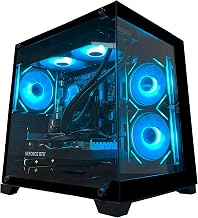
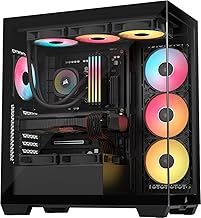
With seven infinity-mirror ARGB fans and a 270-degree glass view, the Y6 is built for showcase builds first — it’s an easy way to get a fully lit, high-fan-count system without buying fans separately.
Frequently Asked Questions
Do more pre-installed fans mean better cooling?
Not automatically. Fan count matters less than airflow path — a mesh front with fewer, well-placed fans can outperform a glass-heavy case stuffed with fans that lack clear intake and exhaust routes.
Is tempered glass or mesh better for gaming cases?
Mesh generally runs cooler under sustained load, while tempered glass looks better for RGB showcase builds; several modern cases, like the Fractal Design North, blend both to balance the two priorities.
What size case do I need for a high-end GPU?
Check the manufacturer’s listed maximum GPU length before buying, especially with flagship-tier graphics cards, and favor cases with GPU anti-sag brackets if you’re running a large, heavy card.
Are reverse-connection or BTF-compatible cases worth it?
If your motherboard supports reverse connectors or a BTF/Project Zero/Stealth layout, a compatible case makes cable management dramatically easier and cleaner; if not, it’s a non-factor in your decision.
Final Thoughts
For most gaming builds in 2026, the CORSAIR 4000D RS ARGB is the safest all-around pick thanks to its airflow design and next-gen motherboard compatibility, while the Fractal Design North is the top choice for anyone prioritizing understated style, and the MUSETEX Y6 is the best option for builders who want maximum RGB impact right out of the box.