Key takeaways
- RAM first: 32GB is the practical floor for smooth 4K editing; 16GB works for 1080p but fills fast once you add effects and browser tabs.
- Core count for exports: More cores cut render times; an i7/i9 or Ryzen 7/9 with 12-plus cores meaningfully speeds up encoding.
- GPU acceleration: Resolve and Premiere offload effects and encoding to the GPU, so a discrete RTX card transforms timeline responsiveness and export speed.
- NVMe storage: A fast M.2 SSD for the OS and cache plus roomy storage for media prevents the stutter that kills 4K playback.
- Form factor: Mini PCs save desk space and run quiet; full towers give you upgrade room and better sustained cooling for long renders.
Video editing punishes a computer differently than gaming does. Timeline scrubbing leans on fast single-core speed and lots of RAM, exports lean on many cores and GPU acceleration, and 4K media leans on fast NVMe storage so playback does not stutter. The best editing PC balances all four rather than chasing a single headline spec, and in 2026 that balance is available across a huge price range, from sub-$300 refurbished towers to $1,500 mini and full-size workstations.
This roundup gathers ready-to-run desktops that suit editors at different levels, whether you are cutting YouTube videos in 1080p, grading 4K footage in DaVinci Resolve, or running a Copilot+ mini PC for portable timelines. We prioritized RAM capacity, CPU core count, GPU acceleration, and SSD speed, then flagged who each machine is really for.
Our top picks




As an Amazon Associate we earn from qualifying purchases at no extra cost to you. Ratings are shown as listed on Amazon.
⚡ Save on Your Next PC — Amazon Prime
Prime members get fast free shipping on the systems above, plus early access to Prime Day & Black Friday PC deals. New members get a 30-day free trial.
Watch: Best PC for Video Editing — Video Review
How to Choose
- RAM first: 32GB is the practical floor for smooth 4K editing; 16GB works for 1080p but fills fast once you add effects and browser tabs.
- Core count for exports: More cores cut render times; an i7/i9 or Ryzen 7/9 with 12-plus cores meaningfully speeds up encoding.
- GPU acceleration: Resolve and Premiere offload effects and encoding to the GPU, so a discrete RTX card transforms timeline responsiveness and export speed.
- NVMe storage: A fast M.2 SSD for the OS and cache plus roomy storage for media prevents the stutter that kills 4K playback.
- Form factor: Mini PCs save desk space and run quiet; full towers give you upgrade room and better sustained cooling for long renders.
The Best Picks Reviewed
WIWB Gaming PC Core i9-14900HX, RTX 5060 Ti 8GB
At around $1,500 this is the performance pick, pairing a 24-thread i9-class chip with an RTX 5060 Ti and a 1TB NVMe SSD. The discrete GPU accelerates Resolve and Premiere effects and speeds hardware encoding dramatically, making it the machine for serious 4K grading and fast exports.
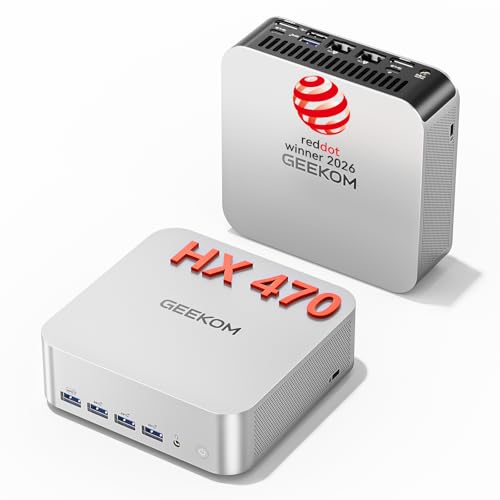
GEEKOM A9 Max Ryzen AI 9 HX 470 Mini PC
Near $1,440, this Copilot+ mini PC crams a Ryzen AI 9 chip, 32GB DDR5, and a 2TB SSD into a tiny chassis with USB4 and HDMI 2.1 for 8K output. It is the pick for editors who want workstation RAM and storage without a big tower, and the NPU helps with AI-assisted editing tools.
Getorli Mini PC Ryzen 7 6800H, 32GB, 1TB
At roughly $540 this mini PC is the value 4K editor, with 32GB LPDDR5, a 1TB NVMe SSD, and triple 4K display support. It leans on integrated graphics, so heavy effects render slower than a discrete-GPU rig, but for straightforward 1080p and light 4K cuts it punches far above its price.
HP Workstation PC i5, 32GB, 1TB SSD + 4TB HDD
This renewed workstation around $480 is the storage-first choice, pairing 32GB RAM with a 1TB SSD for the OS and cache plus a 4TB HDD for your media library. The Quadro K1200 is modest, so treat it as a capable 1080p editor and archive machine rather than a 4K powerhouse.
Dell OptiPlex 3050 Refurbished, 32GB, 512GB NVMe
At about $279 this is the budget entry point for anyone starting out, with a surprising 32GB of RAM and a fresh 512GB NVMe SSD. The older i5 and integrated graphics limit heavy 4K work, but for learning Premiere or DaVinci Resolve on 1080p footage it is a lot of usable performance for the money.
Frequently Asked Questions
How much RAM do I need to edit 4K video?
Aim for 32GB. It gives editing apps room for cache, multiple 4K streams, and background tasks without swapping to disk. 16GB is usable for 1080p but becomes a bottleneck once effects and multiple tracks pile up.
Do I really need a discrete GPU?
For fast 4K editing and short export times, yes. Premiere and DaVinci Resolve offload effects and encoding to the GPU, so a discrete RTX card makes the timeline far more responsive. Integrated graphics can handle 1080p but will feel slow on complex 4K projects.
Is a mini PC powerful enough for editing?
Modern mini PCs with 32GB RAM and fast NVMe storage handle 1080p and light 4K editing well, and higher-end models with strong NPUs speed up AI tools. For heavy grading you still want a discrete GPU, which most minis lack.
Should I buy renewed or refurbished for editing?
Renewed desktops are a smart way to get lots of RAM and storage cheaply for learning or 1080p work. Just verify the SSD is new and the RAM meets 32GB; the CPU generation matters less than those two for smooth timelines.
Final Thoughts
Match the machine to your footage. For 4K grading and quick exports, the RTX-equipped WIWB tower or the GEEKOM A9 Max mini deliver real power. For 1080p and budget-conscious editors, the Getorli mini and the refurbished Dell OptiPlex offer astonishing value thanks to their 32GB of RAM. Decide how much 4K you actually cut, then prioritize RAM and a fast SSD before anything else.