Key takeaways
- November 12, 2025: Valve announced the Steam Machine alongside the second-generation Steam Controller and the Steam Frame VR headset, all due in 2026.
- February 2026: Valve said it would miss the original spring window, citing the rising cost of RAM during the memory supply shortage, and moved its target to the first half of 2026.
- May 4, 2026: The new Steam Controller launched on its own.
- June 29 to 30, 2026: The Steam Machine launched. Wikipedia and Ars Technica give June 29; several outlets including PC Guide list June 30, likely reflecting time zones and regional availability.
- September 18, 2026: The Steam Frame headset followed.
Valve’s Steam Machine is real and on sale: it was announced on November 12, 2025, delayed in February 2026 because of the memory shortage, and released at the end of June 2026 running SteamOS. It is a compact, quiet living-room PC with performance that Digital Foundry and Gamers Nexus place around an RX 6600 to RTX 3060 class graphics card, which makes it excellent for 1080p and upscaled 1440p but weak for native 4K and heavy ray tracing. If you want the easiest couch PC with a console-style interface, the Steam Machine is the cleanest option; if you want the most performance for the money, Gamers Nexus concluded that a self-built PC can beat it for the same budget or less.
Verdict at a glance
| If you want… | Pick | Why |
|---|---|---|
| A plug-and-play living-room PC | Steam Machine | SteamOS boots straight into Big Picture style gaming, the box is tiny and very quiet |
| Maximum frames per dollar | DIY gaming PC | Gamers Nexus found an equivalent DIY build costs less and can outperform it |
| 4K or ray tracing | Mid-range or high-end gaming PC | The Steam Machine’s 8GB of VRAM limits 4K and ray-traced settings |
| Games with kernel anti-cheat (Call of Duty, Battlefield 6, Fortnite) | Windows gaming PC | Those games do not run on SteamOS/Linux |
| A small, quiet second PC for an existing Steam library | Steam Machine | Gamers Nexus measured roughly 20 to 21 dBA while gaming |
| Easy upgrades over time | DIY gaming PC | The Steam Machine’s GPU and CPU are soldered; only memory and SSD are user-replaceable |
Has the Steam Machine been released? The timeline
Yes. Here is the confirmed sequence of events, drawn from Valve’s announcements and coverage collected on Wikipedia, PC Guide and Ars Technica:
- November 12, 2025: Valve announced the Steam Machine alongside the second-generation Steam Controller and the Steam Frame VR headset, all due in 2026.
- February 2026: Valve said it would miss the original spring window, citing the rising cost of RAM during the memory supply shortage, and moved its target to the first half of 2026.
- May 4, 2026: The new Steam Controller launched on its own.
- June 29 to 30, 2026: The Steam Machine launched. Wikipedia and Ars Technica give June 29; several outlets including PC Guide list June 30, likely reflecting time zones and regional availability.
- September 18, 2026: The Steam Frame headset followed.
Launch pricing came in well above what many had hoped for, landing in premium-console territory rather than undercutting consoles. Valve engineers told press that the AI-driven memory shortage drove component costs up. Valve sells it in two storage tiers, with or without a bundled controller.
Steam Machine confirmed specifications
| Component | Steam Machine (confirmed) |
|---|---|
| CPU | Semi-custom AMD Zen 4, 6 cores / 12 threads, up to 4.8 GHz, 30W TDP |
| GPU | Semi-custom AMD RDNA 3, 28 compute units, up to 2.45 GHz sustained, 110W TDP |
| Video memory | 8GB GDDR6 |
| System memory | 16GB DDR5 (single-channel, SO-DIMM, user-upgradeable) |
| Storage | 512GB or 2TB NVMe (M.2 2230/2280), plus microSD slot |
| Video outputs | DisplayPort 1.4, HDMI 2.0 |
| USB | Front: 2x USB-A 3.2 Gen 1; rear: 1x USB-C 3.2 Gen 2, 2x USB-A 2.0 |
| Networking | Wi-Fi 6E (2×2), Bluetooth 5.3, gigabit Ethernet, built-in 2.4 GHz Steam Controller receiver |
| Power | Internal 110-240V supply |
| Size and weight | 156 x 162.4 x 152 mm; 2.6 kg |
| Operating system | SteamOS 3 (Arch Linux based) |
Wikipedia’s summary compares the CPU to a Ryzen 5 7540U and the GPU to a Radeon RX 7600M. Valve’s marketing claimed “over six times the horsepower of Steam Deck.” Before release, Valve also softened its performance wording from 4K at 60fps with FSR and ray tracing to “up to 4K gaming with FSR,” a change IGN described as more representative of most games without extra tweaking.
How fast is the Steam Machine in practice?
Independent reviews broadly agree on where it lands:
- Digital Foundry placed it between an RX 6600 and RX 7600, called SteamOS “fantastic,” and said 8GB of VRAM becomes a limit at 4K with ray tracing. In its earlier preview it reached 1440p at 60fps with upscaling fairly easily in Cyberpunk 2077, but dropped to around 30fps once ray-traced shadows and reflections were enabled.
- Gamers Nexus found its GPU performance closest to the RTX 3060 12GB, RX 6600, RX 5700 and Arc B570, with the RX 7600 consistently 15 to 20% faster. At 1080p it measured about 94fps in Resident Evil 4, 44fps in Black Myth: Wukong, 41fps in Starfield on Ultra and 50fps in Kingdom Come: Deliverance II. Its CPU behaved like a 2019-era Ryzen in many workloads because of aggressive power limits.
- Kotaku ran 25 games and found the experience good, with Cyberpunk 2077 holding 60fps at 1080p upscaled to a TV with light ray tracing.
- Ars Technica, in a separate comparison of Windows and SteamOS on desktop Radeon cards, found the two operating systems close in most raster games, Windows ahead by 15 to 20% in some ray-traced tests, and a big Windows advantage when an 8GB card ran out of VRAM. That last point is directly relevant to the Steam Machine’s 8GB GPU.
Gamers Nexus also measured gaming power draw around 173 to 176W and noise of roughly 20 to 21 dBA under gaming load, which is exceptionally quiet for a gaming PC.
Steam Machine vs typical gaming PCs: spec comparison
| Spec | Steam Machine | Entry DIY 1080p/1440p PC | Mid-range DIY 1440p PC |
|---|---|---|---|
| CPU | 6-core Zen 4, 30W | Ryzen 5 7600 (6-core Zen 4, 65W) | Ryzen 7 7800X3D or 9800X3D |
| GPU class | Near RX 6600 / RTX 3060 (per Gamers Nexus) | RX 9060 XT 16GB or RTX 5060 Ti 16GB | RX 9070 XT or RTX 5070 Ti |
| VRAM | 8GB | 16GB | 16GB |
| System RAM | 16GB single-channel | 32GB dual-channel | 32GB dual-channel |
| Size | Roughly 4 liters | Mini-ITX to mid-tower | Usually mid-tower |
| Noise | Very quiet | Depends on cooler and case | Depends on cooler and case |
| Upgradeable | RAM and SSD only | Everything | Everything |
| Anti-cheat multiplayer | Limited (Linux) | Full (Windows) | Full (Windows) |
The DIY columns are our illustrative build tiers, not reviewed systems. The point is the shape of the trade: a small DIY PC with a current 16GB graphics card will usually outrun the Steam Machine, but it will be larger, louder unless carefully built, and needs more setup.
Option 1: Steam Machine
Reasons to pick:
- SteamOS gives a console-like experience: power on, pick a game, play with a controller.
- Tiny, very quiet and power-efficient, per Gamers Nexus measurements.
- Your existing Steam library comes with you, including Steam Deck Verified games.
- Memory and SSD are user-upgradeable, and storage expands via microSD.
- Built-in Steam Controller receiver and Wi-Fi 6E for streaming and downloads.
Reasons to skip:
- 8GB VRAM and single-channel memory hold back newer, heavier games, especially at 4K.
- Games with kernel-level anti-cheat, including recent Call of Duty titles and Battlefield 6, do not run on Linux.
- Gamers Nexus judged value weak compared with DIY builds.
- Only HDMI 2.0, so 4K at 120Hz on a TV is not possible over HDMI.
- Gamers Nexus noted SteamOS defaults to a 1080p output cap that confuses users on 4K displays and is controller-first rather than mouse-and-keyboard friendly.
The catch: you pay for convenience, size and silence, not for raw performance.
Option 2: Building your own gaming PC
Gamers Nexus estimated the Steam Machine costs roughly 7 to 18% more than an equivalent DIY build, and said you could assemble a faster box for the same amount or less. A self-built system also lets you choose Windows for full anti-cheat compatibility, or install SteamOS-like Linux distributions such as Bazzite if you want a similar couch interface.
Reasons to pick:
- More GPU performance and 16GB of VRAM at a similar budget.
- Every part is replaceable, so the PC can grow with new games.
- Run Windows for every multiplayer game, or Linux if you prefer.
Reasons to skip:
- Small-form-factor builds that match the Steam Machine’s size are harder to build and cool quietly.
- Memory prices in 2026 make 32GB kits expensive.
- No single warranty covers the whole system.
The catch: matching the Steam Machine’s size and noise takes careful part selection; a mid-tower is easier but will not fit under most TVs.
Option 3: A prebuilt gaming PC
Prebuilt desktops with an RTX 5060 Ti, RX 9060 XT or above deliver more performance than the Steam Machine with Windows and full game compatibility. They are usually much larger and louder, and many ship with cheaper motherboards and memory to hit price targets. They suit desk setups better than living rooms.
The catch: check the memory configuration; many prebuilts cut corners there during the 2026 shortage.
SteamOS vs Windows: what you gain and lose
What SteamOS does well
- Fast resume and a controller-first interface built for TVs.
- Proton compatibility runs a large share of the Steam catalog, and Valve’s Verified program flags which games work out of the box.
- Fewer background tasks and no forced Windows updates during a gaming session.
What SteamOS cannot do
- Run games whose anti-cheat blocks Linux. TechPowerUp noted that Black Ops 7 does not work on Linux because of its anti-cheat, for example.
- Natively run every launcher. Some third-party launchers need extra setup, and some do not work.
- Match Windows in every case. Ars Technica found Windows ahead in some ray-traced games and when VRAM runs out.
Because the Steam Machine is a PC, Valve has not locked it to SteamOS, but installing Windows means giving up the console-style experience that is its main selling point.
Who should buy which
- You already own a Steam Deck and a big library: the Steam Machine is a natural TV companion, and most of your Verified games will run better on it.
- You play competitive shooters with kernel anti-cheat: buy or build a Windows PC.
- You have a 4K 120Hz TV and want to use it fully: a PC with an HDMI 2.1 graphics card is the better fit.
- You want to upgrade over five years: a DIY tower wins.
- You want silence and simplicity above all: the Steam Machine is hard to beat.
- You mostly play indie, older or Steam Deck Verified games: the Steam Machine has more than enough performance, and its 1080p and 1440p results in the reviews above show headroom for higher settings than a Steam Deck allows.
- You stream or edit video on the same machine: a desktop with a stronger CPU and more memory will serve you far better than a six-core, 30W chip.
Steam Machine vs PS5 and Xbox: where does it sit?
Many buyers compare the Steam Machine with consoles rather than PCs, because it lives under a TV and uses a controller-first interface. Gaming journalists cited on Wikipedia placed its specifications roughly on par with the current console generation, and Digital Foundry reported that it can struggle to match the PlayStation 5 in some titles despite costing more. A Notebookcheck comparison of the Steam Machine, a PS5 and a similarly specified PC in Cyberpunk 2077 reached a similar conclusion: the experience is comparable, not clearly better.
The trade-offs are different from a console’s, though:
- Game prices and library: you keep your Steam library and benefit from frequent Steam sales, and there is no paid subscription needed for online play.
- Optimization: console versions are tuned for one fixed hardware target, while Steam Machine performance depends on each game’s PC port and on Proton compatibility.
- Flexibility: the Steam Machine runs emulators, mods, desktop apps and other launchers in ways consoles do not.
- Output: current consoles support HDMI 2.1 features such as 4K at 120Hz, which the Steam Machine’s HDMI 2.0 port cannot carry.
If you only want to play big console releases on a TV with no fuss, a console remains simpler. If your library is already on Steam, the Steam Machine is the more natural fit.
The wider Valve ecosystem: Controller and Steam Frame
The Steam Machine was announced as part of a family. The second-generation Steam Controller launched in May 2026 and pairs through the Steam Machine’s built-in 2.4 GHz receiver, so you do not need a separate dongle. The Steam Frame VR headset followed in September 2026. If you plan to use the Frame for PC VR streaming, keep in mind that the Steam Machine’s RX 6600-class GPU, per Gamers Nexus, is modest for demanding VR titles; a gaming PC with a faster card will give a better VR experience. For flat-screen couch gaming, the controller and Steam Machine combination is the tidiest setup Valve has offered.
Setup tips if you buy a Steam Machine
- Check the output resolution in SteamOS display settings, because Gamers Nexus found it defaults to 1080p even on 4K displays.
- Use FSR or the in-game upscaler rather than native 4K in demanding games.
- Keep texture settings within 8GB of VRAM; dropping textures one notch is usually the biggest fix for stutter.
- Consider upgrading to dual-channel memory when prices ease, since the base 16GB is single-channel.
- Use the Ethernet port for game downloads and remote play if possible.
Common mistakes
- Expecting native 4K in modern AAA games. Reviewers found upscaling is required for most.
- Buying it for a multiplayer game that uses Linux-incompatible anti-cheat.
- Comparing its price only with consoles. It is a PC, so compare it with similarly sized PCs too.
- Assuming the GPU can be upgraded later. Only memory and storage are user-replaceable.
Products Mentioned in This Guide
These are the specific parts behind the entry and mid-range DIY build tiers we compared against the Steam Machine above.
AMD Ryzen 5 7600 6-Core Desktop Processor
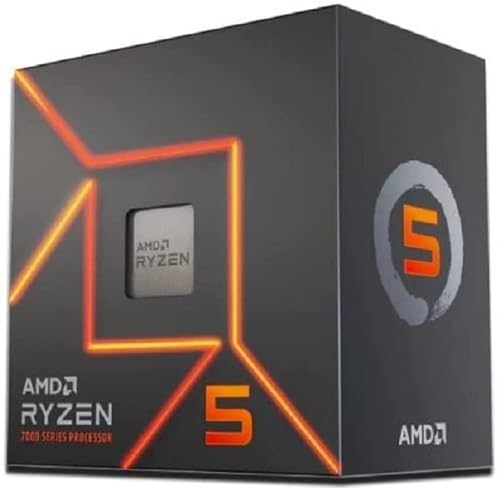
AMD Ryzen 5 7600 6-Core, 12-Thread Unlocked Desktop Processor
Included for 'Steam Machine vs Gaming PC (2026): Specs, SteamOS, DIY Options' as a representative home product in this roundup; selection reflects the product set returned for this topic.
View on AmazonThe CPU in our entry DIY 1080p/1440p tier: six Zen 4 cores at 65W, the same architecture as the Steam Machine’s chip but without its 30W power limit.
ASRock Radeon RX 9060 XT Challenger 16GB OC

ASRock Radeon RX 9060 XT Challenger 16GB OC, RDNA 4, 3290MHz Boost, 16GB GDDR6 128-bit, PCIe 5.0, Dual Fans, 0dB Silent, LED Indicator, DisplayPort 2.1a, HDMI 2.1b
Included for 'Steam Machine vs Gaming PC (2026): Specs, SteamOS, DIY Options' as a representative home product in this roundup; selection reflects the product set returned for this topic.
View on AmazonOne of the two GPU options for the entry DIY tier, giving you 16GB of VRAM instead of the Steam Machine’s 8GB, which matters most at higher resolutions and in ray-traced settings.
ASUS Dual GeForce RTX 5060 Ti 16GB OC Edition

ASUS Dual GeForce RTX 5060 Ti 16GB GDDR7 OC Edition Gaming Graphics Card
Included for 'Steam Machine vs Gaming PC (2026): Specs, SteamOS, DIY Options' as a representative home product in this roundup; selection reflects the product set returned for this topic.
View on AmazonThe NVIDIA alternative for the entry DIY tier, also with 16GB of VRAM, for builders who want Windows and full anti-cheat compatibility.
AMD Ryzen 7 7800X3D 8-Core Desktop Processor

AMD Ryzen 7 7800X3D 8-Core, 16-Thread Desktop Processor
Included for 'Steam Machine vs Gaming PC (2026): Specs, SteamOS, DIY Options' as a representative home product in this roundup; selection reflects the product set returned for this topic.
View on AmazonThe CPU for our mid-range DIY 1440p tier, a large step up from the Steam Machine’s six-core chip for gaming, streaming or editing on the same machine.
GIGABYTE Radeon RX 9070 XT Gaming OC 16G

GIGABYTE Radeon RX 9070 XT Gaming OC 16G Graphics Card, PCIe 5.0, 16GB GDDR6, GV-R9070XTGAMING OC-16GD Video Card
Included for 'Steam Machine vs Gaming PC (2026): Specs, SteamOS, DIY Options' as a representative home product in this roundup; selection reflects the product set returned for this topic.
View on AmazonThe mid-range tier GPU, for buyers who want 4K or ray tracing and an HDMI 2.1 card that can drive a 4K 120Hz TV, which the Steam Machine cannot.
How we compared
We compared the Steam Machine and gaming PC options using Valve’s published specifications, independent lab measurements from the sources named above, and owner reports. We did not bench-test these units ourselves. Performance figures are attributed to the outlets that measured them.
Sources
- Valve, Steam Machine announcement and specifications
- Wikipedia, Steam Machine (2026) article
- PC Guide, Steam Machine release date, specs and price
- Digital Foundry, Steam Machine review and preview
- Gamers Nexus, Valve Steam Machine review: GPU and CPU benchmarks, thermals, noise
- Kotaku, 25 games on the Steam Machine
- Ars Technica, Windows 11 vs SteamOS performance comparison
- IGN, coverage of Valve’s updated 4K performance wording
- TechPowerUp, Black Ops 7 handheld performance review (anti-cheat note)
Frequently Asked Questions
Is the Valve Steam Machine out?
Yes. It launched at the end of June 2026 after a delay from its original spring window caused by memory shortages.
How powerful is the Steam Machine compared with a gaming PC?
Gamers Nexus found its GPU performance closest to an RTX 3060 12GB or RX 6600, with an RX 7600 about 15 to 20% faster. That is entry-level gaming PC territory.
Can the Steam Machine run games at 4K?
With upscaling in lighter or well-optimized games, yes. Digital Foundry noted 8GB of VRAM limits 4K with ray tracing, and Valve itself revised its claim to “up to 4K gaming with FSR.”
Can you install Windows on the Steam Machine?
It is a PC and is not locked to SteamOS, but Windows removes the console-style experience. Ars Technica’s testing on desktop hardware suggests Windows can help in ray-traced or VRAM-limited games.
Does the Steam Machine play Call of Duty or Battlefield 6?
Not under SteamOS. Games with Linux-incompatible kernel anti-cheat will not run; you would need Windows.
Can I upgrade the Steam Machine?
The DDR5 SO-DIMM memory and the M.2 SSD are user-replaceable, and storage expands via microSD. The CPU and GPU are not upgradeable.
Is it cheaper to build a PC than buy a Steam Machine?
Gamers Nexus estimated an equivalent DIY build costs about 7 to 18% less and that you could build something faster for the same money, though it would likely be larger.
Is the Steam Machine quiet?
Very. Gamers Nexus measured about 20 to 21 dBA while gaming and said it is nearly inaudible at idle.