Our Top Picks
 MSI B650 Gaming Plus WiFi Gaming MotherboardB650 GAMING PLUS WIFI12 x 9.6 x 2 inches3.5 poundsCheck on Amazon
For most gaming builds in 2026, the best-value chipsets are B850 for AMD Ryzen 9000 on the AM5 socket and B860 for Intel Core Ultra 200S on the LGA1851 socket. Step up to X870 or Z890 only if you want a feature those boards guarantee, such as USB4, more M.2 slots, or multiplier overclocking on an unlocked Intel chip. The chipset matters far less to frame rates than the CPU and graphics card, so the goal is to buy enough board, not the most expensive one.
Short Answer by Platform
| Platform | Sensible gaming chipset | Step-up option | Budget option |
|---|---|---|---|
| AMD Ryzen 9000 / 9800X3D (AM5) | B850 | X870 or X870E | B650 (may need a BIOS update for newer chips) |
| Intel Core Ultra 200S (LGA1851) | B860 | Z890 | H810 |
| Intel 12th to 14th Gen (LGA1700) | B760 | Z790 | H610 |
What a Chipset Actually Does
The chipset is the hub that sits between the processor and everything that is not wired straight to it. The CPU provides the main graphics slot and usually one or more storage connections directly. The chipset adds the rest: extra M.2 storage slots, SATA ports, USB ports, and in some cases overclocking permissions. A more expensive chipset therefore mostly buys more connections and a few guaranteed features, not faster games.

MSI B550 Gaming WIFI6E Motherboard, ATX - Supports AMD Ryzen 5000 Series, 5000 G-Series, 4000 G-Series and 3000 Series Processors, AM4 - DDR4 Memory Boost 4800+MHz/OC, PCIe 4.0 x16, M.2 Gen4, 1G LAN
Chosen because it specifies ATX and Supports AMD Ryzen 5000 Series.
View on Amazon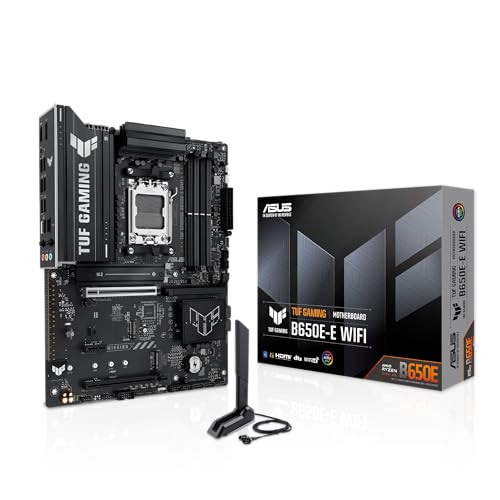
ASUS TUF GAMING B650E-E WIFI AMD AM5 B650 ATX motherboard, 8+2+1 80A DrMOS stage, DDR5, PCIe 5.0 Ready, 3x M.2, Wi-Fi 6E, 2.5 Gb LAN, DisplayPort, HDMI™, USB 20Gbps Type-C®, BIOS FlashBack™, Aura Sync
Chosen because it specifies 8+2+1 80A DrMOS stage and DDR5.
View on AmazonMSI B650 Gaming Plus WiFi Gaming Motherboard (AMD Ryzen 9000/8000/7000 Series Processors, AM5, DDR5, PCIe 4.0, M.2, SATA 6Gb/s, USB 3.2 Gen 2, HDMI/DP, Wi-Fi 6E, Bluetooth 5.3, 2.5Gbps LAN, ATX)
Chosen because it specifies AM5 and DDR5.
View on Amazon
Z890 Gaming Plus WIFI6E Motherboard, ATX-Supports Intel Core Ultra Processors (Series 2), LGA 1851 - DDR5 Memory Boost (Up to 9200+MT/s OC), 1 x PCIe 5.0 x16, 1 x M.2 Gen5, Intel Killer 5G LAN, Wi-Fi
Chosen because it specifies ATX-Supports Intel Core Ultra Processors (Series 2) and LGA 1851.
View on AmazonBecause the graphics slot and the first SSD slot normally come from the CPU, a mid-range chipset can still feed a fast graphics card at full speed. Reviewers covering Intel boards make this point repeatedly: a cheaper B-series board does not hold back a gaming card in a single-GPU build.
AMD AM5: B650, B850, X870 and X870E
All of these AM5 chipsets run Ryzen 9000 processors, including the 9800X3D, and all allow CPU and memory tuning. The differences come down to PCIe 5.0 and USB4 guarantees.
- B850: Every board is expected to offer CPU and memory overclocking and at least one PCIe 5.0 M.2 slot. A PCIe 5.0 graphics slot and USB4 are optional features that vary by board, and B850 boards start Ryzen 9000 chips without a BIOS update, according to coverage from TechSpot and others. Several guides call it the best fit for most gaming builds.
- X870: Makes USB4 standard and provides PCIe 5.0 for the graphics slot. Its chipset functions are described as largely similar to B650E, with the USB4 controller added.
- X870E: Adds a guaranteed second PCIe 5.0 NVMe slot and more lanes for builders with many drives or add-in cards.
- B650 and B650E: Still on shelves. A plain B650 board may need a BIOS update before it will boot a Ryzen 9000 chip, which is awkward if you do not own an older CPU to flash it. B650E makes PCIe 5.0 mandatory for graphics and NVMe.
One buying guide claims B850 guarantees USB4, but AMD’s specification as reported by TechSpot and iTechGuides lists USB4 as optional on B850. Read the individual board’s specification page rather than trusting the chipset name alone.
Intel LGA1851: B860, Z890 and H810
Core Ultra 200S processors use the 800-series chipsets. According to Puget Systems and HWCooling, Z890 supports core, BCLK and memory overclocking, while B860 supports memory overclocking only. Z890 also has more chipset PCIe 4.0 lanes, more SATA and USB ports, and is the only one in the family, along with workstation parts, that supports splitting the CPU’s PCIe 5.0 x16 graphics slot into multiple connections. B860 boards can still provide a PCIe 5.0 graphics slot and PCIe 5.0 SSD support depending on the design.
The consensus across the sources is straightforward: if you are not overclocking the CPU, B860 is enough. Recent Intel chips gain little from manual overclocking, so money is usually better spent on the processor or graphics card.
Older Intel Boards: B760 vs Z790
If you are building on the LGA1700 socket, Corsair’s explainer notes that Z790 supports CPU overclocking on K-series chips and offers 20 PCIe 4.0 chipset lanes against 10 on B760, plus four M.2 drives against two and eight SATA ports against four. Both support XMP 3.0 memory profiles and PCIe 5.0 graphics slots. PCWorld argued that a B760 board is enough for the large majority of users and that Z790 is mainly worth it for extra lanes, not for overclocking.
Features That Matter More Than the Chipset Name
- Socket and CPU plan: AM5 has been the platform AMD continues to build on, while LGA1851 is Intel’s current desktop socket. Choosing the CPU first locks in the chipset family.
- Memory type: Current platforms use DDR5. On older LGA1700 boards, the individual board decides between DDR4 and DDR5, not the chipset.
- M.2 slot count and speed: Check how many slots there are and which are PCIe 5.0 versus 4.0. Many gamers only ever fill one or two.
- Power delivery: Higher-end processors draw more power. A board with a stronger VRM heatsink keeps a demanding chip running stable.
- Networking and USB: WiFi 7 and 2.5 Gb Ethernet are common on mid-range boards. If you want USB4, confirm it is listed for that exact board.
- BIOS flashing: A BIOS Flashback button lets you update the firmware without a CPU installed, which helps with new processors on older boards.
Decision Table: Pick This Chipset If…
| Your situation | Pick | Why |
|---|---|---|
| Ryzen 9000 or 9800X3D, one GPU, one or two SSDs | B850 | Full tuning support and PCIe 5.0 storage without paying for extras |
| Need USB4 guaranteed or a guaranteed Gen 5 graphics slot | X870 | USB4 is standard on the chipset |
| Many NVMe drives, capture cards, creator workload on AMD | X870E | More guaranteed PCIe 5.0 lanes |
| Core Ultra 200S non-K or no overclocking plans | B860 | Memory tuning works, lower board cost |
| Unlocked Core Ultra K chip you want to tune | Z890 | Core and BCLK overclocking, more ports and lanes |
| Tight budget with an existing older AM5 CPU | B650 | Works fine, but confirm BIOS support for your CPU |
| Using an LGA1700 chip you already own | B760 | Enough for most single-GPU gaming builds |
Common Mistakes
- Paying for overclocking you will not use. Z-series boards on the Intel side exist for unlocked chips. If your processor is not a K-series model, that premium buys nothing for CPU tuning.
- Assuming B-series means weak. Reviewers describe modern B-series boards as fully capable for gaming; the cuts are in port counts and lane totals.
- Ignoring BIOS compatibility. A board with an older chipset may not recognise a newer CPU out of the box. Read the maker’s CPU support list for the exact board revision.
- Buying by chipset alone. Two boards on the same chipset can differ widely in VRM quality, M.2 count, rear I/O and audio. Compare the board specifications.
- Chasing PCIe 5.0 for graphics. The extra bandwidth matters little for current graphics cards in gaming, so do not overspend for it.
- Forgetting the form factor. ATX, micro-ATX and mini-ITX boards need matching cases. Smaller boards often have fewer slots and ports.
Pairing a Chipset With Your Graphics Card
One retail guide pairs X870E or Z890 with top-tier cards, B850, X870 or B860 with high-end cards, and B650 or B860 with upper mid-range cards. Treat that as a loose rule of thumb. In practice, any of those chipsets can run any current GeForce RTX 50-series or Radeon RX 9000 card, because the graphics slot comes from the processor. Spend the saved money on the card or processor, since those are what move frame rates.
A Note on Overclocking and BIOS Changes
Changing BIOS voltages, power limits or memory timings can cause instability and may void your warranty. If you do use XMP or EXPO memory profiles, those are the mildest changes, but they are still overclocks in the strict sense. Start conservative, change one setting at a time, and consult the motherboard manual for menu names, which vary by maker. If a system will not post after a change, clear CMOS using the method in the manual before contacting support.
Frequently Asked Questions
Is B850 good enough for gaming?
Yes. Multiple guides describe B850 as the sweet spot for Ryzen 9000 gaming builds because it supports CPU and memory tuning and offers at least one PCIe 5.0 M.2 slot. Only specific extras such as guaranteed USB4 require stepping up.
Do I need Z890 for a Core Ultra gaming PC?
Not unless you want to overclock the CPU. B860 supports memory overclocking and is the value choice for non-overclocked builds, according to Puget Systems and other sources.
Does the chipset change FPS?
Not directly. Frame rates are dominated by the graphics card and processor. A better chipset adds connectivity and, on some boards, tuning headroom, but it does not make the same CPU and GPU render faster by itself.
Is X870E worth it for gaming?
Only if you need its extra guaranteed PCIe 5.0 lanes, for example with several fast SSDs or add-in cards. For a typical gaming build with one graphics card and one or two drives, it adds cost without a gaming benefit.
Can I use a B650 board with a Ryzen 9000 chip?
Often yes, but a B650 board may need a BIOS update first, which can require an older compatible CPU or a Flashback feature. Look for a board that the maker lists as ready for Ryzen 9000, or choose B850 to avoid the question.
Should I buy a motherboard with WiFi 7?
If you game over wireless or cannot run a cable, it is a useful inclusion that many mid-range boards now carry. If you use Ethernet, it is a nice extra rather than a deciding factor.
FAQ
Is B850 good enough for gaming?
Do I need Z890 for a Core Ultra gaming PC?
Does the chipset change FPS?
Is X870E worth it for gaming?
Can I use a B650 board with a Ryzen 9000 chip?
Should I buy a motherboard with WiFi 7?
More from Amazon
Programs that pair well with the guide above. Offers and eligibility are set by Amazon and may change.
Free shipping on eligible items, Prime Video and more. Eligible new members can start with a free trial.
Start a Prime free trialAd-free music streaming. Eligible new subscribers can start with a free trial.
Try Music Unlimited freeA Prime membership for ages 18-24 with a trial period. Eligibility is set by Amazon.
See Prime for Young AdultsAudiobooks and podcasts to listen to on the go. Eligible new members can start with a free trial.
Try Audible freeAs an Amazon Associate we earn from qualifying purchases.