Our Top Picks
 ASUS TUF Gaming VG27AQ3A 27 Inch 1440p 180Hz14.4" x 24.2" x 2.1"24.2 x 8.4 x 17.9 inches10.1 poundsCheck on Amazon
For 1440p gaming, a card in the RTX 5070 or Radeon RX 9070 class is the usual sweet spot for high settings at 60 to 100 plus frames per second, while the RTX 5060 Ti and RX 9060 XT class is enough if you are willing to tune settings or use upscaling, and an RTX 5070 Ti or RX 9070 XT class card suits players chasing 144 fps in demanding games. The deciding factors are your frame-rate target, the games you play and the amount of video memory.
Quick Answer by Target
| Target at 1440p | GPU class | Notes |
|---|---|---|
| 60 fps, high settings | RTX 5060 Ti or RX 9060 XT 16 GB class | Tune the heaviest options and use upscaling in the newest games |
| 100 to 144 fps, high settings | RTX 5070 or RX 9070 class and up | Matches 144 Hz monitors well in many titles |
| 144 fps or more in demanding games | RTX 5070 Ti or RX 9070 XT class | Often paired with a fast CPU |
| Esports at 240 Hz | Mainstream card is often enough | These games are light; the CPU matters |
| Ray tracing at 1440p | Upper mid-range or better with upscaling | Ray tracing is expensive in frame rate |
What the Makers List
NVIDIA positions the GeForce RTX 5060 Ti for 1440p, listing 8 GB and 16 GB versions with GDDR7 on a 128-bit bus, 180 watts of total graphics power and a 600 watt minimum power supply. The maker claims about twice the 1440p performance of the RTX 3060 Ti at maximum settings when DLSS and ray reconstruction are used. That is an upscaling-assisted comparison against an older card, so it describes relative uplift, not a frame rate.
ASUS TUF Gaming VG27AQ3A 27 Inch 1440p 180Hz G-SYNC Gaming Monitor | Fast IPS, ELMB Sync, 1ms, 130% sRGB, Built-In Speakers, FreeSync Premium, HDR10, for PS5 and Xbox, 3yr warranty
Chosen because it specifies Fast IPS and ELMB Sync.
View on Amazon
ASUS TUF Gaming VG27AQM5A 27 Inch 1440p 300Hz G-SYNC Gaming Monitor | Fast IPS,ELMB Sync, 95% DCI-P3, Built-In Speakers, Shadow Boost, DisplayWidget Center, 0.3ms, for PS5 and Xbox
Chosen because it specifies Fast IPS and ELMB Sync.
View on Amazon
msi Gaming GeForce RTX 3090 24GB GDRR6X 384-Bit HDMI/DP Nvlink Tri-Frozr 2 Ampere Architecture OC Graphics Card (RTX 3090 Gaming X Trio 24G)
Picked as a relevant option in this category.
View on Amazon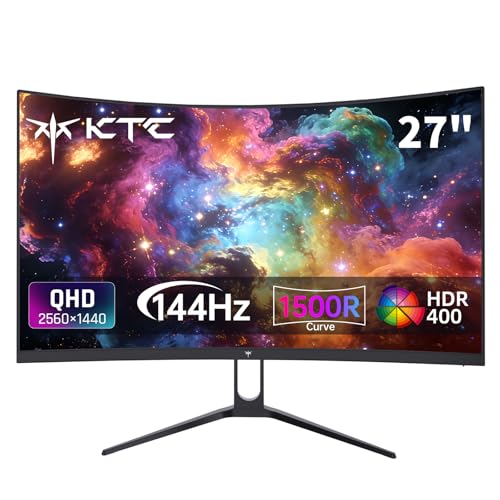
KTC H27S5C 27 Inch Curved Gaming Monitor, 1440P QHD 144Hz Monitor, HDR 400 | 2560x1440 120Hz Curve Monitors, 1500R HVA Panel, Adaptive Sync, 400nits, 129%sRGB, HDMI DP, Eye Care VESA 100x100 Mount
Chosen because it specifies 1440P QHD 144Hz Monitor and HDR 400.
View on AmazonOne step up, the RTX 5070 is listed with 12 GB of GDDR7 on a 192-bit bus, 250 watts and a 650 watt minimum supply. The RTX 5070 Ti is listed with 16 GB on a 256-bit bus, 300 watts and a 750 watt minimum supply. NVIDIA notes that these minimums are based on a test system with a Ryzen 9 9950X and that a PCIe CEM 5.1 compliant supply is recommended, so your own needs can differ. AMD’s competing Radeon RX 9070 and RX 9070 XT carry 16 GB of memory according to the maker’s lineup; confirm board-specific power and connector requirements on the maker or partner page.
Why 1440p Asks More Than 1080p
A 1440p image contains about 3.69 million pixels, which is roughly 78 percent more than the 2.07 million in a 1080p image. The GPU shades every pixel, so frame rates fall compared with 1080p on the same card. At the same time, the processor load is similar, so the GPU becomes the main limit more often. This is why 1440p is a comfortable resolution for mid-range and upper mid-range cards: it uses the GPU well without needing the most expensive models.
Video Memory at 1440p
Video memory pressure rises with resolution, texture quality, ray tracing and frame generation. Reviewers commonly say 8 GB is tight at 1440p in new games and that 12 GB is a reasonable minimum, with 16 GB giving the most room. If you are buying a card to keep for several years, a 16 GB model is the safer pick, particularly for games with high-resolution texture packs.
- 8 GB: workable with reduced texture settings in recent games.
- 12 GB: a good balance for most 1440p play.
- 16 GB: comfortable for heavy texture and ray-tracing settings.
Match the Monitor
A 1440p monitor at 60 Hz is satisfied by a mainstream card. A 144 Hz or 165 Hz panel rewards a faster card because every extra frame is visible, and variable refresh rate (FreeSync or G-Sync compatible) smooths the dips when the card cannot keep up. A 240 Hz 1440p panel is mostly useful for esports titles, which run at very high frame rates on mid-range cards. Buying a very fast GPU to feed a 60 Hz monitor is wasteful; a faster monitor may add more to the experience.
Upscaling and Frame Generation at 1440p
At 1440p, quality-mode upscaling from DLSS, FSR or XeSS typically gives a good balance of image quality and speed, and reviewers often describe it as a reasonable way to reach higher frame rates without a more expensive card. Frame generation raises the number of displayed frames but does not reduce latency the way rendered frames do, so it is better suited to single-player games than competitive ones. Support differs by card and game, so check the game and the maker page.
Do Not Forget the Rest of the System
- Processor: at high frame rates the CPU may limit the result. A balanced pairing matters.
- Power supply: use the maker’s stated minimum and the right connectors. For the 12V-2×6 connector, follow the GPU and PSU maker guidance, make sure it is fully seated, and stop use and contact the maker if you see heat damage.
- Case clearance and cooling: many 1440p cards are long and thick, so measure the case.
- Memory and storage: 16 GB of system RAM is a common baseline for modern games, and an SSD reduces load times.
Common Mistakes
- Buying an 8 GB card for a multi-year 1440p plan.
- Pairing a high-end GPU with a very old CPU.
- Judging a card by an upscaled and frame-generated claim without checking native performance.
- Choosing a 1440p panel with a slow or poorly tuned response and then blaming the GPU for blur.
- Skipping a power supply check before installing a higher-wattage card.
Pick-If Table
| Pick this if … | Class |
|---|---|
| You want 60 fps and a modest budget | RTX 5060 Ti or RX 9060 XT 16 GB class |
| You have a 144 Hz monitor and play mixed games | RTX 5070 or RX 9070 class |
| You play demanding single-player games at high settings | RTX 5070 Ti or RX 9070 XT class |
| You mainly play esports | Mainstream card with a fast CPU |
| You plan to move to 4K later | Upper mid-range with 16 GB |
Frequently Asked Questions
Is 12 GB of video memory enough for 1440p?
For most games today, yes, especially at high rather than ultra textures. A few new titles use more with ray tracing and high-resolution textures. If you want extra room, a 16 GB card avoids the issue.
Can an RTX 5060 class card play 1440p?
It can with tuned settings and upscaling, but it is positioned by the maker for 1080p. A 5060 Ti or similar card is a more natural 1440p fit, particularly with 16 GB of memory.
Do I need a 4K-class card for 1440p at 144 fps?
Not usually. An upper mid-range card handles 144 fps in many games, though the heaviest new titles may need lower settings or upscaling.
Does the CPU matter at 1440p?
Yes, especially above 100 fps. At 1440p the GPU is the limit more often than at 1080p, but a weak processor can still hold back the result in CPU-heavy games.
Is ray tracing worth it at 1440p?
It can look better in some games, but it lowers frame rate noticeably. Many players enable it with upscaling in single-player games and leave it off in competitive ones.
What power supply do I need?
Follow the card maker’s minimum, which NVIDIA lists as 650 watts for the RTX 5070 and 750 watts for the RTX 5070 Ti on its reference system. Your needs vary, so consult the card manual or a technician if you are unsure.
FAQ
Is 12 GB of video memory enough for 1440p?
Can an RTX 5060 class card play 1440p?
Do I need a 4K-class card for 1440p at 144 fps?
Does the CPU matter at 1440p?
Is ray tracing worth it at 1440p?
What power supply do I need?
More from Amazon
Programs that pair well with the guide above. Offers and eligibility are set by Amazon and may change.
Free shipping on eligible items, Prime Video and more. Eligible new members can start with a free trial.
Start a Prime free trialAd-free music streaming. Eligible new subscribers can start with a free trial.
Try Music Unlimited freeA Prime membership for ages 18-24 with a trial period. Eligibility is set by Amazon.
See Prime for Young AdultsAudiobooks and podcasts to listen to on the go. Eligible new members can start with a free trial.
Try Audible freeAs an Amazon Associate we earn from qualifying purchases.