Key takeaways
- Switch type: Membrane boards are quieter and cheaper but mushier; mechanical switches offer crisper actuation and far better longevity. Under $100 you can now get genuine hot-swappable mechanical, so only settle for membrane if you specifically want silence or a lower price.
- Size and layout: Full-size 104-key boards give you a numpad for MMOs and productivity; 65% and 75% layouts free up desk space for low-sensitivity mouse sweeps. Pick based on your grip and DPI, not on looks.
- Anti-ghosting and rollover: Look for explicit anti-ghosting or N-key rollover. Cheap boards often only guarantee it on a subset of keys — fine for shooters, a problem for fighting games and complex keybinds.
- Build materials: An aluminium or metal top plate massively reduces flex and deck rattle compared to bare ABS plastic. PBT keycaps also resist the greasy shine that ABS develops within months.
- Connectivity and extras: Wired USB-C is the safest choice for latency; tri-mode (2.4GHz/Bluetooth) is worth it if you switch between PC, laptop and console. Volume knobs, dedicated media keys and detachable wrist rests are genuine quality-of-life wins.
What's inside
Shopping for a gaming keyboard under $100 sounds easy until you actually start looking. The sub-$100 tier is the most crowded segment on the market, packed with boards that promise “mechanical feel,” RGB lighting and anti-ghosting — but the gap between a genuinely good budget keyboard and a plastic slab with rainbow LEDs is enormous. Switch type, build materials, keycap quality and connectivity all vary wildly at this price, and marketing copy rarely tells you which corners were cut.
This guide cuts through that noise. We’ve focused on keyboards that deliver real gaming performance for the money: reliable actuation, solid anti-ghosting, usable software or on-board controls, and build quality that survives more than a season of daily use. Below you’ll find our top picks across membrane, mechanical-feel and true hot-swappable mechanical designs, plus a straightforward buying framework so you can match a board to how you actually play.
As an Amazon Associate we earn from qualifying purchases at no extra cost to you.


⚡ Save on Your Next PC — Amazon Prime
Prime members get fast free shipping on the systems above, plus early access to Prime Day & Black Friday PC deals. New members get a 30-day free trial.
Watch: Best Gaming Keyboard Under $100 — Video Review
How to Choose Gaming Keyboard Under $100
- Switch type: Membrane boards are quieter and cheaper but mushier; mechanical switches offer crisper actuation and far better longevity. Under $100 you can now get genuine hot-swappable mechanical, so only settle for membrane if you specifically want silence or a lower price.
- Size and layout: Full-size 104-key boards give you a numpad for MMOs and productivity; 65% and 75% layouts free up desk space for low-sensitivity mouse sweeps. Pick based on your grip and DPI, not on looks.
- Anti-ghosting and rollover: Look for explicit anti-ghosting or N-key rollover. Cheap boards often only guarantee it on a subset of keys — fine for shooters, a problem for fighting games and complex keybinds.
- Build materials: An aluminium or metal top plate massively reduces flex and deck rattle compared to bare ABS plastic. PBT keycaps also resist the greasy shine that ABS develops within months.
- Connectivity and extras: Wired USB-C is the safest choice for latency; tri-mode (2.4GHz/Bluetooth) is worth it if you switch between PC, laptop and console. Volume knobs, dedicated media keys and detachable wrist rests are genuine quality-of-life wins.
The Best Picks Reviewed
AULA F75 Pro Wireless Mechanical Keyboard
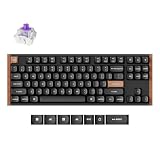
The most complete package here by a wide margin: a hot-swappable 75% board with pre-lubed Reaper switches, side-printed PBT keycaps, a control knob and tri-mode connectivity. It sounds and feels closer to a custom build than a budget keyboard, and the hot-swap sockets mean you can change switch feel later without buying a new board.
SteelSeries Apex 3 RGB
SteelSeries’ whisper-quiet gaming switches make this the pick for shared spaces, dorms and late-night sessions, and the IP32 water resistance is genuinely useful insurance for anyone who games with a drink nearby. The magnetic wrist rest is unusually good at this price and the 10-zone RGB is cleanly implemented through SteelSeries GG.
Logitech G213 Prodigy
A long-running favourite for a reason: Logitech’s Mech-Dome keys give membrane boards a surprisingly responsive bottom-out, and the spill-resistant chassis plus dedicated media controls make it a dependable daily driver. G HUB integration is the most mature software in this bracket, which matters if you run per-game lighting or macros.
Redragon K521 Upgrade
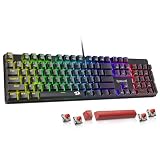
Redragon’s mechanical-feel design splits the difference nicely — full 104-key layout, multimedia keys, one-touch backlighting and broad console compatibility including PS4/5 and Xbox. It’s the best choice if you want a single full-size board that moves between a gaming PC and a console setup without fuss.
TECKNET Wired Gaming Keyboard
The metal top panel is the headline feature here, delivering a rigid, rattle-free typing surface that most keyboards in this price range simply can’t match. RGB backlighting is bright and even, making it a strong value option if you want a sturdy wired board and don’t need mechanical switches.
Frequently Asked Questions
Is a mechanical keyboard worth it under $100?
Yes. In 2026 the budget mechanical market is mature enough that you can get hot-swappable sockets, pre-lubed switches and PBT keycaps well under $100 — features that were premium-only a few years ago. If you type or game for several hours a day, the durability and consistency alone justify it.
Does a 65% or 75% keyboard hurt gaming performance?
Not at all — in fact, most competitive FPS players prefer compact layouts because they free up mouse space for low-sensitivity aiming. The trade-off is losing the numpad and, on 65% boards, the function row, so consider your non-gaming workload before committing.
Are membrane keyboards still viable for gaming?
They are, particularly the better-engineered ones like the G213. Membrane boards are quieter, more spill-resistant and cheaper, and the actuation delay difference is negligible for the vast majority of players. Mechanical simply lasts longer and feels more precise.
Should I choose wireless or wired at this price?
Modern 2.4GHz wireless is effectively lag-free, so wireless is no longer a compromise if the board includes a proper dongle. Bluetooth-only connections are best reserved for typing and travel rather than competitive play.
Final Thoughts
If you want the most keyboard for your money, the AULA F75 Pro is the clear standout — hot-swappable mechanical, tri-mode wireless and PBT keycaps at a price that would have bought a basic membrane board a few years ago. Choose the SteelSeries Apex 3 if quiet operation and spill resistance matter more than switch feel, or the Logitech G213 Prodigy if you want proven reliability and the best software ecosystem in the budget bracket. All three represent genuine value under $100.