Our Top Picks
 Philips 24 Inch Computer Monitor FHD 100Hz VA24 inch 100Hz8.7 x 21.3 x 16.4 inches6.4 PoundsCheck on Amazon
 Acer 23.8in FHD 1920x1080 IPS 120Hz Office Monitor23.8-inch4.53 x 21.21 x 16.7 Inches7.7 poundsCheck on Amazon
A 24 inch monitor is the size most desks were built around. It fits beside a laptop dock, sits comfortably at arm’s length, and still leaves room for a keyboard and a mouse pad without forcing you to lean back. The real decision in 2026 is not whether 24 inches is enough, but which flavor of 24 inch panel suits the way you actually work and play: a calm office panel with a sturdy stand, a 144Hz screen for shooters, or a budget curved model with speakers so the desk stays uncluttered.
This guide is written for buyers who already know they want the 24 inch class, which in practice includes panels listed as 23.8 inch. At this size nearly everything is 1920×1080, so the differences hide in refresh rate, panel type, connection options, and how the stand moves. Below you will find eight models sorted into a quick comparison, a checklist of thresholds worth verifying on the spec sheet, short write-ups based on the listed specs, and scenario picks for common setups.
Quick Picks
Philips 24 Inch Computer Monitor FHD 100Hz VA VESA Flicker-Free, 241V8LB | 1920×1080 LED Monitor, 4ms GtG, Adaptive Sync, HDMI 1.4, Tilt Adjust, Low Blue Light, 4yr Advance Replacement Warranty
One of the consumer electronics options compared in this guide.
View on Amazon
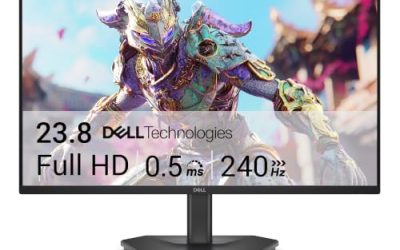
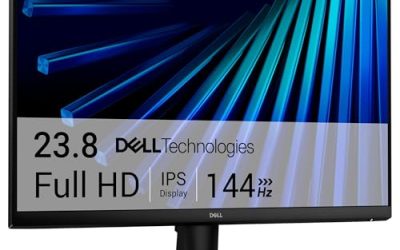
Dell 24 Monitor - SE2426H - 23.8-inch FHD (1920x1080) 144Hz 1ms Display, in-Plane Switching (IPS) Technology, AMD FreeSync™, TÜV 3-Star 2X HDMI, Tilt
One of the consumer electronics options compared in this guide.
View on AmazonAcer 23.8in FHD 1920x1080 IPS 120Hz Office Monitor KB242Y G0bi | 1ms, AdaptiveSync (FreeSync Compatible), sRGB 99%, HDMI, VGA, VESA Mountable, Bluelight Filter, Flickerless Technology
One of the consumer electronics options compared in this guide.
View on Amazon
LG 24U411A-B 24-inch Full HD (1920 x 1080) IPS Computer Monitor, 120Hz, HDR10, Reader Mode, Flicker Safe, HDMI, Slim Stand Base, Black
One of the consumer electronics options compared in this guide.
View on Amazon
ASUS VA249HG 24 Inch 1080P 120Hz Eye Care Gaming Monitor, HDMI, VGA | IPS, Full HD, 99% sRGB, Frameless, Adaptive-Sync, 1ms, Low Blue Light, Flicker Free, VESA Wall Mount, 3 yr warranty, EPEAT
One of the consumer electronics options compared in this guide.
View on Amazon
Samsung 24" (S30GD) Essential Monitor with IPS Panel and Tilt Only Stand | 100Hz Refresh Rate, Ergonomic Design, Advanced Eye Care, Game Mode, LS24D304GANXZA
One of the consumer electronics options compared in this guide.
View on Amazon
Dell 24 Plus Monitor - S2425HSM - 23.8-inch FHD (1920x1080) 144Hz 1ms Display, 2 x 3W Speakers, HDMI Connectivity, Height/Tilt/Pivot/Swivel Adjustability, AMD FreeSync - Ash White
One of the consumer electronics options compared in this guide.
View on Amazon
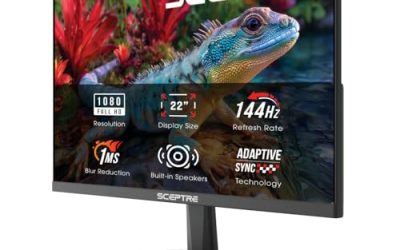
Sceptre Curved 24-inch Gaming Monitor 1080p R1500 98% sRGB HDMI x2 VGA Build-in Speakers, VESA Wall Mount Machine Black (C248W-1920RN Series)
One of the consumer electronics options compared in this guide.
View on Amazon| Product | Best for | Key spec taken from the product title |
|---|---|---|
| Philips 241V8LB | Budget office use | 24 inch FHD, 100Hz VA, 4ms GtG, flicker-free |
| Dell SE2426H | Affordable fast IPS | 23.8-inch FHD IPS, 144Hz, 1ms, FreeSync |
| Acer KB242Y G0bi | Mixed office and light gaming | 23.8in IPS, 120Hz, sRGB 99%, HDMI and VGA |
| LG 24U411A-B | Reading and everyday browsing | 24-inch IPS, 120Hz, HDR10, Reader Mode |
| ASUS VA249HG | Eye-care gaming on a budget | 24 inch IPS, 120Hz, 99% sRGB, 1ms, frameless |
| Samsung S30GD | Simple, clean desk setup | 24″ IPS, 100Hz, tilt-only stand, Game Mode |
| Dell S2425HSM | Ergonomic adjustability and sound | 23.8-inch FHD, 144Hz, 2 x 3W speakers, height/tilt/pivot/swivel |
| Sceptre C248W-1920RN | Curved screen on a tight budget | 24-inch curved, R1500, 98% sRGB, built-in speakers |
How to Choose
Refresh rate: 100Hz, 120Hz, or 144Hz
Every model here goes above the old 60Hz standard, but the steps matter. A 100Hz or 120Hz panel makes scrolling and cursor movement noticeably smoother than 60Hz, and it is plenty for office work and casual games. A 144Hz panel is the sweet spot for fast shooters and racing titles, because frame pacing improves when your graphics card can feed it. If your PC cannot hold more than 90 frames per second in the games you play, paying extra for 144Hz buys little. Also confirm the cable: to reach the top refresh rate you generally need a modern HDMI or DisplayPort connection, not VGA.
Panel type: IPS versus VA
IPS panels keep colors and brightness consistent when you view them from the side, which matters at 24 inches when two people share the screen or when you sit at an angle. VA panels usually deliver deeper blacks and higher contrast, which suits dim rooms and movie nights, though they can smear dark transitions in fast motion. For general use, an IPS panel with sRGB coverage around 99 percent is the safer bet. Treat contrast figures in marketing with caution and compare panel type first.
Stand and mounting
The stand is where budget models cut corners most often. Tilt-only stands are common at the entry level, and they work if your desk and chair already put the screen near eye level. If you need to adjust height, rotate into portrait for coding, or swivel to share the screen, look for a listing that names height, pivot, and swivel adjustment explicitly. Every model on this page that lists VESA compatibility can move to an arm later, which is often a cheaper route to good ergonomics than a pricier monitor.
Ports, speakers, and eye-comfort features
Count the inputs you need. Two HDMI ports help when a console and a PC share the screen; VGA matters only if you still connect older hardware. Built-in speakers are convenient but rarely impressive, so view them as a backup for video calls rather than a replacement for headphones. Features such as low blue light and flicker-free backlights are standard at this size and worth having for long sessions, but they are not a reason to pay a premium on their own. Ignore the HDR badge on entry-level panels unless the listing says more than HDR10 support; it mostly changes how the image is decoded rather than how bright it can get.
The 8 Best Options
Philips 241V8LB
This is the plain, practical choice for a home office or a student desk. The listing shows a 24 inch full HD VA panel at 100Hz with 4ms GtG response, Adaptive Sync, HDMI 1.4, flicker-free backlighting, and a low blue light mode. It is aimed at people who need a reliable second screen without paying for gaming features they will never use.
- Strength: the 100Hz refresh rate gives smoother scrolling than a basic 60Hz office panel.
- Strength: flicker-free and low blue light features suit long document sessions.
- Trade-off: the stand is listed as tilt adjust only, and HDMI 1.4 limits the top refresh rate options.
Skip it if you want the widest viewing angles of an IPS screen or plan to push 144Hz in fast shooters.
Dell SE2426H
Dell pairs a 23.8-inch full HD IPS panel with a 144Hz refresh rate and a 1ms response claim, plus AMD FreeSync and two HDMI inputs. That combination makes it a sensible pick for someone who games on weekends but also needs a monitor for spreadsheets and video calls during the week.
- Strength: 144Hz at this size is a real step up for shooters and racing games.
- Strength: two HDMI ports let a PC and a console share the screen.
- Trade-off: the listing mentions a tilt stand only, so height and rotation are not adjustable.
Skip it if you need height adjustment out of the box or a built-in speaker for a quick call.
Acer KB242Y G0bi
Acer positions this as an office monitor with gaming-friendly numbers. It lists a 23.8-inch IPS panel, 120Hz, a 1ms response claim, AdaptiveSync, 99 percent sRGB coverage, HDMI and VGA inputs, VESA mounting, and a bluelight filter. The VGA port is a small but real advantage for people who still use an older work desktop.
- Strength: 99 percent sRGB suits light photo editing and general color work.
- Strength: VESA mounting leaves a clear upgrade path to a monitor arm.
- Trade-off: it carries a single HDMI port, which is limiting for multi-device desks.
Skip it if you want two modern digital inputs or a feature-rich stand.
LG 24U411A-B
LG’s 24-inch full HD IPS display lists 120Hz, HDR10 support, Reader Mode, a flicker-safe backlight, HDMI, and a slim stand base. The slim base is a quiet selling point for small desks, and Reader Mode targets people who spend hours with text.
- Strength: the slim stand base frees up desk space for a keyboard and notebook.
- Strength: the 120Hz IPS combination handles both reading and casual games well on paper.
- Trade-off: only HDMI is named among the inputs, so legacy VGA devices will need an adapter.
Skip it if you want a multi-input hub or an ergonomic stand with height adjustment.
ASUS VA249HG
This ASUS panel mixes eye-care branding with gaming features. The title lists a 24 inch 1080P IPS display at 120Hz, 99 percent sRGB, a 1ms response claim, Adaptive-Sync, a frameless design, low blue light, and flicker-free operation, with both HDMI and VGA connections.
- Strength: the frameless design suits dual-monitor rows where bezels become distracting.
- Strength: Adaptive-Sync helps reduce tearing when frame rates fluctuate.
- Trade-off: the connection list stops at HDMI and VGA, with no DisplayPort named.
Skip it if you expect DisplayPort or a stand that rotates into portrait.
Samsung S30GD
Samsung’s Essential monitor is the minimalist option here. It lists a 24-inch IPS panel, a 100Hz refresh rate, an ergonomic design, advanced eye care, a Game Mode, and a tilt-only stand. It suits a bedroom or dorm desk where simplicity matters more than extras.
- Strength: an IPS panel at 100Hz is a comfortable step above a standard office screen.
- Strength: Game Mode gives console players a quick preset without menu digging.
- Trade-off: the tilt-only stand means height is fixed unless you add a mount.
Skip it if you game competitively and want 144Hz or more.
Dell S2425HSM
The standout here is the stand. Dell lists height, tilt, pivot, and swivel adjustability on a 23.8-inch full HD panel running at 144Hz with a 1ms claim, plus two 3W speakers and HDMI connectivity. It is the better fit for people who share a desk or switch between landscape and portrait.
- Strength: full ergonomic adjustment is rare at this size and easy to value every day.
- Strength: built-in 3W speakers cover video calls without extra hardware.
- Trade-off: the title highlights HDMI only, so confirm port count before pairing with several devices.
Skip it if speakers are irrelevant and you would rather spend less on the cheaper SE2426H.
Sceptre C248W-1920RN
Sceptre goes for value with a curved 24-inch screen. It lists a 1080p panel with an R1500 curve, 98 percent sRGB, two HDMI inputs, VGA, built-in speakers, and VESA wall-mount support. It is a tidy solution for a small room where the monitor also doubles as a casual entertainment screen.
- Strength: two HDMI ports plus VGA make it flexible for older and newer devices.
- Strength: built-in speakers and a wall-mount option reduce clutter.
- Trade-off: the title does not list a high refresh rate, so it is less suited to fast games.
Skip it if you want a flat panel for precise layout work or a 120Hz-plus refresh rate.
Which One Fits Your Situation
You are building a first gaming desk on a limited budget
The Dell SE2426H offers 144Hz, a 1ms claim, FreeSync, and an IPS panel in one listing. It leaves money for a keyboard and headset, and the two HDMI ports allow a console to share the screen.
You work from home and sit at the desk for most of the day
The Dell S2425HSM is the stronger option because height, tilt, pivot, and swivel adjustment protect your neck and shoulders, and its built-in speakers cover meetings. If you would rather keep the desk minimal, the LG 24U411A-B with its slim stand base is a pleasant alternative.
You need to connect an older computer and a new laptop
The Acer KB242Y G0bi lists both HDMI and VGA, along with 99 percent sRGB coverage. It lets an aging office desktop and a modern laptop share one screen without adapters.
You want a bold, space-saving screen for a small room
The Sceptre C248W-1920RN combines a curved panel, speakers, and wall-mount compatibility. It will do for movies, streaming, and casual play when floor and desk space are scarce.
Common Mistakes
- Buying on refresh rate alone while ignoring panel type; a 144Hz VA panel and a 144Hz IPS panel look different in dark scenes and from side angles.
- Assuming VGA can deliver the advertised refresh rate; analog connections hold back modern panels, so use HDMI or DisplayPort.
- Skipping the stand specification and discovering later that a tilt-only base leaves the screen too low for your chair.
- Trusting speaker listings as a substitute for headphones or desktop speakers when audio quality matters.
- Paying extra for an HDR label on an entry-level panel without checking the brightness and local dimming behind it.
Related guides
- External Hard Drive For Xbox Series X
- How To Check Gpu Temperature While Gaming
- 7.1 Surround Sound Gaming Headsets
Frequently Asked Questions
Is a 23.8 inch monitor the same as a 24 inch monitor?
For shopping purposes, yes. Many 24 inch listings use a 23.8 inch viewable diagonal, and the physical footprint is nearly identical. Compare resolution and panel type instead of chasing a tenth of an inch.
Is 1080p sharp enough at 24 inches?
Full HD at 24 inches gives a pixel density that most buyers find clean for office work, streaming, and gaming. Text is readable without scaling. A higher resolution only becomes noticeable if you sit very close or work with fine detail daily.
Do I need FreeSync or Adaptive Sync?
It helps if your graphics card supports it, because it reduces tearing when frame rates vary. For office use it is irrelevant. For games, it is a low-cost bonus that most models here include.
Should I buy two 24 inch monitors or one larger screen?
Two matching 24 inch panels give more usable windows and are easier to place on a standard desk. A single larger display is tidier but costs more for the same screen area. If budget matters, a pair of mid-range 24 inch screens is the more practical route.