Our Top Picks
The best Samsung monitor for most gamers in 2026 is an Odyssey OLED model, with the 27-inch Odyssey OLED G6 (G60SF) the pick if you want 1440p at 500Hz and the Odyssey OLED G8 line the pick if you want 4K at 240Hz. If you want a cheaper panel, the Odyssey G5 (G50D) delivers 1440p at 180Hz on an IPS panel, and the ViewFinity S8 or Smart Monitor M7 suit work and streaming better than competitive play. Samsung sells so many overlapping model names that the exact model number matters more than the series name.
Quick comparison of the best Samsung monitors
| Pick | Best for | Panel and resolution | Refresh rate | Price tier |
|---|---|---|---|---|
| Odyssey OLED G6 (G60SF), 27 in | Competitive and esports play | QD-OLED, 2560×1440 | 500Hz | Premium |
| Odyssey OLED G8 (G80SH / G81SF) | 4K gaming and mixed use | QD-OLED, 3840×2160 | 240Hz | Premium |
| Odyssey G5 (G50D), 27 in | Value 1440p gaming | Fast IPS, 2560×1440 | 180Hz | Budget to mid |
| ViewFinity S8 (S80D), 27 in | Office work and creative tasks | IPS, 3840×2160 | 60Hz | Mid |
| Smart Monitor M7 (M70F), 32 in | Streaming apps without a PC | VA, 3840×2160 | 60Hz | Mid |
Price tiers are general market bands, so check the current price before you decide.

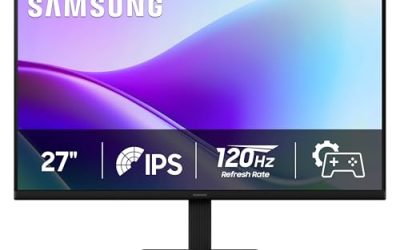
Samsung 27" S3 (S32GF) Series FHD High Resolution Monitor | 120Hz Monitor with IPS Panel, Flicker Free, Eye Saver Mode (LS27F320GANXZA)
Chosen because it specifies 120Hz Monitor with IPS Panel and Flicker Free.
View on Amazon
Samsung 27" Essential S3 (S36GD) Series FHD 1800R Curved Computer Monitor | 100Hz, Game Mode, Advanced Eye Comfort, HDMI and D-sub Ports (LS27D366GANXZA)
Chosen because it specifies 100Hz and Game Mode.
View on Amazon
Samsung 32" Flat Computer Monitor | 75Hz Refresh Rate, Borderless Display, AMD FreeSync, Game Mode, Advanced Eye Care, HDMI and DisplayPort, LS32B304NWNXGO, 2024
Chosen because it specifies 75Hz Refresh Rate and Borderless Display.
View on Amazon
Samsung 24" (S30GD) Essential Monitor with IPS Panel and Tilt Only Stand | 100Hz Refresh Rate, Ergonomic Design, Advanced Eye Care, Game Mode, LS24D304GANXZA
Chosen because it specifies 100Hz Refresh Rate and Ergonomic Design.
View on AmazonBest overall for gaming: Samsung Odyssey OLED G6 (G60SF)
The G60SF is a 27-inch QD-OLED panel at 2560×1440 with a 500Hz refresh rate and a 0.03ms response time, according to Samsung’s spec sheet. It supports AMD FreeSync Premium Pro, works with Nvidia G-Sync as a compatible display, and carries a VESA DisplayHDR True Black 500 certification. Samsung lists a 3-year warranty that covers burn-in under normal use, which is longer than many OLED rivals offer.
It has two HDMI 2.1 ports and one DisplayPort 1.4. The detail that catches buyers out is that the top refresh rate runs over DisplayPort, because HDMI is capped lower on this model. The trade-off is brightness: full-screen white is modest at around 300 nits, so bright rooms and long spreadsheet sessions are not its strength.
Best for 4K: Samsung Odyssey OLED G8
The Odyssey OLED G8 family pairs a QD-OLED panel with 4K resolution and a 240Hz refresh rate. RTINGS names the 32-inch G80SH as the best Samsung monitor it has reviewed, and a 27-inch G81SF variant also exists, so confirm the screen size in the model code before buying. At 4K, the sharpness is excellent for text and game detail alike, which makes it a better all-round desk monitor than the G6.
The cost is GPU demand. Driving 4K at high frame rates takes something in the RTX 5070 Ti or RX 9070 XT class and above, and most players will run 4K at 120Hz or less in demanding titles. Like all OLEDs, it rewards a dark mode and a screen saver for static desktop elements.
Best budget gaming monitor: Samsung Odyssey G5 (G50D)
The 27-inch G50D uses a fast IPS panel at 2560×1440 and 180Hz, with a 1ms GtG response time, VESA DisplayHDR 400 and about 99% sRGB coverage per Samsung’s specifications. It supports FreeSync and is G-Sync compatible, and the stand adjusts for height, tilt and swivel, which is rare at this price.
It has HDMI and DisplayPort inputs and no USB hub. Treat the HDR400 label as a marketing tier rather than real HDR, since an edge-lit IPS panel cannot match OLED contrast. For a mid-range GPU such as an RTX 5060 or RX 9060 XT, this is the sweet spot of sharpness and frame rate.
Best for work and creative tasks: Samsung ViewFinity S8 (S80D)
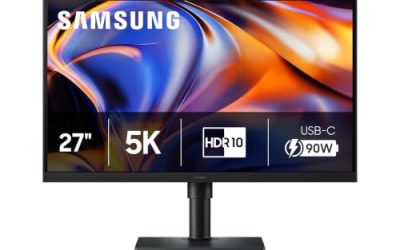
The 27-inch ViewFinity S8 is a 4K IPS monitor with 99% sRGB coverage, HDR10 support, 350 nits and a height-adjustable stand. It runs at 60Hz, so it is a poor fit for fast games but a good fit for documents, photo editing and code. Some S80D SKUs add USB-C with 90W charging, a built-in LAN port and a KVM switch, while others have only HDMI and DisplayPort, so match the full model number to the ports you need.
Best smart monitor: Samsung Smart Monitor M7 (M70F)
The 32-inch M70F is a 4K VA panel with Samsung’s Tizen smart platform, so you can open streaming apps, use Gaming Hub for cloud gaming and mirror a phone without turning on a PC. It includes 2x HDMI 2.0, USB-C with 65W charging, Wi-Fi 5, Bluetooth 5.2 and 10W stereo speakers, per Samsung. Refresh is 60Hz and brightness is about 300 nits, so it is a living-room and dorm pick, not a competitive one. A camera is not built in, and an optional one is sold separately in some regions.
How to choose: bandwidth math for Samsung’s fast panels
Refresh rate claims only matter if your cable and GPU can carry the signal. Pixel rate is width x height x refresh rate, then multiplied by bits per pixel.
- 1440p at 500Hz: 2560 x 1440 x 500 is about 1.84 billion pixels per second. At 8-bit color (24 bits), that is about 44 Gbps before blanking, well above the roughly 26 Gbps usable on DisplayPort 1.4, so Display Stream Compression is required.
- 4K at 240Hz: 3840 x 2160 x 240 is about 2.0 billion pixels per second. At 10-bit color (30 bits), that is about 60 Gbps, which exceeds HDMI 2.1’s 48 Gbps link, so compression is again needed.
- 4K at 60Hz: about 12 Gbps at 8-bit, which any modern HDMI 2.0 or USB-C link carries comfortably.
The practical consequence: use the DisplayPort cable that ships with the monitor, update your GPU driver, and confirm the refresh rate in Windows display settings after connecting.
Decision matrix
| Your situation | Choose | Reason |
|---|---|---|
| Esports shooter, RTX 5070 or better | Odyssey OLED G6 | 500Hz with near-instant response |
| Single-screen gaming and movies, RTX 5070 Ti or better | Odyssey OLED G8 | 4K sharpness with OLED contrast |
| Tight budget, mid-range GPU | Odyssey G5 G50D | 1440p 180Hz without OLED pricing |
| Mostly work, occasional games | ViewFinity S8 | 4K text clarity and USB-C options |
| No PC, want apps and cloud gaming | Smart Monitor M7 | Built-in Tizen apps |
Ownership realities
OLED panels can show burn-in if the same static elements stay on screen for thousands of hours, so enable the pixel-shift and screen-saver options and use auto-hide taskbars. Several owners report that QD-OLED panels look slightly washed out in very bright rooms because of the way ambient light reflects off the panel, so control your lighting if you buy one. IPS and VA models avoid burn-in but add glow or ghosting in dark scenes. Always register the warranty, since burn-in coverage terms differ by region.
Frequently Asked Questions
Which Samsung monitor is best for gaming?
The Odyssey OLED G6 (G60SF) is the best pure gaming choice because of its 500Hz refresh rate and 0.03ms response time. If you prefer 4K, the Odyssey OLED G8 offers 240Hz at higher resolution. The Odyssey G5 G50D is the better pick on a budget.
Are Samsung OLED monitors prone to burn-in?
All OLED panels carry some burn-in risk with long static content. Samsung ships protection features and lists a 3-year warranty on the G6 that includes burn-in under normal use, per its published information. Using dark mode and a hidden taskbar lowers the risk further.
Do I need DisplayPort for 500Hz on the Odyssey OLED G6?
Yes. Retailers list the full 500Hz over DisplayPort, with lower rates over HDMI. Use the included DisplayPort cable and a recent graphics card.
Is the Samsung Smart Monitor M7 good for gaming?
It suits casual and cloud gaming through Gaming Hub, but its 60Hz VA panel and 4ms-class response are not built for fast shooters. It is better for streaming, office use and console play at 60fps.
What is the best cheap Samsung gaming monitor?
The 27-inch Odyssey G5 G50D is the standout value, with 1440p, 180Hz and a fully adjustable stand. It pairs well with an RTX 5060-class card or similar.