Our Top Picks
 ASUS TUF Gaming VG27AQL5A 27 Inch 1440p 210Hz14.4" x 24.2" x 2"8.5 x 24.2 x 21 inches15.2 PoundsCheck on Amazon
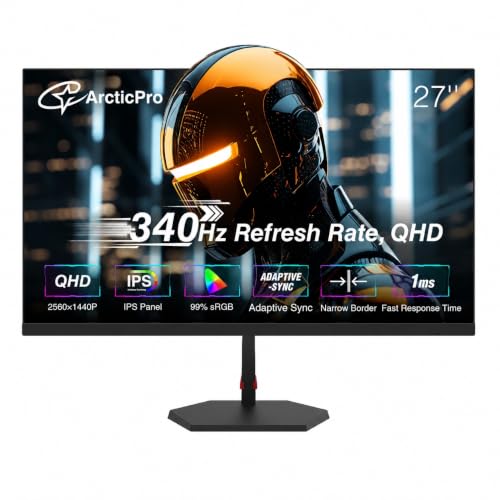 ArcticPro 27 Inch Gaming Monitor 340Hz 300Hz27" 340Hz QHD IPS24.17 x 2.68 x 14.27 Inches11.2 poundsCheck on Amazon
The jump from 1080p to 1440p is the most satisfying upgrade in monitor shopping, and it has become surprisingly affordable. Shopping for a 1440p monitor under 300 dollars used to mean settling for a 60Hz panel with washed-out color. In 2026 the same ceiling gets you fast IPS panels with refresh rates that once cost far more, which creates a different problem: the spec sheets are crowded with numbers that look alike, and the real differences hide in the details. Refresh rate, panel type, HDR labels and input ports all behave differently once the monitor is on your desk.
This guide is for gamers and everyday users who want sharper text and image detail than 1080p offers, without outgrowing the budget. It covers 24.5-inch and 27-inch panels, a white-finish model, and one curved VA option. Everything below comes from what each listing states, so use it as a way to narrow a list, then confirm ports and stand adjustments on the product page. Your graphics card matters too: pushing 300 frames per second at 1440p takes real horsepower.
Quick Picks
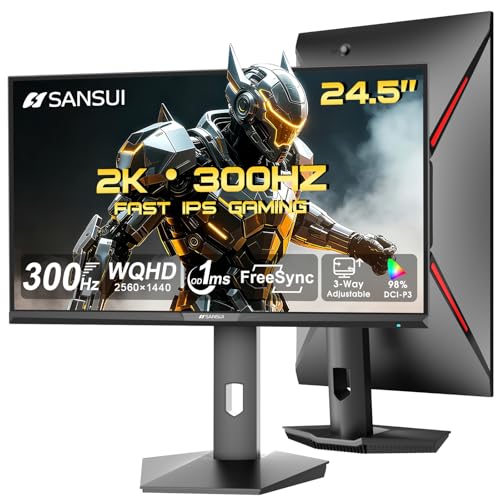
SANSUI 24.5 Inch Gaming Monitor QHD 1440P 300Hz 240Hz, 1ms Fast IPS Computer Monitor, 2× HDMI 2.1 Up to 300Hz, 2× DP 1.4 Up to 300Hz, 130% sRGB Eye Care VESA Support (DP Cable Included ES-G25F6Q Pro)
One of the consumer electronics options compared in this guide.
View on Amazon
ASUS TUF Gaming VG27AQM5A 27 Inch 1440p 300Hz G-SYNC Gaming Monitor | Fast IPS,ELMB Sync, 95% DCI-P3, Built-In Speakers, Shadow Boost, DisplayWidget Center, 0.3ms, for PS5 and Xbox
One of the consumer electronics options compared in this guide.
View on Amazon
Acer Nitro 27in QHD 2560x1440 IPS 300Hz Gaming Monitor XV272U F3bmiiprx | 0.5ms, AMD FreeSync Premium, sRGB 99%, 2xHDMI 2.1, DisplayPort, VESA HDR400, Ergo Stand, Speaker, Bluelight Filter
One of the consumer electronics options compared in this guide.
View on AmazonASUS TUF Gaming VG27AQL5A 27 Inch 1440p 210Hz G-SYNC Gaming Monitor | Fast IPS, ELMB Sync,0.3ms, 130% sRGB, Built-In Speakers, FreeSync Premium, Height Adjustable, HDR10, for PS5 and Xbox
One of the consumer electronics options compared in this guide.
View on AmazonArcticPro 27 Inch Gaming Monitor 340Hz 300Hz, QHD 1440p Monitor, 1ms, IPS
One of the consumer electronics options compared in this guide.
View on Amazon
Hikers 27 Inch Curved Gaming Monitor 280Hz 240Hz 1ms 2K Gaming Monitor | 2K WQHD 1440P HDMI 2.1×2 & DP 1.4×1 Fast VA 5000:1 Contrast, 134% sRGB 1500R VESA (G27H1Q Pro Includes One HDMI 2.1 Cable)
One of the consumer electronics options compared in this guide.
View on Amazon
KTC 27 Inch 320Hz Gming Monitor 2K, 1440P Monitor 300Hz, Fast IPS, H27E6 | WQHD White Monitors 1ms, HDR 400, 144%sRGB, HDMI DispalyPort, Tilt Swivel Pivot Height Adjust, Low Blue Light, VESA Mount
One of the consumer electronics options compared in this guide.
View on Amazon
LG 27G640A-B 27-inch Ultragear QHD (2560 x 1440) IPS Gaming Monitor, 300Hz, 1ms, NVIDIA G-Sync, AMD FreeSync Premium, VESA DisplayHDR 400, HDMI 2.1, USB Type-C, Tilt/Height/Swivel/Pivot Stand, Black
One of the consumer electronics options compared in this guide.
View on Amazon| Product | Best for | Key spec from the title |
|---|---|---|
| SANSUI 24.5 Inch | Compact desks and esports | QHD 1440P, up to 300Hz, 1ms Fast IPS, 2x HDMI 2.1 |
| ASUS TUF VG27AQM5A | NVIDIA owners wanting G-SYNC | 27 inch, 1440p, 300Hz, G-SYNC, 95% DCI-P3 |
| Acer Nitro XV272U F3bmiiprx | Console and PC mixes | 2560×1440 IPS, 300Hz, 0.5ms, 2xHDMI 2.1, HDR400 |
| ASUS TUF VG27AQL5A | Balanced speed for mid-range GPUs | 1440p, 210Hz, 0.3ms, G-SYNC, FreeSync Premium |
| ArcticPro 27 Inch | Chasing the highest refresh number | 340Hz 300Hz, QHD 1440p, 1ms, IPS |
| Hikers 27 Inch Curved | Immersive curve and dark scenes | 280Hz, Fast VA, 5000:1 contrast, 1500R |
| KTC H27E6 | White-setup builds and color range | 320Hz 2K, Fast IPS, HDR 400, 144% sRGB |
| LG 27G640A-B UltraGear | Brand support and broad sync | QHD IPS, 300Hz, 1ms, G-Sync, DisplayHDR 400 |
How to Choose
Size and sharpness: 24.5 versus 27 inches
At 1440p, a 27-inch screen works out to roughly 109 pixels per inch, which is a sweet spot for sharp text without scaling. A 24.5-inch panel packs the same pixels into less space, making it crisper but smaller, and suits shallow desks and competitive players who prefer to see the whole screen without moving their eyes. Sit about an arm’s length away and pick the size that keeps the corners comfortable to glance at. Avoid pairing a 27-inch 1440p screen with a very close seating distance if you notice pixel grid lines, which are more visible at that range.
Refresh rate: how much is enough
The listings here range from 210Hz to 340Hz, but there are diminishing returns. Going from 60Hz to 144Hz is a transformation, and from 144Hz to 240Hz is a noticeable step for fast shooters. Beyond 240Hz the gains are small and your graphics card has to supply the frames. Many titles at 1440p will not hold 300 frames per second on a mid-range card, so a 210Hz or 240Hz ceiling is not a handicap. Also look for variable refresh support, such as G-SYNC or FreeSync Premium, which smooths tearing when frame rates fluctuate. Be careful with titles that list two numbers, like 340Hz 300Hz; the lower figure is often the realistic one at full 1440p.
Panel type: Fast IPS versus VA
IPS panels offer wide viewing angles and accurate color, and the “Fast IPS” label means faster pixel transitions. VA panels, like the Hikers curved model, deliver higher contrast, listed here at 5000:1, so dark scenes look deeper, but VA generally has slower dark-to-light pixel changes and may smear in fast motion. If you play competitive shooters, Fast IPS is the safer choice. If you watch movies in a dim room, VA contrast may matter more. Treat response-time claims such as 0.3ms or 0.5ms as best-case grey-to-grey figures, not guarantees across all transitions.
Ports, HDR labels and where budget panels cut corners
Check that the monitor has the connection that gets you full refresh at 1440p. DisplayPort 1.4 handles it comfortably, and HDMI 2.1 is what you need on a console or a newer GPU for high refresh over HDMI. Be skeptical of HDR400 or “HDR 400” badges: these indicate basic brightness support, not the dramatic highlights of premium HDR. Color claims such as 130% sRGB describe gamut size, not accuracy, and out-of-the-box color can look oversaturated. Budget stands often tilt only, so look for height adjustment or plan on a VESA arm.
The 8 Best Options
SANSUI 24.5 Inch QHD Gaming Monitor
This 24.5-inch panel lists QHD 1440P, 300Hz and 240Hz modes, 1ms Fast IPS, two HDMI 2.1 and two DisplayPort 1.4 inputs, each up to 300Hz, and 130% sRGB with eye-care features. Few listings in this range spell out so many inputs, which matters if you juggle a desktop, a laptop and a console on one screen.
- Strength: four inputs, all listed up to 300Hz, suit multi-device setups.
- Strength: the smaller size keeps the entire screen in view for esports.
- Trade-off: 24.5 inches is smaller than the usual 27-inch 1440p sweet spot.
Skip it if you want a larger desktop canvas or a monitor with built-in speakers listed.
ASUS TUF Gaming VG27AQM5A
A 27-inch, 1440p, 300Hz Fast IPS monitor with G-SYNC, ELMB Sync, 95% DCI-P3, built-in speakers and Shadow Boost. Shadow Boost is a feature meant to lift detail in dark areas, a small advantage in games with murky corridors.
- Strength: G-SYNC and ELMB Sync target smooth motion for NVIDIA setups.
- Strength: 95% DCI-P3 points to a wider color range than basic sRGB panels.
- Trade-off: the title does not list HDR support.
Skip it if you want HDR labeling or a curved screen.
Acer Nitro XV272U F3bmiiprx
Acer’s 27-inch QHD 2560×1440 IPS monitor lists 300Hz, 0.5ms, AMD FreeSync Premium, 99% sRGB, two HDMI 2.1 ports, DisplayPort and VESA HDR400. The model code suggests a mainstream gaming line, so it is a sensible pick for shoppers who value a familiar brand and flexible inputs over exotic features.
- Strength: two HDMI 2.1 inputs suit PC plus console use.
- Strength: 99% sRGB and HDR400 give both color and brightness support.
- Trade-off: HDR400 is entry-level HDR, so expect modest highlight impact.
Skip it if you need NVIDIA G-SYNC branding in the listing.
ASUS TUF Gaming VG27AQL5A
This 27-inch 1440p model tops out at 210Hz but lists 0.3ms response, G-SYNC, FreeSync Premium, ELMB Sync, 130% sRGB and built-in speakers. It is the sibling to the 300Hz TUF model, and the lower refresh ceiling is the main difference to weigh against it.
- Strength: both G-SYNC and FreeSync Premium appear in the listing.
- Strength: 210Hz is realistic for mid-range graphics cards at 1440p.
- Trade-off: it has the lowest refresh rate in this group.
Skip it if you want the highest possible refresh figure.
ArcticPro 27 Inch Gaming Monitor
A 27-inch QHD 1440p IPS monitor listing 340Hz and 300Hz modes with 1ms response. The title is short, so plan to read the product page for ports and stand details. Shoppers who pick it for the refresh number alone should remember that a graphics card has to render those frames, and a modest card will never reach the top of the range at 1440p.
- Strength: the highest refresh rate listed in this lineup.
- Strength: IPS panel brings wide viewing angles.
- Trade-off: the title gives no sync technology, color gamut or port details.
Skip it if you need verified sync branding or detailed color specs.
Hikers 27 Inch Curved Gaming Monitor
The only curved choice: a 27-inch 1500R Fast VA panel at 280Hz and 240Hz, 1ms, 134% sRGB, 5000:1 contrast, with two HDMI 2.1 and one DisplayPort 1.4. The 1500R curve is fairly aggressive, which is why the monitor feels wrap-around at normal desk distance and less natural when used for precise layout work.
- Strength: 5000:1 contrast helps dark scenes and movies.
- Strength: curved 1500R screen adds immersion at desk distance.
- Trade-off: VA panels tend to show more motion smear than Fast IPS.
Skip it if you play fast competitive shooters or prefer a flat screen for editing.
KTC H27E6
A 27-inch WQHD monitor with a white finish, listing 320Hz and 300Hz modes, Fast IPS, 1ms, HDR 400 and 144% sRGB, plus tilt and swivel. White monitors are rarer than black ones, so this suits a themed build with white peripherals, and the high refresh claims keep it relevant for gaming too.
- Strength: white styling suits light-themed desk setups.
- Strength: Fast IPS with a high refresh rate and HDR 400 labeling.
- Trade-off: the title lists tilt and swivel but not height adjustment.
Skip it if you need a pivoting height stand without a separate arm.
LG 27G640A-B UltraGear
LG’s 27-inch QHD IPS monitor lists 300Hz, 1ms, NVIDIA G-Sync, AMD FreeSync Premium, VESA DisplayHDR 400 and HDMI 2.1. It is the pick for shoppers who want a recognized electronics brand and clearly named standards rather than a long list of marketing terms.
- Strength: certified DisplayHDR 400 and both sync standards are named.
- Strength: established brand with HDMI 2.1 support.
- Trade-off: DisplayHDR 400 remains entry-level HDR.
Skip it if you want a curved panel or higher refresh figures.
Which One Fits Your Situation
You own an NVIDIA graphics card and play competitive shooters
The ASUS TUF VG27AQM5A and the LG 27G640A-B both name G-Sync and sit at 300Hz. Choose the ASUS for the wider DCI-P3 color figure, or the LG for DisplayHDR 400.
You split time between a PC and a console
The Acer Nitro XV272U lists two HDMI 2.1 ports and DisplayPort, and the SANSUI offers two HDMI 2.1 and two DisplayPort inputs, which gives more room to plug in extra devices. Console owners should match the HDMI 2.1 port to the console output to unlock the higher refresh modes.
You have a mid-range graphics card
The ASUS TUF VG27AQL5A at 210Hz fits the frame rates a mid-range card can realistically deliver at 1440p, and you still get adaptive sync. Lower targets also leave more headroom, so frame times stay steadier than on a card that is constantly straining.
You watch more movies than you play shooters
The Hikers curved VA panel with 5000:1 contrast favors dark scenes, while the KTC H27E6 suits a bright, white desk.
Common Mistakes
- Paying for 300Hz or more without a graphics card that can supply the frames.
- Treating HDR400 as real HDR and expecting cinematic highlights.
- Choosing a curved VA screen for fast shooters and then noticing smear.
- Ignoring stand height adjustment and ending up with a monitor too low.
- Plugging into the wrong port, so the monitor runs below its top refresh rate.
Related guides
- External Hard Drive For Xbox Series X
- How To Check Gpu Temperature While Gaming
- 7.1 Surround Sound Gaming Headsets
Frequently Asked Questions
Is 1440p worth it over 1080p?
Yes for most 24 to 27 inch screens. Text is crisper and games look clearer, though your graphics card will work harder.
Do I need G-SYNC or is FreeSync enough?
Many FreeSync Premium monitors work with NVIDIA cards too, but check the listing. Models naming G-SYNC are the surest fit for NVIDIA setups.
Is a 24.5-inch 1440p monitor too small?
Not for competitive play or small desks. It looks very sharp but gives you less desktop space than 27 inches.
Why does the listing mention two refresh rates?
Some titles list a maximum plus a lower mode. Check the manual or product page for which modes are available at full resolution over each port.