Key takeaways
- Protects your PC from floor dust, spills, and accidental knocks.
- Improves airflow by lifting intake vents off the ground.
- Easy mobility on models with locking caster wheels.
- Adjustable width and height to fit nearly any tower.
What's inside
A desktop PC stand seems like a minor accessory until you realize how much it protects your investment. Lifting your tower off the floor keeps it away from dust, spills, and accidental kicks, improves airflow, and, on rolling models, makes it easy to reach the ports or move the whole rig for cleaning and cable work.
This review looks at the best adjustable CPU stands and holders, comparing stability, mobility, and adjustability, so you can find the right one to keep your gaming or office PC safe, cool, and conveniently placed.
As an Amazon Associate we earn from qualifying purchases at no extra cost to you.



🎮 Get More From Your Setup — Free
Prime Gaming gives you free PC games every month, in-game loot, and a free Twitch channel sub — plus fast free shipping on all the gear above. New members get a 30-day free trial.
Watch: Desktop Pc Stand: Review & Buyer’s Guide — Video Review
Design & Build
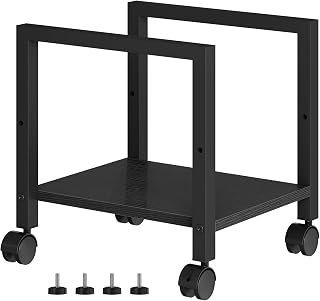
Most desktop PC stands follow a similar template: an adjustable-width cradle that grips the base of your tower, mounted on either fixed feet or rolling caster wheels. The mobile CPU holders with locking casters are the most popular, letting you slide the tower out from under a desk for maintenance and roll it back with ease. Models like the JANE EYRE stand add a charging station and adjust from around 23 to 28 inches in height, while the 6-level adjustable and D-Black carpet-friendly stands focus on stability across different tower sizes. For heavier duty, the EUREKA Ergonomic two-tier steel stand handles full ATX cases or even printers. Build quality ranges from lightweight plastic-and-metal to sturdy welded steel frames.
Performance
In daily use, the value of a good stand comes down to stability and smooth mobility. The adjustable ventilated holders keep even large towers secure while improving airflow underneath, which helps intake fans breathe and reduces dust buildup. Rolling models with quality caster wheels glide easily on hard floors, and the carpet-specific designs like the D-Black use wheels sized to roll over rugs without snagging. Height-adjustable stands such as the JANE EYRE and the 6-level model let you match the tower to your desk height for easy port access. The heavy-duty EUREKA steel stand is the most stable of the group, ideal for large cases that you rarely want to tip. All of them accomplish the core goal: getting your PC off the floor safely.
Pros & Cons
- Protects your PC from floor dust, spills, and accidental knocks.
- Improves airflow by lifting intake vents off the ground.
- Easy mobility on models with locking caster wheels.
- Adjustable width and height to fit nearly any tower.
- Cheaper stands can feel wobbly with very heavy full-tower cases.
- Caster wheels vary in quality, so carpet users should pick carpet-rated models.
Alternatives to Consider
If stability with a large case is your top priority, the EUREKA Ergonomic steel stand is the sturdiest option here. For maximum convenience under a desk, a rolling model with locking casters like the JANE EYRE or 6-level adjustable stand is the way to go. Carpet users should specifically choose the D-Black carpet-friendly design, while anyone who never moves their PC could opt for a simple fixed-foot riser to save money. Those wanting extra utility will appreciate the built-in charging station on the JANE EYRE model.
Frequently Asked Questions
Does a PC stand really improve cooling?
Yes, modestly. Lifting the case off the floor lets bottom-mounted intake fans draw cleaner air and reduces dust accumulation, which helps maintain airflow and cooling over time.
Will a rolling stand support a heavy full tower?
Most adjustable holders support standard mid and full towers, but for very heavy cases choose a sturdy steel model like the EUREKA and check the weight rating before buying.
Are these stands good for carpet?
Some are. Look for carpet-rated designs like the D-Black stand, which use larger wheels that roll smoothly over rugs. Standard casters work best on hard floors.
Do PC stands fit all tower sizes?
Adjustable-width models fit most towers by expanding the cradle to match your case. Always confirm your tower’s dimensions fall within the stand’s adjustment range.
Verdict
A desktop PC stand is a small purchase that pays off in protection, cooling, and convenience. For most people, an adjustable rolling holder with locking casters offers the best mix of mobility and value, while the EUREKA steel stand is the pick for heavy full towers. Match the stand to your floor type and case size, and your PC will stay cleaner, cooler, and easier to live with.