Our Top Picks
 Kado 3-Pack Trio 27" Curved 1500R 1920x1080 75Hz272.83 x 24.46 x 14.56 inches12.24 poundsCheck on Amazon
 Kado Triple Monitor 3-Pack 27" 1920x1080 75Hz FHD27" 3-Pack1.75 x 24.13 x 14.23 inches10.6 poundsCheck on Amazon
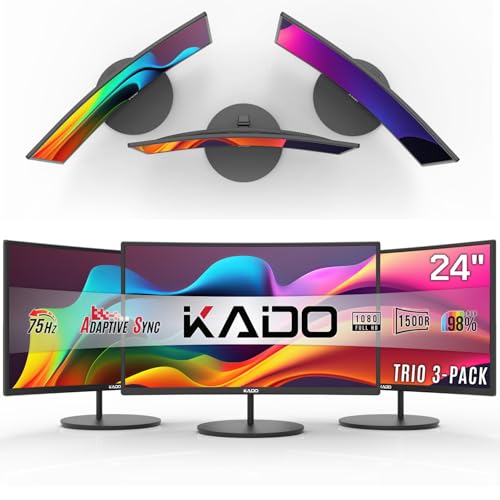 Kado 3-Pack Trio 24" Curved 1500R 1920x1080 75Hz242.21 x 21.17 x 12.65 inches11.64 poundsCheck on Amazon
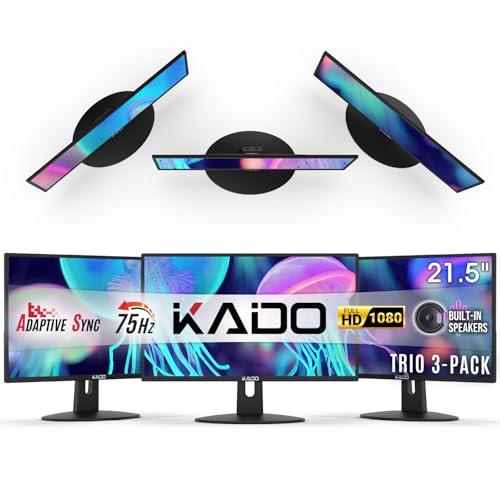 Kado 3-Pack Trio 22" Flat Screen 1920x1080 75Hz221.46 x 19.93 x 11.92 inches8.25 poundsCheck on Amazon
To set up triple monitors for gaming, connect all three screens to the graphics card (not the motherboard), arrange them side by side in Windows Display settings, then either run games across all three using the driver’s spanning feature (NVIDIA Surround or AMD Eyefinity-style options) or play on the centre screen and use the outer two for chat, maps and monitoring.
What you need before you start
| Item | What to check | Why it matters |
|---|---|---|
| Graphics card outputs | Count the DisplayPort and HDMI ports on the card and read the maker’s spec page for how many displays it can drive | Each monitor needs its own output on the card |
| Monitors | Ideally three of the same model, size and resolution | Mixed screens cause scaling and refresh-rate mismatch |
| Cables | DisplayPort or HDMI cables rated for the resolution and rate | An old cable can limit the refresh rate |
| Graphics power | Rendering three screens at once is heavy | Resolution across three panels multiplies the pixels the GPU must draw |
| Desk space and stands | Room for three screens at the right angle, or a triple monitor stand | Comfort and viewing angle |
| Software | Current graphics driver | Surround and similar features live in the driver |
Step 1: Place and cable the monitors
- Switch the PC off and unplug it from the wall before reaching behind it.
- Place the monitors on the desk or stand. Put the centre one directly in front of you and angle the two side screens inward so that each faces your eyes. A shallow curve across the three reduces the stretched look at the edges.
- Plug each monitor into a separate output on the graphics card. Avoid the motherboard video ports when you have a dedicated card, as they connect to a different video source.
- Power on and let Windows detect the displays.
Step 2: Arrange them in Windows
- Right-click the desktop and open Display settings.
- You will see three numbered rectangles. Use Identify to confirm which number each physical screen has.
- Drag the rectangles into the same left to right order as the real screens.
- Select each one and set the same resolution and the same refresh rate, using the highest rate all three support.
- Choose your main display by selecting the centre screen and ticking Make this my main display.
- Under Multiple displays, keep Extend these displays.
At this point you have an extended desktop. Many players stop here, using the centre screen for the game and the others for streaming chat, a browser, or a hardware monitoring overlay.
Kado 3-Pack Trio 27" Curved 1500R 1920x1080 75Hz FHD Computer Monitor | Triple Monitor Setup HDMI Office Gaming Hybrid, VESA Wall Mount Arm Mount Built-in Speakers, Panoramic Display Multi-tasking
Chosen because it specifies Triple Monitor Setup HDMI Office Gaming Hybrid and VESA Wall Mount Arm Mount Built-in Speakers.
View on AmazonKado Triple Monitor 3-Pack 27" 1920x1080 75Hz FHD Computer Monitor Trio | HDMI Office Gaming Hybrid Desk Setup, VESA Wall Mount Arm Mount Built-in Speakers, Panoramic Display Multi-tasking
Chosen because it specifies HDMI Office Gaming Hybrid Desk Setup and VESA Wall Mount Arm Mount Built-in Speakers.
View on AmazonKado 3-Pack Trio 24" Curved 1500R 1920x1080 75Hz FHD Computer Monitor | Triple Monitor Setup HDMI Office Gaming Hybrid, VESA Wall Mount Arm Mount Built-in Speakers, Panoramic Display Multi-tasking
Chosen because it specifies Triple Monitor Setup HDMI Office Gaming Hybrid and VESA Wall Mount Arm Mount Built-in Speakers.
View on AmazonKado 3-Pack Trio 22" Flat Screen 1920x1080 75Hz FHD Computer Monitor | Triple Monitor Setup HDMI Office Gaming Hybrid, VESA Wall Mount Arm Mount Built-in Speakers, Panoramic Display Multi-tasking
Chosen because it specifies Triple Monitor Setup HDMI Office Gaming Hybrid and VESA Wall Mount Arm Mount Built-in Speakers.
View on AmazonStep 3: Use all three as one game screen
NVIDIA’s driver has a feature called Surround, which combines up to three displays into one wide display for games. In the NVIDIA Control Panel, look under 3D Settings for Configure Surround, PhysX, tick Span displays with Surround, choose the three displays, and pick a resolution and refresh rate. The control panel includes bezel correction settings so the image lines up across the screen frames. NVIDIA’s own support pages describe the supported display count and cables for your card. On AMD cards, the Adrenalin software offers a similar feature through the display options for combining multiple screens, and the wording changes with the driver release, so follow the AMD Software menu for your version. In both cases the three displays should match in resolution and refresh rate.
Once the driver has combined the screens, the game sees one very wide display. Pick that wide resolution inside the game’s video settings. Games that support ultrawide aspect ratios handle this better; some titles stretch the interface or use a narrow field of view, so look for a field-of-view slider.
Extended desktop or combined screen?
| Approach | Best for | Drawback |
|---|---|---|
| Extended desktop, game on centre screen | Shooters, competitive play, streaming, productivity during play | No extra peripheral vision in the game |
| Surround or combined spanning | Racing and flight simulators, immersive titles | Much higher GPU load; menus may stretch; some games ignore it |
| Centre screen for the game, side screens angled for sim cockpit views | Games with native multi-monitor camera support | Requires game support in the video options |
Performance expectations
Three 1080p screens have three times the pixels of one 1080p screen, so the load is close to a single 5760 by 1080 display. Three 1440p screens push much further and need a high-end card. Check what your graphics card is aimed at on the maker’s page and consider lowering settings or using upscaling features such as DLSS or FSR where the game supports them. Reviewers generally treat triple-screen gaming as demanding because of the pixel count and not because of the number of ports.
Port and bandwidth notes
Modern graphics cards usually have several DisplayPort outputs and one or more HDMI outputs, though the counts differ by model, so read the card’s specification page. If you want high refresh on all three, DisplayPort on each is often the safest route. Some monitors list their maximum rate only on one input. If your card lacks enough DisplayPort outputs, an active adapter that the card maker lists as compatible may help, but passive and cheap adapters can cause drop-outs.
Common mistakes
- Plugging one monitor into the motherboard and two into the card, then wondering why Surround cannot combine them.
- Mixing refresh rates, so the extended desktop feels inconsistent or one screen stutters.
- Mixing resolutions, which forces scaling and makes Surround unavailable.
- Placing the side monitors flat instead of angled, producing a stretched edge and neck strain.
- Choosing a resolution the graphics card cannot drive smoothly.
- Ignoring bezel correction, so a road line or horizon breaks at the screen frames.
Comfort and safety
Set the centre screen with its top edge at or just below eye level and sit at an arm’s length or more. Use a stand rated for the weight of the monitors and follow the stand maker’s mounting instructions. When running cables behind the desk, avoid pulling plugs under tension and keep power strips away from foot traffic.
Decision table
| Pick this if | Choose |
|---|---|
| You play competitive shooters and want information on the side | Extended desktop, centre screen for the game |
| You play racing or flight sims and want wide field of view | Surround or driver spanning, matched monitors |
| You have a mid-range graphics card | Extended desktop or lower resolution across three screens |
| You have three different monitors | Extended desktop only |
Frequently Asked Questions
Do all three monitors need to be identical?
For combined spanning they should match in resolution and refresh rate, and identical models give the cleanest result. For an extended desktop, different models work, but you may see colour and size differences.
Can my graphics card run three monitors?
Most current discrete cards support three or more displays, but the number depends on the model and the ports. Read the maker’s specification page for the maximum display count and connector types.
Is triple-monitor gaming worth it?
It is worth it for racing and flight simulation, where the wide view is useful. For fast shooters, many players prefer a single large or ultrawide screen because the interface and crosshair stay in one place.
Will a triple monitor setup lower my frame rate?
Yes, when the game renders on all three screens, because the card has far more pixels to draw. If you only play on the centre screen, the cost is small.
Should I use one ultrawide instead?
An ultrawide monitor avoids bezels and uses a single cable, but gives less width than three screens. It suits many players who want immersion without the desk space and cabling.
FAQ
Do all three monitors need to be identical?
Can my graphics card run three monitors?
Is triple-monitor gaming worth it?
Will a triple monitor setup lower my frame rate?
Should I use one ultrawide instead?
More from Amazon
Programs that pair well with the guide above. Offers and eligibility are set by Amazon and may change.
Free shipping on eligible items, Prime Video and more. Eligible new members can start with a free trial.
Start a Prime free trialAd-free music streaming. Eligible new subscribers can start with a free trial.
Try Music Unlimited freeA Prime membership for ages 18-24 with a trial period. Eligibility is set by Amazon.
See Prime for Young AdultsAudiobooks and podcasts to listen to on the go. Eligible new members can start with a free trial.
Try Audible freeAs an Amazon Associate we earn from qualifying purchases.