Key takeaways
- Wi-Fi generation: Wi-Fi 7 adds MLO and lower latency for gaming, but Wi-Fi 6 remains excellent value if your devices don’t yet support the newer standard.
- Wired backhaul: Nodes with 2.5G ports and Ethernet backhaul keep the connection between units rock-solid, which is ideal for a gaming node.
- Coverage area: Match the system’s rated square footage to your home, with a margin, so signal stays strong at the edges.
- Band configuration: Tri-band systems dedicate a band to backhaul, reducing congestion when many devices are active.
- Latency features: Look for AI-roaming, QoS, and MLO to prioritize gaming traffic and minimize lag.
What's inside
Nothing sours an online match faster than a laggy, unreliable connection, and if your router sits two rooms away from your gaming rig, distance is often the culprit. A mesh Wi-Fi system blankets your whole home in strong, consistent signal, cutting the ping spikes and dropouts that a single router struggles to prevent in larger spaces.
This roundup covers the best mesh systems for gaming in 2026, weighing Wi-Fi 7 flagships against proven Wi-Fi 6 workhorses, with an eye on low latency, wired backhaul, and whole-home coverage that keeps every device stable.
As an Amazon Associate we earn from qualifying purchases at no extra cost to you.




🎮 Get More From Your Setup — Free
Prime Gaming gives you free PC games every month, in-game loot, and a free Twitch channel sub — plus fast free shipping on all the gear above. New members get a 30-day free trial.
Watch: Best Mesh System For Gaming — Video Review
How to Choose a Gaming Mesh System
- Wi-Fi generation: Wi-Fi 7 adds MLO and lower latency for gaming, but Wi-Fi 6 remains excellent value if your devices don’t yet support the newer standard.
- Wired backhaul: Nodes with 2.5G ports and Ethernet backhaul keep the connection between units rock-solid, which is ideal for a gaming node.
- Coverage area: Match the system’s rated square footage to your home, with a margin, so signal stays strong at the edges.
- Band configuration: Tri-band systems dedicate a band to backhaul, reducing congestion when many devices are active.
- Latency features: Look for AI-roaming, QoS, and MLO to prioritize gaming traffic and minimize lag.
The Best Gaming Mesh Systems Reviewed
TP-Link Deco BE25 (Wi-Fi 7)
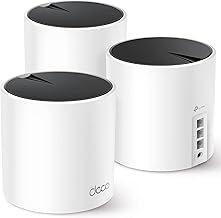
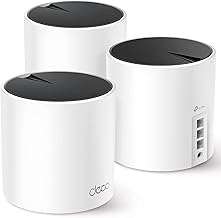
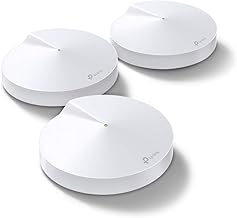
An accessible entry into Wi-Fi 7, the Deco 7 BE25 delivers BE5000 speeds, dual 2.5G ports for wired backhaul, and MLO across roughly 6,600 square feet with a three-pack. Its AI-roaming and HomeShield security make it a smart, future-ready pick for gamers upgrading from older hardware.
NETGEAR Orbi 370 (Wi-Fi 7)
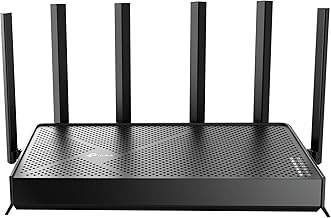
The Orbi 370 pairs a router with two satellites to cover up to 6,000 square feet, handling 70 devices at up to 5 Gbps over a 2.5 Gig internet port. NETGEAR’s mesh pedigree shows in the stable roaming and strong throughput, making it a dependable backbone for a busy gaming household.
TP-Link Deco BE23 (Wi-Fi 7)
The Deco 7 BE23 offers BE3600 Wi-Fi 7 with dual 2.5G ports and MLO across about 6,500 square feet. It hits a strong balance of modern features and price, giving competitive players low-latency wired backhaul without paying flagship money.
TP-Link Deco XE70 Pro (Wi-Fi 6E)
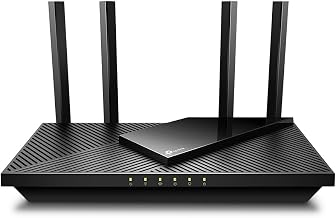
For gamers who want the clean 6GHz band without jumping to Wi-Fi 7, the Deco XE70 Pro is tri-band Wi-Fi 6E with 2.5G ports and coverage for around 7,200 square feet and 200 devices. That dedicated 6GHz lane is excellent for keeping gaming traffic away from congestion.
TP-Link Deco X55 (Wi-Fi 6)
The value champion, the Deco X55 delivers AX3000 Wi-Fi 6 across up to 6,500 square feet with gigabit ports and Ethernet backhaul support in a three-pack. For most homes with Wi-Fi 6 devices, it provides stable, low-lag coverage at a very friendly price.
Frequently Asked Questions
Does a mesh system add lag compared to a single router?
Not meaningfully when set up well. Using wired Ethernet backhaul between nodes, or a tri-band system with a dedicated backhaul band, keeps latency low. In fact, a mesh reduces lag in far rooms where a single router’s signal would be weak.
Is Wi-Fi 7 worth it for gaming right now?
If you have Wi-Fi 7 devices, its MLO feature genuinely lowers latency and boosts reliability. If your gaming gear is Wi-Fi 6 or 6E, a system like the Deco X55 or XE70 Pro delivers excellent results for less.
Should I wire my gaming PC or console to a mesh node?
Yes, whenever possible. A wired Ethernet connection to the nearest node gives the lowest, most consistent ping. Systems with 2.5G ports like the Deco BE25 and Orbi 370 make this especially effective.
How much coverage do I actually need?
Buy for a bit more than your home’s square footage to keep signal strong at the edges. A three-pack covering 6,000 to 7,000 square feet suits most houses; smaller apartments can often manage with a two-pack.
Final Thoughts
For a future-proof gaming network, the TP-Link Deco BE25 and NETGEAR Orbi 370 lead with Wi-Fi 7 and fast wired backhaul. If you want the best value, the Deco X55 covers most homes beautifully for less, while the XE70 Pro’s dedicated 6GHz band is a smart middle ground. Wire your rig to the nearest node and lag becomes a memory.