Key takeaways
- Resolution & frame rate: 1080p at 60fps is the streaming sweet spot; choose 4K only if you plan to crop in or record high-detail footage.
- Autofocus: PDAF autofocus keeps you sharp as you move, while fixed-focus cameras can soften if you lean in and out.
- Low-light handling: auto light correction and a larger sensor keep your face bright and clean in dim gaming rooms.
- Microphone: dual noise-reduction mics are handy for casual use, though a dedicated microphone always sounds better.
- Privacy & mounting: a built-in shutter and a secure, tripod-ready clip make daily use safer and more flexible.
What's inside
A great webcam is the face of your stream, the difference between a professional-looking broadcast and a dim, blurry square in the corner. For gamers who stream on Twitch, record for YouTube, or hop into Discord raids, the right camera delivers sharp video, quick autofocus, and clean audio without demanding a full studio setup. The market has matured fast, and there are now excellent options at every price point.
We’ve gathered the best webcams for gaming, from budget-friendly 1080p workhorses to 4K powerhouses with premium sensors. Below you’ll find guidance on what actually matters when choosing, followed by detailed looks at our top picks so you can find the camera that makes you look your best on camera.
As an Amazon Associate we earn from qualifying purchases at no extra cost to you.




🎮 Get More From Your Setup — Free
Prime Gaming gives you free PC games every month, in-game loot, and a free Twitch channel sub — plus fast free shipping on all the gear above. New members get a 30-day free trial.
Watch: Best Webcam For Gaming — Video Review
How to Choose a Gaming Webcam
- Resolution & frame rate: 1080p at 60fps is the streaming sweet spot; choose 4K only if you plan to crop in or record high-detail footage.
- Autofocus: PDAF autofocus keeps you sharp as you move, while fixed-focus cameras can soften if you lean in and out.
- Low-light handling: auto light correction and a larger sensor keep your face bright and clean in dim gaming rooms.
- Microphone: dual noise-reduction mics are handy for casual use, though a dedicated microphone always sounds better.
- Privacy & mounting: a built-in shutter and a secure, tripod-ready clip make daily use safer and more flexible.
The Best Gaming Webcams Reviewed
EMEET S600 4K
The EMEET S600 is our top pick for streamers who want detail. Its Sony 1/2.55-inch sensor and PDAF autofocus deliver crisp, quick-locking 4K footage, and it captures 1080p at 60fps for smoother motion. Two noise-reduction mics and a built-in privacy cover round out a camera that punches well above its size.
Logitech Brio Ultra 4K
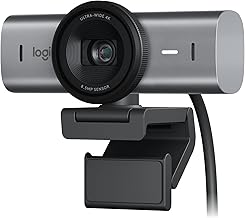
Logitech’s Brio Ultra brings a glass lens, auto light correction, and a wide field of view to serious creators. It works with Windows Hello and is certified for the major meeting platforms, making it a versatile do-everything camera for gaming and professional calls alike.
Acer A640 4K
The Acer A640 pairs a Sony sensor with PDAF autofocus and AI noise-canceling mics, plus a handy USB-A to USB-C adapter. It shoots up to 4K and downsamples cleanly to 2K and 1080p at 60fps, a flexible option for gaming, streaming, and even Switch 2 GameChat.
Logitech C922x HD Pro
A streaming classic, the C922x delivers reliable 1080p at 30fps or 720p at 60fps with strong light correction. It’s a proven, affordable choice that works seamlessly with popular streaming software and remains a favorite for good reason.
PHILIPS 4K Webcam
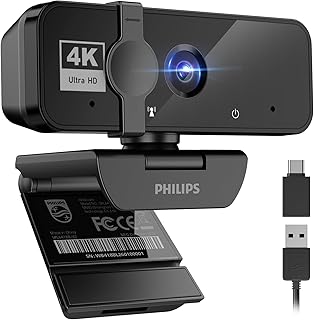
The Philips 4K camera keeps things simple with plug-and-play USB, a built-in microphone, and a privacy cover. It’s an easy, no-fuss upgrade for anyone who wants sharper video for streaming and video calls without tweaking settings.
Frequently Asked Questions
Is 1080p or 4K better for streaming?
Most streaming platforms show face-cams small, so sharp 1080p at 60fps like the C922x is plenty. Pick 4K, such as the EMEET S600, if you want to crop in or record high-resolution video.
Do I need a separate microphone?
Built-in mics with noise reduction sound fine for casual streams and calls. For professional audio quality, pair your webcam with a dedicated USB or XLR microphone.
How important is autofocus?
Very, if you move around. PDAF autofocus keeps you sharp as you shift in your chair, while fixed-focus cameras can go soft outside their optimal range.
Will these work with streaming software?
Yes. All of these cameras appear as standard USB video devices and integrate smoothly with popular broadcasting and meeting software.
Final Thoughts
For the sharpest streaming footage, the EMEET S600 is our overall winner thanks to its excellent sensor and autofocus, while the Logitech Brio Ultra is the most versatile premium pick. Budget-minded streamers can’t go wrong with the proven Logitech C922x. Match the resolution and features to how you stream, and you’ll look polished without building a studio.