Key takeaways
- Bandwidth: DDR5 splits each module into two independent 32-bit subchannels and uses a longer burst length, so a 6000MHz kit moves roughly twice the data per second of DDR4-3200 — the single biggest advantage.
- Latency: DDR4-3600 CL16 lands near 8.9ns of true latency, while DDR5-6000 CL30 sits around 10ns. DDR4 still wins on raw responsiveness; DDR5 wins overall because bandwidth matters more to modern CPUs.
- Power and regulation: DDR5 drops to 1.1V baseline and moves voltage regulation onto the module itself via an integrated PMIC, giving cleaner power delivery than DDR4’s motherboard-side approach.
- Error handling: Every DDR5 module includes on-die ECC to correct internal bit errors at high densities. DDR4 consumer modules have no equivalent.
- Capacity ceiling: DDR5 supports far denser modules, making 64GB and 128GB kits routine. DDR4 realistically tops out at 32GB per UDIMM.
- Availability: DDR4 is end-of-life at the major DRAM fabs. Supply is thinning and pricing has become volatile, which erodes its historic value argument.
What's inside
Choosing between DDR5 and DDR4 in 2026 is less about which memory standard is “better” on paper and more about which one your platform can actually accept. DDR5 has been shipping since late 2021, and every current-generation socket — AMD’s AM5 and Intel’s LGA1851 — is DDR5-only. DDR4 lives on in AM4 and older Intel boards, which still power a huge number of perfectly capable gaming rigs. The two standards are not cross-compatible: the notch position differs, the voltage regulation differs, and no adapter exists.
That makes this a decision about your upgrade path rather than a shopping comparison between two things you can freely swap. If you’re building new, DDR5 is the only sensible answer. If you’re sitting on a Ryzen 5000 or 12th-gen Intel machine, the real question is whether topping up DDR4 buys you enough frames to justify skipping a platform jump — especially now that DDR4 production has largely wound down and availability has tightened considerably.
As an Amazon Associate we earn from qualifying purchases at no extra cost to you.


⚡ Save on Your Next PC — Amazon Prime
Prime members get fast free shipping on the systems above, plus early access to Prime Day & Black Friday PC deals. New members get a 30-day free trial.
Watch: DDR5 vs DDR4 RAM: Does It Matter in 2026? — Video Review
Quick Verdict
DDR5 is the right choice for anyone building a new gaming PC, running a high-refresh 1080p or 1440p display, streaming while playing, or doing creative and AI workloads alongside gaming. A 32GB kit at 6000MHz CL30 — the KLEVV FIT V or Urbane V RGB, for example — is the modern sweet spot. DDR4 remains the pragmatic pick only if you already own an AM4 or LGA1200 board and want a cheap capacity bump without replacing your CPU and motherboard.
Key Differences
- Bandwidth: DDR5 splits each module into two independent 32-bit subchannels and uses a longer burst length, so a 6000MHz kit moves roughly twice the data per second of DDR4-3200 — the single biggest advantage.
- Latency: DDR4-3600 CL16 lands near 8.9ns of true latency, while DDR5-6000 CL30 sits around 10ns. DDR4 still wins on raw responsiveness; DDR5 wins overall because bandwidth matters more to modern CPUs.
- Power and regulation: DDR5 drops to 1.1V baseline and moves voltage regulation onto the module itself via an integrated PMIC, giving cleaner power delivery than DDR4’s motherboard-side approach.
- Error handling: Every DDR5 module includes on-die ECC to correct internal bit errors at high densities. DDR4 consumer modules have no equivalent.
- Capacity ceiling: DDR5 supports far denser modules, making 64GB and 128GB kits routine. DDR4 realistically tops out at 32GB per UDIMM.
- Availability: DDR4 is end-of-life at the major DRAM fabs. Supply is thinning and pricing has become volatile, which erodes its historic value argument.
DDR5: The Standard for Every New Build
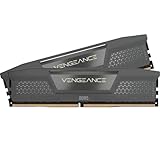
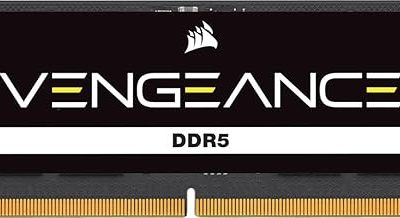
DDR5’s bandwidth advantage shows up most clearly where games are CPU-bound: 1080p competitive shooters, large open-world titles with heavy streaming, and simulation games with big AI or physics loads. Expect single-digit to low-teens percentage gains over well-tuned DDR4 in those scenarios, and larger gains on integrated graphics. Speed alone isn’t the whole story — timings matter. The KLEVV CRAS V RGB at 6400MHz CL30 and the Corsair Vengeance DDR5 6400 CL36 both use fast bins, while the Lexar Thor Z RGB 6000 CL38 trades tighter timings for a lower 1.35V operating point.
On AM5, DDR5-6000 CL30 remains the target because it keeps the memory controller in a 1:1 ratio with the fabric clock — which is exactly why kits like the KLEVV FIT V and Urbane V RGB are so widely recommended. Intel’s newer platforms tolerate higher frequencies and can push past 8000MHz with CUDIMMs. Laptop upgraders aren’t left out either: the Crucial 32GB SODIMM kit brings the same generational benefits to mobile Ryzen and Core systems. Whatever you buy, enable XMP 3.0 or EXPO in BIOS — untuned DDR5 defaults to a sluggish 4800MHz.
DDR4: Still Fine, But a Dead End
A tuned DDR4-3600 CL16 kit paired with a Ryzen 5700X3D or Core i5-12600K still delivers excellent 1440p and 4K gaming, where the GPU is the bottleneck and memory bandwidth barely registers. If your current 16GB is causing stutter in modern titles, doubling to 32GB on the board you already own is genuinely the cheapest meaningful upgrade available, and large-cache X3D chips are unusually tolerant of slower memory.
The catch is that DDR4 has no future. You cannot carry it forward to AM5 or LGA1851, so any money spent is money you write off at your next platform change. With DDR4 manufacturing largely ended, the gap that once made it the obvious budget choice has narrowed sharply — and in some months it has closed entirely.
Which Should You Buy?
- For a new 2026 build: pick DDR5 — a 32GB 6000MHz CL30 kit such as the KLEVV FIT V or Urbane V RGB.
- For competitive 1080p gaming: pick DDR5 at 6400MHz with tight timings, like the KLEVV CRAS V RGB or Corsair Vengeance.
- For an existing AM4 rig you’ll keep another year: stay on DDR4 and add capacity rather than chasing speed.
- For streaming, editing, or local AI work: pick DDR5, and consider 64GB over 32GB.
- For laptop upgrades: pick a DDR5 SODIMM kit such as the Crucial 32GB 5600MHz set, after confirming your model’s supported speed.
Frequently Asked Questions
Can I put DDR5 in a DDR4 motherboard?
No. The modules are physically keyed differently and handle voltage regulation in incompatible ways. A board supports one standard or the other, and the few early “combo” boards required you to choose one at build time.
Is 32GB enough for gaming in 2026?
Yes. 32GB is the comfortable mainstream target and handles current titles alongside a browser, Discord, and capture software. 16GB is now the bare minimum, and 64GB only pays off for heavy multitasking or content creation.
Does faster RAM actually increase FPS?
It does in CPU-limited scenarios — high-refresh 1080p, strategy and simulation titles, and integrated graphics. At 4K with a discrete GPU, the difference is usually within margin of error.
What’s the difference between XMP and EXPO?
They’re overclocking profiles stored on the module — XMP 3.0 for Intel, EXPO for AMD. Most modern kits, including all those listed above, ship with both, so one BIOS