
Key takeaways
- No-glare illumination that spares your eyes
- Space-saving clip design frees your desk
- Adjustable brightness and color temperature
- Auto-dimming and remotes on premium models
What's inside
A screen bar monitor light clips onto the top of your display and casts even, glare-free illumination across your desk without reflecting into your eyes or the panel. For anyone working long hours, it’s a small accessory that makes a big difference to eye comfort and desk aesthetics.
We evaluated the most popular monitor light bars to find which deliver the best brightness, color control, and no-glare design. Here’s the full breakdown.
As an Amazon Associate we earn from qualifying purchases at no extra cost to you.




🎮 Get More From Your Setup — Free
Prime Gaming gives you free PC games every month, in-game loot, and a free Twitch channel sub — plus fast free shipping on all the gear above. New members get a 30-day free trial.
Watch: Screenbar Monitor Light: Review & Buyer’s Guide — Video Review
Design & Build
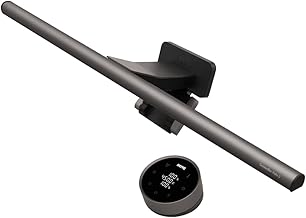
Monitor light bars share a clever counterweighted clip that sits on flat or curved displays without blocking the screen or tipping over. The BenQ ScreenBar Halo 2 is the premium benchmark, adding a rear backlight, a wireless controller, and a motion sensor in a refined build. The Quntis lineup spans a curved RGB backlight model for ultrawides, a PRO+ version with a remote and auto-dimming, and a straightforward auto-dimming task lamp. The YEELIGHT and generic 11.8-inch bars offer clean, compact designs, all engineered so the light angles down onto your desk rather than into your eyes.
Performance
The best bars combine brightness with intelligent control. The BenQ ScreenBar Halo 2 leads with automatic brightness adjustment, adjustable color temperature, and a backlight that reduces contrast strain in dark rooms. Quntis models counter with auto-dimming, touch or remote control, and stepless dimming across a wide temperature range, while the YEELIGHT delivers no-glare, eye-care lighting at a friendlier price. RGB options like the curved Quntis bar add ambient backlighting for gaming setups. Across the board, the key benefit is uniform, flicker-free light that eliminates the harsh glare of an overhead lamp.
Pros & Cons
- No-glare illumination that spares your eyes
- Space-saving clip design frees your desk
- Adjustable brightness and color temperature
- Auto-dimming and remotes on premium models
- Premium bars like the BenQ cost noticeably more
- Very curved monitors may need a compatible model
Alternatives to Consider
If budget is no object, the BenQ ScreenBar Halo 2 is the most feature-complete choice with its backlight and wireless controller. Value seekers should look at the YEELIGHT or standard Quntis auto-dimming bar, while ultrawide and gaming users will appreciate the curved Quntis RGB model. The Quntis PRO+ with a remote is a strong middle-ground pick.
Frequently Asked Questions
Do monitor light bars really reduce eye strain?
Yes, by providing even, flicker-free desk lighting without glare on the screen, they reduce the contrast strain that comes from working in a dim room with a bright display.
Will one fit a curved monitor?
Many are designed for both flat and curved panels, and models like the curved Quntis bar are shaped specifically for ultrawides. Check the listed compatibility for very aggressive curves.
How are they powered?
Most draw power over USB from your monitor, laptop, or a wall adapter, so there’s no need for a separate outlet or bulky power brick.
Is auto-dimming worth it?
It’s a convenient feature that adjusts brightness to your room’s ambient light, maintaining consistent, comfortable illumination without manual tweaking throughout the day.
Verdict
The BenQ ScreenBar Halo 2 is our top pick for its backlight, motion sensor, and wireless control, making it the premium eye-care choice. Budget-conscious buyers get excellent no-glare lighting from the YEELIGHT and Quntis auto-dimming bars.









