Key takeaways
- Resolution: The Series X shines at 1440p120; a QHD panel gives noticeably sharper detail than 1080p on this console.
- Refresh and VRR: Aim for 120Hz or higher with FreeSync/HDMI-VRR to eliminate tearing on supported titles.
- Input lag: Low lag under 10ms keeps aiming and platforming responsive; fast panels feel immediate.
- HDR and panel type: IPS or OLED gives the best color; OLED adds perfect blacks for HDR-enabled Xbox games.
- Size and curve: 24 to 27 inches suits a desk; a curve helps at 30 inches and up for a more immersive couch setup.
The Xbox Series X is a genuine 4K, 120Hz console, and it even supports 1440p at 120Hz natively, a resolution the PS5 lacks. That makes monitor choice especially rewarding: pick the right panel and you unlock sharper visuals and buttery frame rates that a TV across the room cannot match. The keys are HDMI 2.1 or a port that negotiates 120Hz, low input lag, and VRR support.
We compared monitors that pair beautifully with the Series X, from budget 1080p speed demons to a premium QHD OLED. Each pick handles the console’s VRR and high refresh output so shooters feel instant and single-player titles look their best.
Our top picks


As an Amazon Associate we earn from qualifying purchases at no extra cost to you. Ratings are shown as listed on Amazon.
⚡ Save on Your Next PC — Amazon Prime
Prime members get fast free shipping on the systems above, plus early access to Prime Day & Black Friday PC deals. New members get a 30-day free trial.
Watch: Best Gaming Monitor for Xbox Series X — Video Review
How to Choose
- Resolution: The Series X shines at 1440p120; a QHD panel gives noticeably sharper detail than 1080p on this console.
- Refresh and VRR: Aim for 120Hz or higher with FreeSync/HDMI-VRR to eliminate tearing on supported titles.
- Input lag: Low lag under 10ms keeps aiming and platforming responsive; fast panels feel immediate.
- HDR and panel type: IPS or OLED gives the best color; OLED adds perfect blacks for HDR-enabled Xbox games.
- Size and curve: 24 to 27 inches suits a desk; a curve helps at 30 inches and up for a more immersive couch setup.
The Best Picks Reviewed
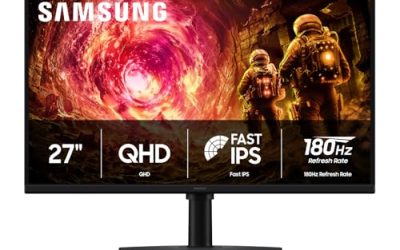
Samsung Odyssey G5 27″ (1440p)
Our top pick near $150. This 27-inch QHD panel matches the Series X’s native 1440p120 sweet spot, delivering sharp detail and strong color at a genuinely reasonable price.
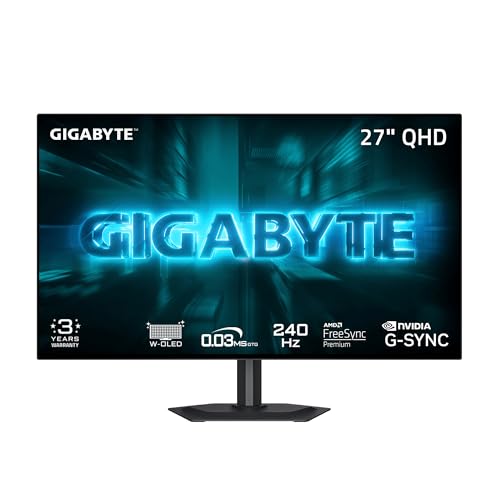
GIGABYTE GO27Q24G (27″ W-OLED 240Hz QHD)
Around $375, this is the premium choice. A 27-inch QHD OLED gives perfect blacks and vivid HDR that make Series X showcase titles look stunning, plus huge refresh headroom for PC.
Sceptre Curved 24.5″ 240Hz
At about $108 this fast curved 1080p panel is ideal for competitive shooters where response time trumps resolution, and it stays tear-free with VRR.
Sceptre Prime Curved 30″ 200Hz
Near $166, the 30-inch curved panel adds immersion for racing and adventure games while keeping a high refresh rate for smooth motion.
Sceptre 22″ FHD 144Hz
The budget entry around $67. A compact 1080p 144Hz screen is a cheap, capable Series X display for a bedroom or dorm setup.
Frequently Asked Questions
Does the Xbox Series X support 1440p at 120Hz?
Yes. Unlike the PS5, the Series X natively supports 1440p120, so a QHD monitor is the ideal match for this console.
Do I need an HDMI 2.1 monitor?
For 4K120 you want HDMI 2.1, but many 1080p and 1440p panels hit 120Hz over HDMI 2.0, which is plenty for most Series X games.
Is OLED worth it for Xbox?
If HDR matters to you, yes. OLED panels like the GIGABYTE GO27Q24G deliver perfect blacks and vibrant highlights that transform HDR-enabled titles.
What size monitor is best for the Series X?
27 inches at 1440p is the sweet spot for desk play, balancing sharpness and immersion. Go larger and curved for a more couch-like experience.
Final Thoughts
Because the Series X excels at 1440p120, the Samsung Odyssey G5 27-inch is our best-value match. Enthusiasts who want the finest image should invest in the GIGABYTE QHD OLED, while budget and competitive players are well served by the fast Sceptre curved panels.