Choosing between a PCIe 4.0 and PCIe 5.0 drive is less straightforward than comparing their advertised speeds. PCIe 4.0 vs PCIe 5.0 SSD for gaming comes down to real-world loading performance, platform compatibility, cooling, and price. This guide explains when the newer generation makes a noticeable difference and when PCIe 4.0 remains the smarter purchase.
What Matters in PCIe 4.0 vs PCIe 5.0 SSD for Gaming
PCIe 5.0 offers substantially higher theoretical bandwidth than PCIe 4.0, but that does not automatically translate into better gaming. Most games depend on a combination of storage access patterns, CPU processing, memory, and asset decompression. Understanding these limitations helps determine whether the extra bandwidth is useful for your particular PC.
1. Sequential Read and Write Speeds
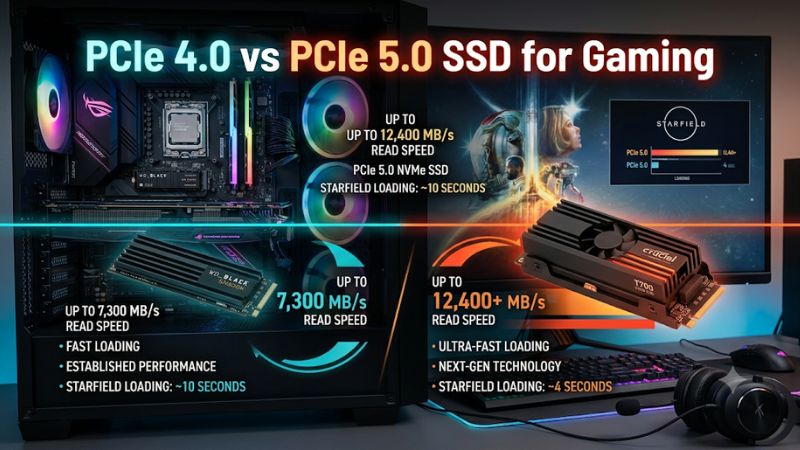
PCIe 4.0 and PCIe 5.0 describe the connection between an NVMe SSD and the motherboard. A PCIe 4.0 x4 connection provides approximately 7.88 GB/s of theoretical bandwidth, while PCIe 5.0 x4 provides approximately 15.75 GB/s. Actual SSD performance is lower because of protocol and controller overhead.
These bandwidth figures explain why newer drives can advertise considerably higher sequential read speeds. However, game loading does not consist entirely of transferring one large, continuous file. Games also perform smaller reads, process compressed assets, and rely on CPU and memory resources, so sequential specifications alone cannot predict loading performance.
2. Real-World Gaming Performance
For gaming, the important measurements are loading times, asset streaming, occasional stuttering, and consistency during gameplay. A faster drive can help when a game requests substantial amounts of data, but it cannot independently increase GPU rendering performance or improve FPS when the graphics card is the limiting component.
The difference between PCIe generations is often smaller than their headline specifications suggest. TechSpot’s August 2025 gaming storage comparison found that several games showed only minor loading differences between SSD generations. This illustrates why buyers should prioritize actual game workloads rather than choosing a drive based exclusively on its maximum advertised throughput.
3. Motherboard and CPU Compatibility
A PCIe 5.0 SSD requires a compatible M.2 slot to operate at Gen5 speeds. Having a PCIe 5.0 graphics card slot does not automatically mean the motherboard supports PCIe 5.0 storage. Check the motherboard specifications and identify which M.2 slots support the required generation and lane configuration.
PCIe devices generally support backward compatibility, so a Gen5 SSD can operate in a Gen4-compatible M.2 slot at the lower generation’s speed. However, the reverse also applies: installing a Gen4 drive in a Gen5 slot does not turn it into a Gen5 device. CPU and chipset lane allocation can also affect which slots are available.
4. Cooling, Power, and Overall Value
Cooling is another important consideration when comparing SSD generations. Some high-performance Gen5 drives consume more power under sustained workloads and can generate substantial heat. Depending on the model, a motherboard M.2 heatsink or a dedicated SSD heatsink may be necessary to manage temperatures during extended transfers.
PCIe 4.0 drives often offer a more balanced combination of performance, cooling requirements, and gaming value. PCIe 5.0 becomes more attractive when you also perform large file transfers, video editing, or other storage-intensive work. For a gaming-only build, spending the difference on additional SSD capacity or a stronger GPU may provide greater practical value.
PCIe 4.0 vs PCIe 5.0 SSD for Gaming: Performance Comparison
The most useful way to compare these drives is to separate theoretical bandwidth from the improvements players actually notice. Both generations support modern NVMe storage, but their differences become more apparent in sustained transfers than in ordinary gaming sessions. The following comparison highlights the practical advantages, limitations, and hardware requirements.
| Comparison | PCIe 4.0 SSD | PCIe 5.0 SSD |
| Theoretical bandwidth, x4 | 7.88 GB/s | 15.75 GB/s |
| Example maximum sequential read | 7,450 MB/s (Samsung 990 PRO) | 14,800 MB/s (Samsung 9100 PRO) |
| Game loading | Fast | Potentially faster, depending on the game |
| Average gaming FPS | Usually similar | Usually similar |
| Asset streaming | Suitable for modern games | More bandwidth headroom |
| Large file transfers | Fast | Higher potential throughput |
| Cooling | Often easier to manage | Some models require more cooling |
| Motherboard support | PCIe 4.0 or compatible newer slot | PCIe 5.0 slot required for Gen5 speeds |
| Best application | Gaming and everyday use | Gaming plus demanding storage workloads |
Sequential read specifications are manufacturer-rated maximums for the cited Samsung models, not guaranteed gaming speeds.
1. What Independent Gaming Comparisons Reveal
A useful reference is TechSpot’s August 2025 comparison of SSD performance across games. Its findings showed that differences between storage generations were generally small in game loading, although individual titles behaved differently. Starfield, for example, showed less than a one-second difference between PCIe 5.0 and PCIe 3.0 drives.
More recent analysis from Tom’s Hardware, published in August 2026, examined SSD activity across 11 games and multiple resolutions. The results showed that higher sequential bandwidth did not consistently translate into better gameplay performance. Some games used significantly less storage bandwidth than the drives could provide.
2. Does PCIe 5.0 Improve FPS?
PCIe 5.0 does not normally increase average FPS simply because the SSD is faster. Frame rendering primarily depends on the GPU, CPU, memory, and game engine. Storage becomes relevant when a game needs to retrieve assets during gameplay or when insufficient storage performance creates a bottleneck.
There can be exceptions in storage-intensive games, particularly during asset streaming or transitions between areas. However, the result depends on the individual game and the complete hardware configuration. A Gen5 SSD should not be treated as an FPS upgrade comparable to replacing a graphics card or processor.
3. Where PCIe 5.0 Has a Clearer Advantage
Large sequential transfers are a more suitable workload for PCIe 5.0. Moving substantial video files, copying large project folders, working with high-resolution media, and handling storage-intensive professional applications can benefit from its greater available bandwidth.
For example, Samsung’s 9100 PRO offers sequential read speeds of up to 14,800 MB/s, while the PCIe 4.0 Samsung 990 PRO reaches up to 7,450 MB/s. These are manufacturer specifications, and actual transfer speeds depend on the source drive, destination drive, file sizes, cache behavior, and system configuration.
4. Which Generation Offers Better Gaming Value?
PCIe 4.0 is generally the more sensible starting point for a gaming-focused PC. It provides high sequential throughput, supports modern NVMe gaming workloads, and avoids paying extra for bandwidth that many games cannot fully utilize. A quality Gen4 SSD with sufficient capacity can make a more balanced purchase.
PCIe 5.0 makes more sense when its additional performance benefits several workloads beyond gaming. If your PC regularly handles large media projects, frequent file transfers, and demanding applications, the extra bandwidth can justify the investment. Compare actual model prices and capacities rather than assuming every Gen5 drive is better value.
FAQ: PCIe 4.0 vs PCIe 5.0 SSD for Gaming
Is a PCIe 5.0 SSD worth buying for gaming?
A PCIe 5.0 SSD is worth buying when you also need high-speed storage for demanding productivity workloads, but it is rarely necessary for gaming alone. A good PCIe 4.0 drive already offers substantial bandwidth for modern PC games.
If you are building a new PC with a Gen5-compatible motherboard, choosing PCIe 5.0 can provide additional upgrade flexibility. However, compare the price difference, cooling requirements, and capacity before spending more.
Can I use a PCIe 5.0 SSD in a PCIe 4.0 motherboard?
Yes, a PCIe 5.0 SSD can generally operate in a compatible PCIe 4.0 M.2 slot at PCIe 4.0 speeds. The drive does not deliver its maximum Gen5 bandwidth because the motherboard connection limits the available throughput.
Check the motherboard manual for M.2 slot compatibility, supported lengths, and lane-sharing restrictions. Also confirm that the drive’s physical dimensions and heatsink fit the available space.
Will a PCIe 5.0 SSD reduce game stuttering?
Not necessarily, because game stuttering can result from shader compilation, CPU limitations, GPU memory pressure, insufficient system RAM, driver problems, or asset streaming. A faster SSD can help when storage throughput or latency is the actual bottleneck, but it cannot resolve unrelated performance problems.
Before upgrading, monitor storage activity and system resource usage while reproducing the issue. If the SSD is not limiting data delivery, moving to Gen5 is unlikely to make a meaningful difference.
Should I upgrade from PCIe 4.0 to PCIe 5.0?
Most gamers should keep their existing PCIe 4.0 SSD unless they have a specific workload that benefits from additional storage bandwidth. Replacing a healthy Gen4 drive solely to improve gaming performance is difficult to justify.
Consider upgrading when you need more capacity, your current drive has reliability problems, or your professional applications benefit from faster transfers. Otherwise, investing in a larger Gen4 SSD, more RAM, or a GPU upgrade may be a better use of your budget.
Final Thoughts
The PCIe 4.0 vs PCIe 5.0 SSD for gaming decision is primarily about value rather than maximum specifications. PCIe 4.0 remains a strong choice for most gaming PCs, while Gen5 suits users with demanding storage workloads. Check your motherboard compatibility, compare real-world performance, and prioritize capacity before upgrading.