Our Top Picks
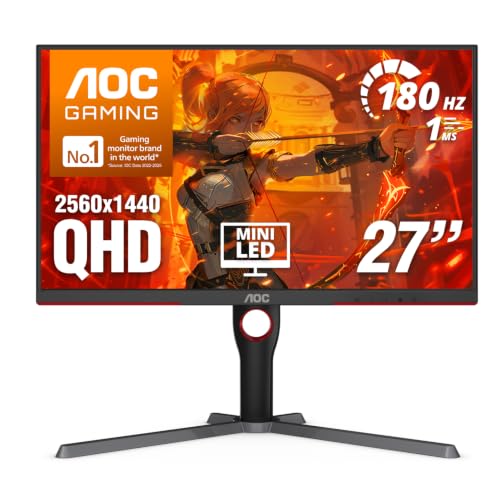 AOC 27 Inch Gaming Monitor QHD 180Hz Mini-LED27" 180Hz Mini-LED10.19 x 23.82 x 20.94 inches15.6 poundsCheck on Amazon
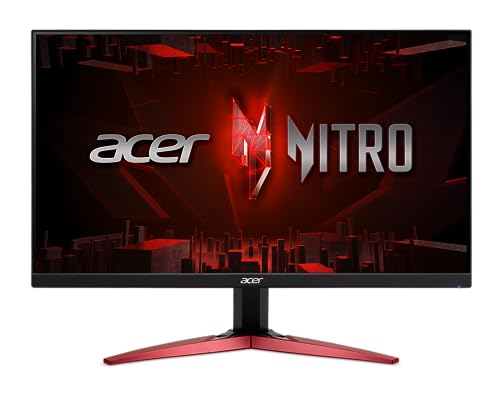 Acer Nitro 23.8in FHD 1920x1080 IPS 180Hz Gaming23.8-inch IPS9.13 x 21.27 x 15.97 inchesCheck on Amazon
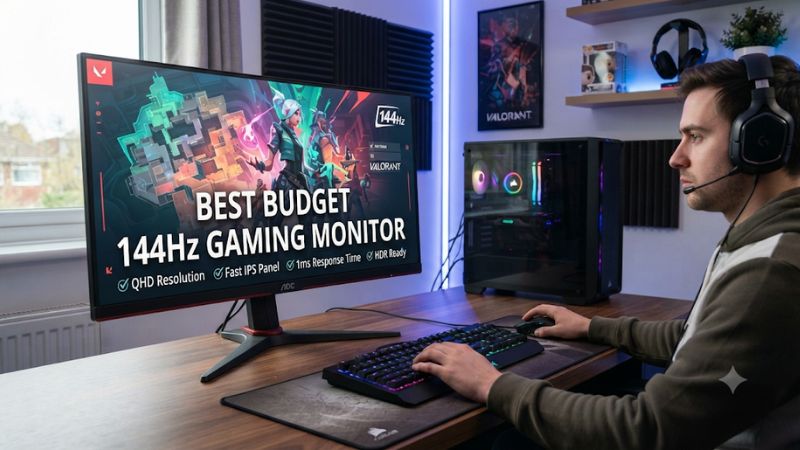
A best budget 144Hz gaming monitor should deliver smooth motion, acceptable image quality, and reliable adaptive sync without consuming your entire hardware budget. In 2026, affordable 165Hz and 180Hz displays are also worth considering, so this guide compares practical options across resolutions, panel types, connectivity, and everyday gaming needs.
How to Choose a Budget 144Hz Gaming Monitor
Choosing an affordable high-refresh display involves more than finding the lowest price with a 144Hz label. Screen resolution, panel technology, adaptive sync, response behavior, and stand adjustments all affect the experience. The right combination depends on your graphics card, favorite games, desk space, and willingness to spend more for image quality.
1. Choose the Right Resolution and Screen Size
For a limited budget, 24-inch 1080p monitors remain a practical starting point. A resolution of 1920 × 1080 is manageable for entry-level and midrange gaming GPUs, while a 23.8-inch screen provides reasonable pixel density for gaming and everyday desktop use.
If you prefer a larger display, consider 27-inch 1440p. This combination provides more workspace and sharper images than 27-inch 1080p, but it also demands more GPU performance. Make sure your graphics card can maintain suitable frame rates at the higher resolution before choosing this option.
2. Understand IPS and VA Panel Differences
IPS panels generally provide wider viewing angles and consistent colors, making them suitable for competitive games, general desktop use, and mixed entertainment. Budget IPS monitors are particularly attractive when you want balanced image quality without spending extra on premium display technology.
VA panels typically offer higher native contrast, which can improve dark-scene visibility and movie viewing. However, some VA displays exhibit black smearing during fast movement. If you frequently play competitive shooters, examine independent motion-performance reviews rather than choosing based on contrast specifications alone.
3. Check Refresh Rate, Response Time, and VRR
A 144Hz display can refresh up to 144 times per second, while 165Hz and 180Hz models provide additional refresh opportunities. The difference is measurable, but a higher advertised refresh rate does not automatically mean better motion clarity or a more responsive gaming experience.
Variable refresh rate technologies such as AMD FreeSync and NVIDIA G-SYNC Compatible can help synchronize the monitor’s refresh behavior with compatible GPU output. Also, distinguish between MPRT and GtG response-time specifications. They describe different measurement approaches and should not be treated as interchangeable.
4. Consider Connectivity and Ergonomics
Check whether the monitor supports its advertised maximum refresh rate through DisplayPort, HDMI, or both. Some displays have different refresh-rate limits depending on the connection. A suitable cable and compatible graphics-card output are necessary to access the intended display mode.
Ergonomics also matter during long gaming sessions. Look for height adjustment, tilt, swivel, and VESA mounting when available. A cheaper monitor with a basic tilt-only stand may require a separate monitor arm if you need more flexible positioning.
Top Budget 144Hz Gaming Monitor Picks
The following shortlist includes affordable 1080p options and a more capable 1440p alternative. The selections prioritize published specifications and independent review evidence rather than unsupported performance rankings. Since US monitor prices and availability change frequently, compare current retailer listings before purchasing.
1. AOC Q27G3XMN – Best Overall for Image Quality
AOC 27 Inch Gaming Monitor QHD 180Hz Mini-LED HDR1000, Q27G3XMN | 3440×1440 Computer Monitor, 0.3ms, HDR400, USB 3.2, DP 1.4, HDMI 2.1, Height Adjustable Stand, Audio Out, VESA Mount
Chosen because it specifies Q27G3XMN and 3440×1440 Computer Monitor.
View on AmazonBest overall
The AOC Q27G3XMN is a compelling option if your budget stretches beyond entry-level 1080p monitors. Its 27-inch VA panel combines 2560 × 1440 resolution with a maximum 180Hz refresh rate, giving gamers a sharper image and higher refresh ceiling than conventional 1080p alternatives.
Its Mini LED backlight includes 336 local dimming zones, while the manufacturer specifies a 4000:1 native contrast ratio and VESA DisplayHDR 1000 certification. It also includes DisplayPort 1.4, HDMI 2.0, Adaptive-Sync, and an adjustable stand.
aoc.com+1
RTINGS reports strong overall response behavior, low input lag, and effective local dimming. However, its review also identifies black smearing in dark scenes and distracting VRR flicker when frame rates fluctuate.
RTINGS.com
Who should buy it: Gamers who want 1440p detail, stronger contrast, and HDR capabilities without moving into expensive premium-monitor territory.
Who should consider an alternative: Competitive players sensitive to VA smearing or users who need HDMI 2.1 for higher-bandwidth console features.
2. MSI G244F E2 – Best Value for 1080p Gaming
Best value
The MSI G244F E2 is a sensible choice for gamers who prioritize high refresh rates over higher resolution. It uses a 23.8-inch Rapid IPS panel with 1920 × 1080 resolution and a maximum refresh rate of 180Hz. Its specifications also include a stated 1ms GtG response time and Adaptive-Sync support.
Connectivity consists of one DisplayPort 1.2a connection and two HDMI 2.0b ports. The monitor has a typical brightness rating of 300 nits, a 1000:1 contrast ratio, and a 178-degree viewing angle.
MSI+1
Its 1080p resolution makes it a practical match for mainstream gaming systems. The Rapid IPS technology also offers a useful balance between color reproduction and motion-oriented gaming features. However, its specifications do not establish that it has better real-world motion handling than every competing 180Hz monitor.
Who should buy it: Budget-conscious PC gamers looking for a compact 1080p IPS monitor with a high refresh rate and flexible video connections.
Who should consider an alternative: Buyers who want a height-adjustable stand, higher resolution, or stronger native contrast.
3. Acer Nitro KG241Y M3 – Best for Competitive Gaming on a Budget
Acer Nitro 23.8in FHD 1920x1080 IPS 180Hz Gaming Monitor KG241Y M3biip | 0.5ms, AMD FreeSync Premium, sRGB 99%, 2xHDMI, DisplayPort, VESA Mountable, Bluelight Filter, Flickerless Technology
Chosen because it specifies 0.5ms and AMD FreeSync Premium.
View on AmazonThe Acer Nitro KG241Y M3 is another 23.8-inch 1080p option, with an IPS panel and 180Hz maximum refresh rate. Acer lists a 1ms GtG response specification, 250-nit brightness, and 99% sRGB color gamut coverage.
Its connectivity includes two HDMI ports and one DisplayPort 1.2 connection. AMD FreeSync Premium is listed for DisplayPort VRR, making connection choice important when configuring adaptive sync.
Acer United States
The compact screen size and high refresh ceiling make this model worth considering for esports and fast-paced multiplayer games. Its main compromise is ergonomics: the included stand supports tilt adjustment but does not provide the broader positioning flexibility of more expensive monitors.
Who should buy it: Players who prefer a compact screen, play competitive games, and want a 180Hz display without paying for 1440p.
Who should consider an alternative: Users who need height adjustment, better connectivity flexibility, or a more versatile screen for productivity.
4. ASUS TUF Gaming VG249Q1A – Best Established 165Hz Alternative

ASUS TUF Gaming 24” 1080P Monitor (VG249Q1A) - Full HD, IPS, 165Hz (Supports 144Hz), 1ms, Extreme Low Motion Blur, Speaker, FreeSync™ Premium, Shadow Boost, VESA Mountable, DisplayPort, HDMI
Chosen because it specifies Full HD and IPS.
View on AmazonThe ASUS TUF Gaming VG249Q1A remains an alternative worth comparing when available at a competitive retail price. It features a 23.8-inch IPS panel, 1920 × 1080 resolution, and a maximum refresh rate of 165Hz.
ASUS specifies a 1ms MPRT response time, Adaptive-Sync support, 250-nit typical brightness, and a 1000:1 typical contrast ratio. Its connections include DisplayPort 1.2 and two HDMI 1.4 ports. It also includes two 2W speakers and a headphone connection.
Tech Specs|Monitors|ASUS USA
The display is suitable for buyers who want a straightforward high-refresh gaming monitor with integrated speakers. However, its 165Hz ceiling is lower than the 180Hz alternatives, and the stand does not provide height adjustment. The HDMI connection also has a lower maximum refresh-rate specification than DisplayPort.
Who should buy it: Gamers who find this model at a substantial discount and prefer its straightforward feature set.
Who should consider an alternative: Buyers who want 180Hz, more flexible ergonomics, or newer connectivity options.
Budget Gaming Monitor Comparison
| Product | Best For | Key Spec | Compatibility | Watch Out For |
| AOC Q27G3XMN | Image quality | 27-inch, 1440p, 180Hz | DisplayPort, HDMI | VA smearing, VRR flicker |
| MSI G244F E2 | Overall value | 23.8-inch IPS, 180Hz | DP 1.2a, HDMI 2.0b | Basic stand |
| Acer Nitro KG241Y M3 | Competitive gaming | 23.8-inch IPS, 180Hz | DP 1.2, HDMI | Tilt-only stand |
| ASUS VG249Q1A | Affordable alternative | 23.8-inch IPS, 165Hz | DP 1.2, HDMI 1.4 | Older refresh-rate class |
FAQ: Buying a Budget 144Hz Gaming Monitor
1. Is a 144Hz Monitor Still Worth Buying in 2026?
Yes, a 144Hz monitor remains worthwhile for PC gaming, especially when upgrading from a conventional 60Hz display. Higher refresh rates can provide smoother motion and more frequent visual updates, particularly in games that produce frame rates above 60 FPS.
However, consider 165Hz and 180Hz models as well. These displays are often more attractive purchases when their prices are similar to older 144Hz alternatives. You do not need to buy a 240Hz monitor simply because newer models offer higher refresh rates.
2. Do I Need a Powerful GPU for a 144Hz Gaming Monitor?
No, you do not need a high-end graphics card to use a 144Hz monitor. The display can operate at its maximum refresh rate even when a game produces fewer frames per second.
However, achieving consistently high frame rates depends on your GPU, CPU, game, resolution, and graphics settings. A budget graphics card may handle esports games at high frame rates but struggle with demanding modern titles at maximum settings. Adaptive sync can help manage fluctuating frame rates within the monitor’s supported range.
3. Is IPS Better Than VA for Budget Gaming?
IPS is generally the safer choice for gamers who prioritize consistent viewing angles and motion-oriented gameplay. VA is attractive when deeper native contrast and darker blacks matter more than motion consistency.
Neither panel technology is automatically superior in every situation. Some IPS displays have weak contrast, while certain VA models exhibit noticeable dark-scene smearing. Compare independent reviews of the exact model rather than relying exclusively on the panel label.
4. Should I Buy a 1080p or 1440p 144Hz Monitor?
Choose 1080p if affordability, easier GPU requirements, and competitive gaming are your priorities. A 24-inch 1080p monitor is a particularly practical combination for smaller desks and mainstream gaming systems.
Choose 1440p if you prefer sharper images, a larger screen, and more desktop workspace. A 27-inch 1440p monitor generally offers a more detailed viewing experience, but maintaining high frame rates requires additional graphics performance. Consider your existing GPU before making the upgrade.
Final Thoughts
The best budget 144Hz gaming monitor depends on whether you prioritize affordability, competitive performance, or image quality. The MSI G244F E2 and Acer Nitro KG241Y M3 offer practical 1080p options, while the AOC Q27G3XMN provides a stronger 1440p experience. Compare current US prices and check GPU compatibility before buying.
More from Amazon
Programs that pair well with the guide above. Offers and eligibility are set by Amazon and may change.
Free shipping on eligible items, Prime Video and more. Eligible new members can start with a free trial.
Start a Prime free trialAd-free music streaming. Eligible new subscribers can start with a free trial.
Try Music Unlimited freeA Prime membership for ages 18-24 with a trial period. Eligibility is set by Amazon.
See Prime for Young AdultsAudiobooks and podcasts to listen to on the go. Eligible new members can start with a free trial.
Try Audible freeAs an Amazon Associate we earn from qualifying purchases.