Key takeaways
- Undervolting is fully reversible, an unstable setting simply reverts, so there is no risk of damage.
- Change voltage in small steps and stress-test after each, patience finds the lowest stable point.
- Aim for equal performance at lower temperature first; extra clock headroom is a bonus.
- Fit a GPU support bracket while you work, sag stresses the slot on today’s heavy cards.
Undervolting your GPU is a counterintuitive trick: you lower the voltage feeding the graphics card and, in most cases, keep the same performance while running cooler and quieter. Manufacturers set voltages conservatively to guarantee every chip is stable, which leaves headroom you can reclaim. The payoff is lower temperatures, reduced fan noise, and even better sustained clocks in thermally limited cases.
This guide explains how to undervolt an NVIDIA or AMD GPU safely using free software, find your card’s stable voltage-frequency curve, and validate stability. It is completely reversible and risk-free, if a setting is unstable, the card simply defaults back, so there is no danger of permanent harm.
Our top picks
 acer GPU Support Bracket
- [Esports-grade Materials] Constructed from high-quality aluminum alloy, the…
- [Ajustment Freely] The detachable design features precise 0.5mm…
- [Powerful Magnetic Design] The top and bottom are…
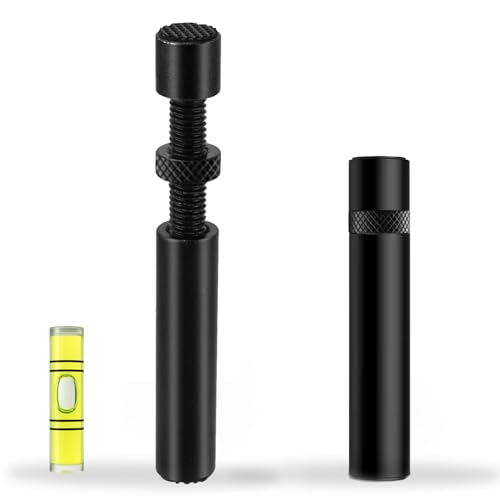 California JOS GPU Support Bracket Graphics Card
- ✅ Package Includes: 1 PCS Large Black GPU…
- ✅Prevents GPU Sag and Damage
- ✅Durable All-Aluminum Build
 GPU Support Bracket
- ✅【Screw adjustment design】The minimum size of the GPU…
- ✅【Aluminum Alloy Metal】The GPU support is made of…
- ✅【Magnetic Non-Slip Base】The magnet hidden in the base…
| Product | Key specs | |
|---|---|---|
| acer GPU Support Bracket | [Esports-grade Materials] Constructed from high-quality aluminum alloy, the… [Ajustment Freely] The detachable design features precise 0.5mm… [Powerful Magnetic Design] The top and bottom are… | Check price |
| California JOS GPU Support Bracket Graphics Card | ✅ Package Includes: 1 PCS Large Black GPU… ✅Prevents GPU Sag and Damage ✅Durable All-Aluminum Build | Check price |
| GPU Support Bracket | ✅【Screw adjustment design】The minimum size of the GPU… ✅【Aluminum Alloy Metal】The GPU support is made of… ✅【Magnetic Non-Slip Base】The magnet hidden in the base… | Check price |
 Graphics Card GPU Brace Support | All-aluminum metal material - Provides strong and long-lasting… Screw adjustment design - The graphics card bracket… Bottom hidden mag.net design - The mag.net hidden… | Check price |
 upHere 5V 3PIN Addressable RGB Graphics Card | 01.Simple and Convenient adjustment method,has a slide type… 02.Use sturdy iron as the main structure to… 03.Adaptable to a wide range of motherboards and… | Check price |
 OwlTree GPU Support Bracket Graphics Card Stand | The GPU Support bracket features an all-metal material… The GPU Support Bracket features 0.24 to 4.92inch… Universal compatibility - the GPU sag bracket fits… | Check price |
As an Amazon Associate we earn from qualifying purchases at no extra cost to you.
⚡ Save on Your Next PC — Amazon Prime
Prime members get fast free shipping on the systems above, plus early access to Prime Day & Black Friday PC deals. New members get a 30-day free trial.
Watch: How to Undervolt Your GPU — Video Review
Understand Why Undervolting Works
GPUs boost to a target clock speed at a set voltage, but factory voltages include a safety margin so even the weakest chips in a batch stay stable. Most cards can hit the same clocks at a lower voltage, which means less heat and power for identical performance. In a thermally constrained build, a lower temperature can even let the card hold its boost clock longer, so undervolting sometimes improves real-world frame rates.
Install the Right Tuning Software
For NVIDIA cards, MSI Afterburner is the standard tool; for AMD, the Radeon driver has a built-in tuning tab under Performance. Install Afterburner and a monitoring overlay so you can watch clock speed, voltage, temperature, and power draw in real time. Also grab a stress tool like Unigine Heaven or a demanding game with a repeatable benchmark, you will need it to test stability after each change.
Build a Voltage-Frequency Curve (NVIDIA)
In Afterburner, open the voltage-frequency curve editor (Ctrl+F). Pick a target voltage, say 900mV, and set your desired core clock at that point, then flatten the curve to the right so the card never exceeds that voltage. Apply, and the GPU now delivers your chosen clock at a lower voltage. Start conservative: a common result is stock performance at 875 to 950mV instead of the default 1050mV or higher.
Undervolt an AMD GPU
On Radeon cards, open the driver’s Performance > Tuning tab and switch to manual GPU tuning. Lower the maximum voltage in small steps (for example, from 1150mV toward 1050mV) while keeping the frequency target the same. Apply each change and test. AMD’s tuning is more straightforward than curve editing, but the principle is identical, reduce voltage until you find the lowest stable point for your target clock.
Test Stability and Watch Sag Physically
After each undervolt, run your stress test and a couple of real games for at least 30 minutes. Instability shows as a driver crash, black screen, or artifacts, if that happens, add 15 to 25mV and retest. A stable undervolt should show lower temperatures and power draw at the same frame rate. While you are in the case, it is worth adding a GPU support bracket to prevent the heavy card from sagging over time, which protects the PCIe slot and connector.
Tips
- Undervolting is fully reversible, an unstable setting simply reverts, so there is no risk of damage.
- Change voltage in small steps and stress-test after each, patience finds the lowest stable point.
- Aim for equal performance at lower temperature first; extra clock headroom is a bonus.
- Fit a GPU support bracket while you work, sag stresses the slot on today’s heavy cards.
Frequently Asked Questions
Is undervolting a GPU safe?
Yes, completely. Lowering voltage cannot damage the card, and an unstable setting just causes a reset to defaults. It is one of the safest tweaks in PC tuning.
Will undervolting reduce my performance?
Usually not. The goal is the same clock speed at lower voltage, so you keep performance while cutting heat and noise. In hot cases it can even raise sustained clocks.
How much cooler will my GPU run?
Results vary by card, but drops of 5 to 15 degrees Celsius and noticeably quieter fans are common, along with lower power draw for the same frame rate.
Do I need special hardware to undervolt?
No, just free software like MSI Afterburner or the Radeon driver. A GPU support bracket is optional but wise to counter the sag that heavy modern cards suffer.
Conclusion
Undervolting is a free, reversible upgrade that makes your GPU cooler and quieter, and sometimes faster in thermally limited builds. Use Afterburner or the Radeon driver, lower voltage in small steps, test thoroughly, and support the card against sag. A little tuning delivers a calmer, more efficient rig.
FAQ
Is undervolting a GPU safe?
Will undervolting reduce my performance?
How much cooler will my GPU run?
Do I need special hardware to undervolt?
More from Amazon
Programs that pair well with the guide above. Offers and eligibility are set by Amazon and may change.
Free shipping on eligible items, Prime Video and more. Eligible new members can start with a free trial.
Start a Prime free trialAd-free music streaming. Eligible new subscribers can start with a free trial.
Try Music Unlimited freeA Prime membership for ages 18-24 with a trial period. Eligibility is set by Amazon.
See Prime for Young AdultsAudiobooks and podcasts to listen to on the go. Eligible new members can start with a free trial.
Try Audible freeAs an Amazon Associate we earn from qualifying purchases.