Key takeaways
- Capacity: 32GB is the modern baseline for 1080p and light 4K; move to 64GB for heavy 4K, After Effects, or 3D.
- Dual channel: Always run two matched sticks (2x16GB) so the CPU gets full memory bandwidth for smooth timeline playback.
- Speed: DDR5-6000 is the sweet spot on current AMD and Intel platforms; faster kits help but with diminishing returns.
- Upgradeability: Choose a laptop with SO-DIMM slots, not soldered memory, so you can add RAM as projects grow.
- CPU pairing: A strong multi-core chip plus ample RAM matters more than either alone; balance the two for export speed.
Video editing is one of the most memory-hungry tasks a computer faces. Timelines with 4K footage, color grades, and dozens of effect layers can swallow 32GB in a single project, and running out of RAM means constant proxy rendering and playback stutter. For smooth scrubbing and fast exports, capacity and dual-channel bandwidth both matter.
Whether you are building a desktop or shopping for a creator laptop, the target is the same: 32GB as a baseline, 64GB for heavy 4K and motion-graphics work, all running in dual channel. Below we look at memory-focused desktops and creator laptops that ship with the capacity editors actually need in 2026.
Our top picks



As an Amazon Associate we earn from qualifying purchases at no extra cost to you. Ratings are shown as listed on Amazon.
⚡ Save on Your Next PC — Amazon Prime
Prime members get fast free shipping on the systems above, plus early access to Prime Day & Black Friday PC deals. New members get a 30-day free trial.
Watch: Best RAM for Video Editing — Video Review
How to Choose
- Capacity: 32GB is the modern baseline for 1080p and light 4K; move to 64GB for heavy 4K, After Effects, or 3D.
- Dual channel: Always run two matched sticks (2x16GB) so the CPU gets full memory bandwidth for smooth timeline playback.
- Speed: DDR5-6000 is the sweet spot on current AMD and Intel platforms; faster kits help but with diminishing returns.
- Upgradeability: Choose a laptop with SO-DIMM slots, not soldered memory, so you can add RAM as projects grow.
- CPU pairing: A strong multi-core chip plus ample RAM matters more than either alone; balance the two for export speed.
The Best Picks Reviewed
Lenovo 16″ i7-13620H (16GB DDR5, 1TB)
Our top laptop pick near $1,000. The 10-core i7-13620H paired with DDR5 and a 1TB SSD gives editors a fast, upgradeable base; add a second stick to reach 32GB for 4K work.
NIMO 17.3″ AI Creator (32GB RAM, 1TB)
Around $800, this 17-inch creator laptop ships with a full 32GB of RAM and a 1TB SSD, making it a strong value for editors who want capacity out of the box on a big screen.
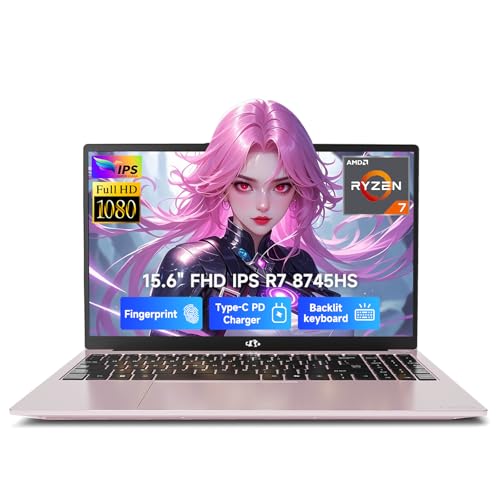
NIMO 15.6″ Ryzen 7 8745HS (16GB, 1TB)
Near $850, the 8-core Ryzen 7 8745HS delivers excellent multi-core export performance. Its 16GB is expandable, and the extra cores speed up rendering noticeably.
Getorli Mini PC Ryzen 7 6800H (32GB LPDDR5, 1TB)
Around $540, this compact mini PC packs 32GB of LPDDR5 and a capable 8-core chip, a space-saving editing station for 1080p and lighter 4K projects.
NIMO 15.6″ Ryzen 5 6600H (16GB, 512GB)
At about $500 this is the budget entry for new editors. 16GB and a 6-core chip handle 1080p timelines, with room to add memory as your projects get more demanding.
Frequently Asked Questions
How much RAM do I need for video editing?
32GB is the baseline for 1080p and light 4K editing. Step up to 64GB for heavy 4K, After Effects compositing, or 3D work.
Does RAM speed matter for editing?
Somewhat. DDR5-6000 helps timeline playback, but capacity and CPU core count have a bigger impact on export times than raw speed.
Is 16GB enough for editing in 2026?
Only for light 1080p projects. Modern editors quickly hit 16GB, so buy a machine you can expand to 32GB or more.
Should editing RAM run in dual channel?
Yes. Two matched sticks give the CPU full bandwidth, which noticeably smooths scrubbing and effect previews versus a single stick.
Final Thoughts
For editors the priority is capacity plus a strong multi-core CPU. The Lenovo i7-13620H laptop is our balanced pick with an easy path to 32GB, while the NIMO 17.3-inch ships with 32GB ready to go and the Ryzen 7 models lead on export speed.