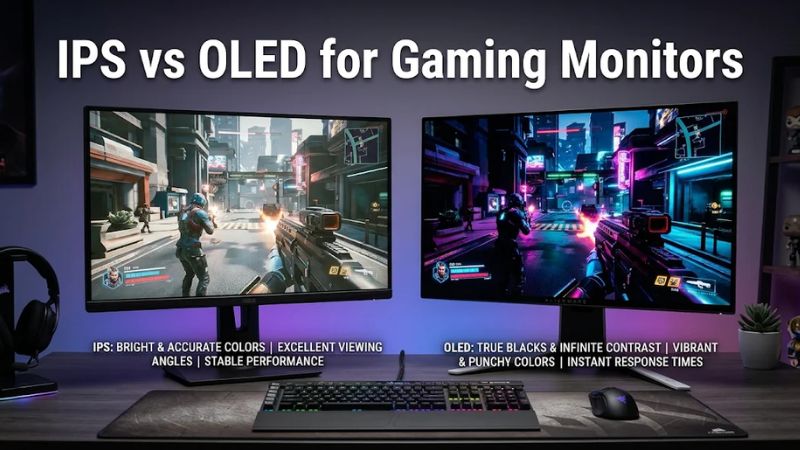
Choosing between IPS and OLED can significantly change how your games look and feel. IPS vs OLED for gaming monitor decisions come down to more than refresh rates: contrast, motion clarity, HDR, room brightness, and long-term durability all matter. This comparison explains the trade-offs and helps you choose the right display for your gaming setup.
How to Choose Between IPS and OLED Gaming Monitors
IPS and OLED monitors serve different gaming priorities. OLED generally delivers better image quality, deeper blacks, and faster pixel response, while IPS offers practical advantages for bright rooms, desktop productivity, and tighter budgets. Understanding these differences helps you avoid paying extra for features that may not improve your everyday experience.
1. Image Quality, Contrast, and Black Levels
OLED has a significant advantage in contrast because each pixel produces its own light. Individual pixels can switch off completely to display black, creating excellent shadow detail and making dark environments look more realistic. This is particularly noticeable in horror games, atmospheric adventures, and cinematic titles.
IPS uses an LED backlight behind its liquid crystal layer. Even when displaying black, some light can pass through, making dark scenes appear gray compared with OLED. This limitation is especially noticeable in dark rooms, although good IPS monitors can still produce attractive images for everyday gaming.
2. Response Time and Refresh Rate
OLED is generally faster at changing individual pixel colors than IPS. This reduces visible ghosting and motion trails, making rapidly moving objects easier to follow. Competitive shooters, racing games, and action titles can benefit from this improvement, particularly when paired with a high refresh rate.
However, response time and refresh rate are different specifications. A 240Hz IPS monitor can display up to 240 frames per second, just like a 240Hz OLED. OLED’s faster pixel transitions improve motion clarity, but the actual frame rate still depends on the graphics card, game settings, and system performance.
3. Brightness, HDR, and Gaming Environment
IPS monitors are often a practical choice for brightly lit gaming rooms because many models maintain stronger full-screen SDR brightness. This helps when playing near windows or under overhead lighting. Some IPS monitors also include Mini LED backlighting, which can substantially improve HDR performance through local dimming.
OLED provides a different HDR advantage. Its ability to switch individual pixels off creates excellent black levels, while small bright highlights can stand out against dark backgrounds. However, OLED brightness varies with the size of the illuminated area and the panel’s brightness management, so peak brightness alone does not tell the entire story.
4. Budget, Longevity, and Everyday Use
IPS is generally more affordable than OLED at comparable screen sizes and resolutions. It also avoids the permanent image-retention risk associated with OLED burn-in. For gamers who spend many hours working with spreadsheets, browser windows, coding environments, or static desktop interfaces, IPS can be a more convenient long-term choice.
OLED requires more consideration because prolonged exposure to static elements can contribute to uneven pixel wear. Modern OLED monitors commonly include protective features such as pixel cleaning and screen-shifting functions, but these reduce risk rather than making burn-in impossible. Warranty coverage should also be checked before purchasing.
IPS vs OLED for Gaming: Real-World Differences
The practical difference between these technologies becomes clearer when you consider the games you play, your room lighting, and how long you use your monitor each day. Neither panel type automatically delivers the best experience in every situation. The right choice depends on balancing visual quality, responsiveness, durability, and total ownership cost.
1. Competitive Gaming: Is OLED Actually Faster?
For competitive games such as Counter-Strike 2, Valorant, Apex Legends, and Call of Duty, OLED offers an advantage through faster pixel transitions. Moving targets remain clearer during rapid camera movements, while reduced ghosting makes tracking opponents easier. These characteristics are particularly attractive to players who prioritize motion clarity.
However, a fast IPS monitor remains a capable competitive gaming display. High-refresh-rate IPS models can deliver responsive gameplay without requiring the premium typically associated with OLED. Players should compare actual response-time measurements, input lag, and refresh rates rather than assuming every OLED automatically outperforms every IPS monitor.
2. Single-Player Gaming: Contrast Makes a Difference
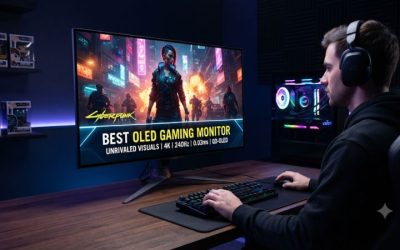
For cinematic games such as Cyberpunk 2077, Alan Wake 2, and Resident Evil, OLED offers a more immersive presentation. Deep blacks, bright highlights, and pixel-level lighting control help nighttime environments and dark interiors appear more convincing. This makes OLED particularly appealing for gamers who prioritize visual atmosphere over competitive specifications.
IPS can still deliver enjoyable image quality, especially when playing in a brightly lit room. Mini LED IPS monitors are worth considering because local dimming can improve contrast compared with conventional IPS backlighting. Nevertheless, bright objects may produce visible halos around darker areas, something OLED generally avoids.
3. Everyday Desktop Use: Text and Static Content
IPS has an advantage when gaming is only one part of a daily computer setup. Traditional RGB subpixel arrangements generally provide cleaner text rendering, making documents, spreadsheets, websites, and programming interfaces easier to read. OLED subpixel arrangements differ between WOLED and QD-OLED, potentially producing colored fringing around small text.
This does not mean OLED is unsuitable for productivity. Higher pixel density can make text fringing less noticeable, and individual sensitivity varies. However, users who spend most of their computer time reading or working with static windows should consider IPS, especially when comparing monitors with similar resolution and screen size.
4. Long-Term Ownership: Burn-In and Maintenance
OLED burn-in is a genuine ownership consideration rather than a reason to automatically reject the technology. Static elements such as taskbars, application interfaces, and persistent game HUDs can contribute to uneven pixel wear over extended use. The actual risk depends on usage patterns, brightness, panel technology, and protective features.
Manufacturers have introduced measures such as Pixel Shift, screen savers, logo dimming, and automatic pixel refresh. ASUS and MSI document these features in their OLED monitor support materials. They help manage panel wear, but buyers should still check the manufacturer’s warranty terms and whether burn-in is explicitly covered.
IPS vs OLED Gaming Monitor Comparison Table
The following table summarizes the practical differences between the two technologies. These are general panel characteristics, not guaranteed specifications for every individual monitor. Implementation, panel generation, backlighting, and manufacturer settings can change the actual experience.
| Comparison | IPS Gaming Monitor | OLED Gaming Monitor |
| Black levels | Grayish blacks in dark scenes | True black through pixel shutoff |
| Contrast | Lower native contrast | Near-infinite pixel-level contrast |
| Pixel response | Generally slower | Near-instantaneous |
| Refresh rate | Excellent high-refresh options | Excellent high-refresh options |
| HDR | Stronger with Mini LED local dimming | Excellent pixel-level contrast |
| Full-screen brightness | Often higher and more consistent | Varies with screen content |
| Motion clarity | Good to excellent | Generally superior |
| Text clarity | Usually cleaner RGB rendering | Depends on subpixel layout |
| Burn-in risk | No OLED-style burn-in | Possible with prolonged static content |
| VRR flicker | Less common | Can occur with fluctuating frame rates |
| Price | Generally more affordable | Generally more expensive |
| Best application | Bright rooms and mixed productivity | Gaming immersion and HDR |
One important distinction is that refresh rate does not determine pixel response time. A 165Hz OLED and a 240Hz IPS have different strengths: the IPS can refresh more frequently, while the OLED can transition pixels faster. The better option depends on the actual monitor specifications and the frame rates your PC can produce.
Which Gaming Monitor Should You Buy?
The best choice depends on your gaming habits, budget, and environment. Instead of choosing OLED simply because it is a newer premium technology, consider how much time you spend gaming versus working, whether your room is bright, and whether you regularly play games with demanding visual effects.
Should You Choose IPS?
Choose IPS if you want an affordable gaming monitor that also works well for everyday computing. It is particularly suitable for students, office users, streamers, and gamers who spend extended periods switching between games, browsers, and productivity applications.
IPS is also a sensible option if your room receives considerable daylight or you prefer not to manage OLED panel protection features. A good Fast IPS monitor with a high refresh rate can provide excellent competitive gaming performance without the additional ownership considerations associated with OLED.
Should You Choose OLED?
Choose OLED if image quality, dark-scene performance, and motion clarity are your highest priorities. It is especially attractive for immersive single-player games, cinematic experiences, and competitive titles where rapid pixel transitions make fast movement easier to follow.
The additional cost makes more sense when you spend substantial time gaming and can control your room lighting. Before buying, compare the exact model’s HDR performance, screen coating, refresh rate, connectivity, warranty, and OLED protection features rather than relying exclusively on its panel technology.
What About WOLED and QD-OLED?
OLED is not a single panel implementation. WOLED and QD-OLED use different pixel structures, which can affect brightness, color reproduction, text rendering, and performance in brightly lit environments. Understanding this distinction becomes important when comparing two premium gaming monitors.
WOLED uses a white OLED light source with color filters and an additional white subpixel. QD-OLED uses blue OLED light with a quantum dot layer to produce red and green colors. QD-OLED can offer particularly impressive color volume, while the specific WOLED implementation may have different strengths in brightness management and subpixel arrangement.
Neither technology is universally superior. Check independent measurements of the actual monitor, particularly HDR brightness, color volume, text clarity, and reflection handling. These characteristics can matter more than the WOLED or QD-OLED label when comparing two monitors at similar prices.
Don’t Ignore Your GPU and Monitor Specifications
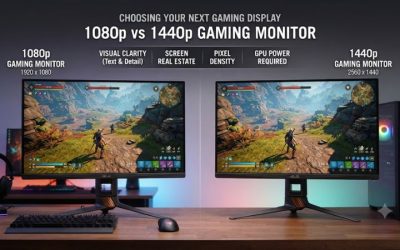
A premium OLED display cannot compensate for a graphics card that struggles to deliver the frame rates required by your preferred resolution. For example, a 4K high-refresh-rate monitor demands considerably more GPU performance than a 1080p display at the same settings.
Before upgrading, consider these factors:
- Resolution: Match 1080p, 1440p, or 4K to your GPU capabilities and preferred screen size.
- Refresh rate: Choose a refresh rate that your PC can use effectively in your regular games.
- Adaptive sync: Check G-SYNC compatibility or AMD FreeSync support for your graphics card.
- Connectivity: Verify that HDMI and DisplayPort versions support your desired resolution, refresh rate, and color settings.
- HDR certification: Look beyond an HDR label and check actual brightness, contrast, and local dimming performance.
- Warranty: For OLED, read the specific manufacturer’s burn-in coverage and exclusions.
These details help ensure that your monitor upgrade improves your gaming experience rather than creating unnecessary compatibility or performance limitations.
Frequently Asked Questions
1. Is IPS or OLED better for gaming?
OLED is generally better for overall gaming image quality because it provides deeper blacks, higher contrast, and faster pixel response. However, IPS is a better practical choice for many budget-conscious gamers and people who use their monitors extensively for productivity. The right option depends on your priorities.
2. Is OLED worth the extra money for gaming?
OLED is worth considering if you regularly play visually demanding games and value HDR contrast, dark-scene detail, and motion clarity. If you mainly play competitive games on a limited budget, a quality high-refresh-rate IPS monitor may offer better overall value without requiring the additional expense.
3. Can OLED monitors get burn-in from gaming?
Yes, OLED monitors can develop burn-in when static elements remain visible for prolonged periods. Persistent HUDs, health bars, minimaps, and interface elements can contribute to uneven pixel wear. Modern panel protection features help reduce this risk, but they cannot guarantee that burn-in will never occur.
4. Is a 240Hz IPS monitor better than a 165Hz OLED?
Not necessarily, because the two monitors prioritize different characteristics. A 240Hz IPS can display more frames per second, while a 165Hz OLED generally provides faster pixel transitions and clearer motion. Your GPU performance, preferred games, and individual monitor measurements should determine which is more suitable.
Final Thoughts
The IPS vs OLED for gaming monitor decision ultimately depends on how you use your PC. OLED is the stronger choice for immersive visuals, contrast, and motion clarity, while IPS offers affordability, consistent desktop brightness, and freedom from OLED burn-in. Compare individual monitor specifications and choose the technology that best matches your gaming habits and budget.
More from Amazon
Programs that pair well with the guide above. Offers and eligibility are set by Amazon and may change.
Free shipping on eligible items, Prime Video and more. Eligible new members can start with a free trial.
Start a Prime free trialAd-free music streaming. Eligible new subscribers can start with a free trial.
Try Music Unlimited freeA Prime membership for ages 18-24 with a trial period. Eligibility is set by Amazon.
See Prime for Young AdultsAudiobooks and podcasts to listen to on the go. Eligible new members can start with a free trial.
Try Audible freeAs an Amazon Associate we earn from qualifying purchases.