Key takeaways
- GPU: A dedicated GPU like the RTX 5060 is essential for modern gaming at high settings; integrated graphics (Radeon 680M/660M) handle esports titles and light gaming but struggle with demanding AAA games.
- Display: Look for at least a 144Hz refresh rate if gaming matters, and 1080p or higher resolution for crisp text during long study sessions and note-taking.
- Portability and battery life: College means carrying your laptop between classes and the library, so weigh screen size and battery life against raw performance if you’re constantly on the move.
- RAM and storage: 16GB of RAM is the sweet spot for multitasking between browser tabs, lecture slides, and games; a fast Gen 4 SSD with at least 512GB keeps both software and game libraries running smoothly.
- Budget vs. longevity: Higher-end GPUs and processors cost more upfront but stay relevant for years of new game releases, while budget builds may need an upgrade sooner if your gaming needs grow.
What's inside
Choosing a laptop that can handle a full course load and still run the latest games at solid frame rates is harder than it sounds. Most “student laptops” skimp on graphics power, while most gaming laptops are bulky, loud, and priced beyond a college budget, leaving shoppers stuck trying to find a machine that actually balances both worlds.
This guide breaks down six laptops that cover every price point and use case, from thin-and-light everyday machines to full RTX-powered gaming rigs, so you can match your coursework, your games, and your budget without any guesswork.
As an Amazon Associate we earn from qualifying purchases at no extra cost to you.



🎮 Get More From Your Setup — Free
Prime Gaming gives you free PC games every month, in-game loot, and a free Twitch channel sub — plus fast free shipping on all the gear above. New members get a 30-day free trial.
Watch: Best Laptop For College And Gaming — Video Review
How to Choose a Laptop For College And Gaming (2026)
- GPU: A dedicated GPU like the RTX 5060 is essential for modern gaming at high settings; integrated graphics (Radeon 680M/660M) handle esports titles and light gaming but struggle with demanding AAA games.
- Display: Look for at least a 144Hz refresh rate if gaming matters, and 1080p or higher resolution for crisp text during long study sessions and note-taking.
- Portability and battery life: College means carrying your laptop between classes and the library, so weigh screen size and battery life against raw performance if you’re constantly on the move.
- RAM and storage: 16GB of RAM is the sweet spot for multitasking between browser tabs, lecture slides, and games; a fast Gen 4 SSD with at least 512GB keeps both software and game libraries running smoothly.
- Budget vs. longevity: Higher-end GPUs and processors cost more upfront but stay relevant for years of new game releases, while budget builds may need an upgrade sooner if your gaming needs grow.
The Best Laptop For College And Gaming (2026)s Reviewed
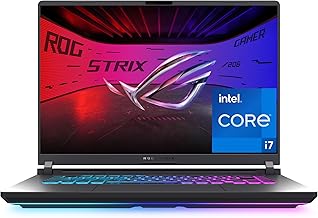
ASUS ROG Strix G16
The Strix G16 pairs an RTX 5060 with a 165Hz 16:10 display, making it the strongest all-around choice for students who want genuine gaming performance without sacrificing screen real estate for coursework. Wi-Fi 7 and a Core i7 processor round out a machine that handles everything from research papers to ray-traced games with ease.
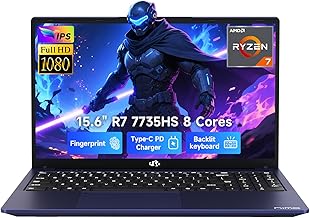
NIMO Thin & Light Gaming Laptop
Built around the AMD Ryzen 7 7735HS and Radeon 680M graphics, this NIMO model is a great pick for students who want a slim, portable machine that still handles moderate gaming and creative work. Its 16GB DDR5 RAM keeps multitasking smooth for everyday campus life.
NIMO Light-Gaming-Laptop
A more budget-focused sibling to the Thin & Light model, this NIMO laptop trims storage to 256GB but keeps the same capable Ryzen 7 7735HS and Radeon 680M combo, plus a fingerprint reader for quick, secure logins between classes. It’s a solid entry point for students prioritizing price over storage headroom.
Acer Nitro V 16S AI Gaming Laptop
With an RTX 5060 GPU, 32GB of DDR5 RAM, and a 180Hz WUXGA display, the Nitro V 16S is built for students who game seriously and also run demanding creative or AI-assisted workloads. It’s the most powerful memory configuration in this roundup, giving it excellent multitasking headroom alongside strong gaming chops.
NIMO 15.6″ AI-Creator-Laptop
Powered by a 6-core Ryzen 5 6600H and Radeon 660M graphics, this NIMO model targets students focused more on video editing, remote work, and study than heavy gaming, while still offering 100W fast charging for quick top-ups between classes. It’s a practical, affordable choice for creative coursework with light gaming on the side.
Frequently Asked Questions
Do I need a dedicated GPU for college and gaming?
If you plan to play modern AAA titles at good frame rates, yes—integrated graphics like the Radeon 660M or 680M are fine for esports and older games but will bottleneck newer releases.
How much RAM is enough for both schoolwork and gaming?
16GB is the practical minimum for smooth multitasking between browser tabs, office apps, and games; 32GB is worth considering if you also run creative software or want extra longevity.
Are thin-and-light laptops good enough for gaming?
Thin-and-light models with chips like the Ryzen 7 7735HS can handle moderate gaming and esports titles well, but they won’t match the sustained performance of a dedicated RTX-equipped gaming laptop under heavy loads.
What’s the difference between the NIMO models in this list?
They vary mainly in processor tier (Ryzen 5 vs. Ryzen 7), storage capacity, and graphics (Radeon 660M vs. 680M), so the right pick depends on whether you prioritize gaming performance, storage space, or budget.
Final Thoughts
For students who want the best overall gaming performance without compromise, the ASUS ROG Strix G16 and Acer Nitro V 16S are the top picks thanks to their RTX 5060 GPUs, while the NIMO Thin & Light Gaming Laptop offers excellent value for those who need a more portable, budget-friendly machine for campus life.