Our Top Picks
 ARCTIC Liquid Freezer III Pro 360 A-RGBLiquid Freezer III Pro 360 A-RGB15.7 x 4.7 x 2.9 inches4.5 poundsCheck on Amazon
 Thermalright FW 360 White ARGB-360mm AIO CPU LiquidFW360 WHITE ARGB4.72 x 2.05 x 15.63 inches0.2 poundsCheck on Amazon
ARCTIC Liquid Freezer III Pro 360 A-RGB - AIO CPU Cooler, Water Cooling | Cooler For LGA1851, LGA1700, AM4, AM5.
Chosen because it specifies AIO CPU Cooler and Water Cooling.
View on AmazonThermalright FW 360 White ARGB-360mm AIO CPU Liquid Cooler,IPS LCD Screen with 320 * 240 Resolution,for AM4/AM5/Intel LGA1700,‘2.4 inch’Magnet-Absorbent LCD Screen for Images -White
Chosen because it specifies IPS LCD Screen with 320 * 240 Resolution and for AM4/AM5/Intel LGA1700.
View on Amazon
ARCTIC Liquid Freezer III Pro 360 - AIO CPU Cooler,3 x 120 mm Water Cooling | Cooler For LGA1851, LGA1700, AM4, AM5.
Chosen because it specifies AIO CPU Cooler and 3 x 120 mm Water Cooling.
View on AmazonThe ARCTIC Liquid Freezer III 360 review reveals a CPU cooler designed for demanding gaming PCs, high-performance processors, and users who prioritize thermal performance over flashy features. Its 360mm radiator, integrated VRM fan, and included contact frame make it interesting, but installation complexity and case compatibility deserve attention before buying.
What Makes the ARCTIC Liquid Freezer III 360 Worth Considering?
Choosing a 360mm liquid cooler involves more than comparing radiator sizes or fan speeds. The ARCTIC Liquid Freezer III 360 combines several practical cooling features with a relatively straightforward cable design, but its unusual radiator dimensions and mounting hardware affect whether it makes sense for your particular PC build.
360mm Radiator and Cooling Design
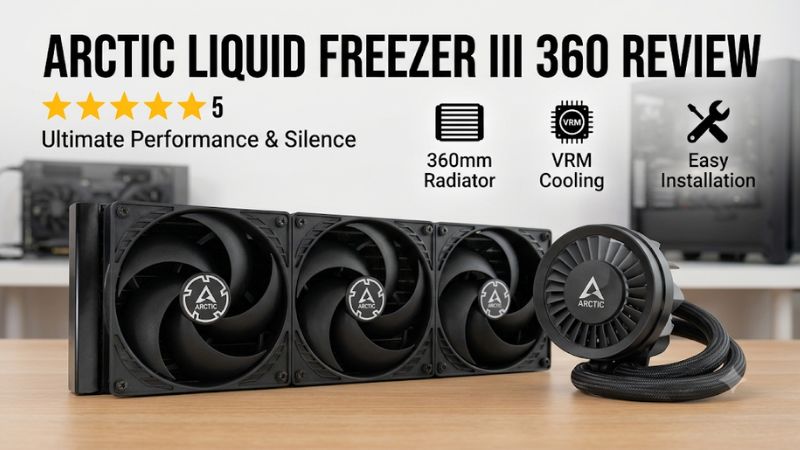
The Liquid Freezer III 360 uses an aluminum radiator measuring 398 x 120 x 38mm. Its three preinstalled P12 PWM fans operate between 200 and 1,800 RPM, providing airflow across the radiator to remove heat from the circulating coolant.
One important detail is its 38mm radiator thickness. Many conventional 360mm AIO radiators use thinner designs, so the additional thickness can improve cooling capacity but creates more demanding clearance requirements. Builders should account for the radiator, fans, motherboard heatsinks, and memory when planning installation.
Integrated VRM Cooling Fan
One distinctive feature is the small fan integrated into the pump housing. Unlike conventional AIO designs that concentrate airflow around the CPU socket, this additional fan directs air toward the motherboard voltage regulator modules.
The VRM fan operates between 400 and 2,500 RPM. Its purpose is to improve airflow around components that receive less direct cooling when a large liquid cooler replaces a conventional CPU heatsink. The magnetic pump cover also makes accessing this component easier.
For gaming systems with powerful processors and sustained workloads, additional motherboard airflow can be useful. However, its actual benefit depends on motherboard layout, case airflow, and surrounding component temperatures.
Pump, Cold Plate, and Thermal Compound
ARCTIC equips this cooler with a copper cold plate featuring micro-skived fins. This design increases the surface area available for heat transfer between the CPU and coolant.
The PWM-controlled pump operates between 800 and 2,800 RPM, while the package includes MX-6 thermal compound. Its 450mm tubes provide flexibility when positioning the radiator in different mounting locations.
The pump housing also has a removable upper section. This gives builders access to the VRM fan without requiring the entire cooler to be dismantled, making certain maintenance tasks easier.
Socket Compatibility and Installation Requirements
The standard Liquid Freezer III 360 supports AMD AM4 and AM5 platforms, alongside Intel LGA1700 and LGA1851. It does not officially support older Intel sockets through its standard mounting hardware.
Intel installation uses ARCTIC’s supplied contact frame, replacing the motherboard’s conventional socket loading mechanism during installation. This requires additional care because the builder must remove and reinstall socket hardware correctly.
AMD installation uses its own mounting arrangement with offset positioning. Although this approach targets the CPU’s heat-producing areas, installation can be less straightforward than with conventional mounting brackets.
Before purchasing, check the exact motherboard model against ARCTIC’s compatibility information rather than relying exclusively on the CPU socket name.
ARCTIC Liquid Freezer III 360 Review: Performance, Price, and Value
The most important consideration is whether the cooler delivers enough thermal performance to justify its installation requirements and physical dimensions. Independent reviews provide useful evidence, although their results depend on CPU power, fan speed, ambient temperature, and testing methodology. Understanding those conditions helps distinguish meaningful performance advantages from marketing claims.
Specifications and Hardware Features
The following table summarizes the standard black Liquid Freezer III 360 configuration. Specifications may differ between standard, white, and A-RGB editions, so check the exact product version before ordering.
| Specification | ARCTIC Liquid Freezer III 360 |
| Cooler type | All-in-one liquid cooler |
| Radiator size | 360mm |
| Radiator dimensions | 398 x 120 x 38mm |
| Radiator material | Aluminum |
| CPU cold plate | Copper, micro-skived fins |
| Pump speed | 800–2,800 RPM |
| Radiator fans | 3 x P12 PWM |
| Fan speed | 200–1,800 RPM |
| VRM fan speed | 400–2,500 RPM |
| Tube length | 450mm |
| Included thermal compound | ARCTIC MX-6 |
| AMD compatibility | AM4, AM5 |
| Intel compatibility | LGA1700, LGA1851 |
| Warranty | 6 years |
The specifications reveal why this cooler needs careful case planning. Its radiator is thicker than many competing 360mm models, and the additional VRM cooling hardware makes its pump assembly different from conventional AIO products.
Independent Cooling Performance
GamersNexus published an independent review of the Liquid Freezer III series in February 2024. Its testing included noise-normalized thermal measurements, maximum fan-speed comparisons, VRM airflow analysis, and contact-pressure examination.
In its 200W noise-normalized comparison, the Liquid Freezer III 360 recorded a 46.7°C temperature difference above ambient. It led that particular comparison, although the margin over the DeepCool Mystique 360 was within the stated margin of error.
The publication also examined Intel LGA1700 operation at 250W. With ARCTIC’s supplied contact frame, the cooler produced results approximately 5°C better than the tested configuration using Intel’s standard socket loading mechanism.
These findings support its strong cooling potential, but they should not be interpreted as guaranteed temperatures for every gaming PC. Different CPUs, motherboard power limits, case airflow, ambient temperatures, and fan curves produce different outcomes.
Tom’s Hardware offered a more qualified assessment. Its original review raised concerns about performance under demanding CPU-only workloads, while its subsequent review using a gaming-oriented workload found the cooler more competitive against high-end air coolers.
This distinction matters: the Liquid Freezer III 360 is attractive for gaming and mixed workloads, but buyers running sustained, heavily multithreaded CPU applications should compare workload-specific results before choosing it.
Price and Value for Gaming PCs
ARCTIC positioned the Liquid Freezer III series competitively when it launched. GamersNexus reported a $130 original MSRP for the standard black 360mm version and $150 for the A-RGB edition.
Those are historical launch prices, not verified November 2026 retail prices. Actual US pricing can change with retailer availability, promotions, and newer product releases.
The value proposition is strongest when the cooler is available at a meaningful discount. Buyers receive a substantial radiator, three PWM fans, an integrated VRM fan, MX-6 thermal compound, and a six-year manufacturer warranty.
However, price alone should not determine the purchase. A thinner 360mm AIO may fit more cases, while a quality air cooler can provide sufficient cooling without introducing a pump or liquid-cooling components.
For a gaming build with a high-power processor, the extra cooling capacity may justify the additional expense. For a midrange gaming CPU, spending more on the graphics card or monitor may produce a more noticeable improvement to the overall experience.
Strengths and Weaknesses
The ARCTIC Liquid Freezer III 360 has several advantages, but its unconventional construction creates compromises worth understanding.
What it does well:
- Strong cooling performance in several independent comparisons.
- Three preinstalled P12 PWM radiator fans.
- Integrated VRM cooling fan.
- Included Intel contact frame for supported processors.
- Copper cold plate and included MX-6 thermal compound.
- Six-year manufacturer warranty.
- Long 450mm coolant tubes.
What could be better:
- Thick radiator creates additional installation restrictions.
- Intel contact-frame installation requires careful handling.
- AMD mounting can be less convenient than conventional AIO brackets.
- No integrated LCD screen for temperatures or system information.
- Pump, radiator fans, and VRM fan can produce additional noise depending on their operating speeds.
- Not suitable for every computer case.
The biggest compromise is installation convenience. Buyers who want a straightforward cooler installation may prefer a conventional AIO with simpler mounting hardware.
Alternatives Worth Considering
The standard Liquid Freezer III 360 is not the only option in this category. Several competing designs target different budgets and installation preferences.
| Alternative | Best For | Key Feature | Compatibility | Watch Out For |
| ARCTIC Liquid Freezer III Pro 360 | Newer ARCTIC cooling design | Updated P12 Pro fan configuration | Check exact socket revision | Different fan noise characteristics |
| Corsair iCUE H150i series | Customization | Software-controlled cooling and lighting | Check specific model | Software and pricing considerations |
| DeepCool Mystique 360 | Display-focused builds | Integrated LCD display | Check motherboard and socket support | Higher feature-oriented pricing |
| Thermalright Peerless Assassin 120 SE | Budget-conscious gaming PCs | Dual-tower air cooling | Check socket and case clearance | Less cooling headroom for demanding CPUs |
The Liquid Freezer III Pro 360 deserves particular attention because it belongs to a newer product generation. However, it should not automatically be considered a better purchase without comparing its actual retail price, fan characteristics, and independent performance results.
Corsair’s H150i family is more attractive to users who prioritize software customization and system monitoring. DeepCool’s Mystique series offers a display-oriented alternative, although availability and regional purchasing options should be checked.
Meanwhile, the Thermalright Peerless Assassin 120 SE is worth considering if you want to avoid liquid cooling altogether. Its air-cooling design removes the pump and radiator from the equation, although suitability depends on CPU power consumption and case airflow.
Frequently Asked Questions
1. Is the ARCTIC Liquid Freezer III 360 good for gaming?
Yes, the ARCTIC Liquid Freezer III 360 is a strong option for gaming PCs with processors that benefit from substantial cooling capacity.
Its 360mm radiator, three P12 fans, and copper cold plate provide considerable cooling potential. Independent reviews also demonstrate competitive thermal performance under several gaming-related and CPU-intensive workloads.
However, a 360mm liquid cooler is unnecessary for many mainstream gaming processors. A quality air cooler may deliver sufficient performance at a lower overall cost.
2. Does the ARCTIC Liquid Freezer III 360 support AM5 and LGA1851?
Yes, the standard model officially supports AMD AM5 and AM4, as well as Intel LGA1851 and LGA1700.
It includes separate mounting hardware for the supported platforms. Intel installation requires the supplied contact frame, so follow ARCTIC’s instructions carefully.
Always check the motherboard compatibility information before purchasing, particularly when using an unusual motherboard layout or a system with limited socket clearance.
3. Will the Liquid Freezer III 360 fit every PC case?
No, the Liquid Freezer III 360 does not fit every case because its radiator measures 398 x 120 x 38mm before accounting for the fans.
You must also consider motherboard heatsinks, RAM clearance, graphics card positioning, and radiator mounting options. Check the case manufacturer’s maximum radiator dimensions and available clearance.
A case advertising 360mm radiator support is not automatically guaranteed to accommodate this particular cooler.
4. Is the ARCTIC Liquid Freezer III 360 worth buying in 2026?
Yes, it remains worth considering if you find it at a competitive price and your system can accommodate its thick radiator.
Its cooling design, integrated VRM fan, included contact frame, and six-year warranty remain attractive features. However, newer alternatives, including the Liquid Freezer III Pro, deserve comparison before purchasing.
For mainstream gaming systems, compare its total cost against a quality air cooler before spending extra on liquid cooling.
Final Thoughts
The ARCTIC Liquid Freezer III 360 review points to a capable AIO cooler with strong independent performance results, useful motherboard airflow, and an appealing warranty. Its thick radiator and complicated mounting process are genuine compromises. If your case supports it and the price is competitive, it remains a worthwhile option for a powerful gaming PC.
More from Amazon
Programs that pair well with the guide above. Offers and eligibility are set by Amazon and may change.
Free shipping on eligible items, Prime Video and more. Eligible new members can start with a free trial.
Start a Prime free trialAd-free music streaming. Eligible new subscribers can start with a free trial.
Try Music Unlimited freeA Prime membership for ages 18-24 with a trial period. Eligibility is set by Amazon.
See Prime for Young AdultsAudiobooks and podcasts to listen to on the go. Eligible new members can start with a free trial.
Try Audible freeAs an Amazon Associate we earn from qualifying purchases.