Choosing the right number of cooling fans helps keep a gaming PC operating at appropriate temperatures without unnecessary noise or expense. How many case fans do I need depends on your CPU, GPU, case design, and airflow restrictions. For most gaming PCs, three or four case fans provide a sensible starting point.
What Determines How Many Case Fans You Need?
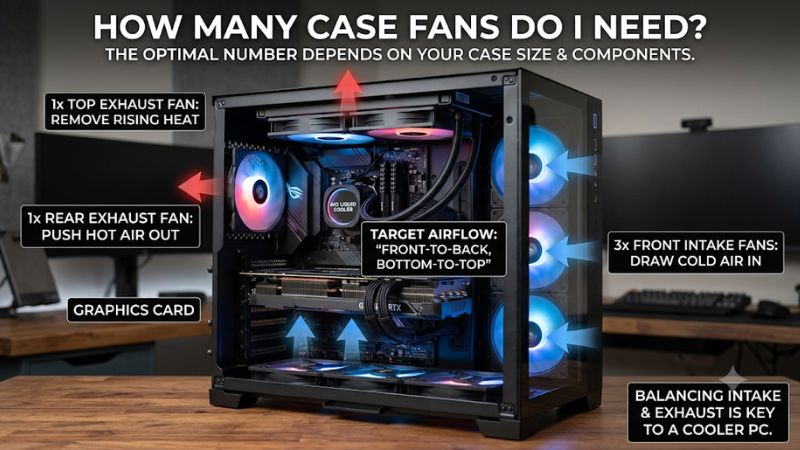
Most gaming PCs do not need a fan installed in every available mounting position. Three fans arranged with two front intakes and one rear exhaust provide a practical starting configuration. However, powerful graphics cards, liquid cooling systems, restricted front panels, and demanding workloads can justify additional airflow. Understanding these factors helps you choose an appropriate setup.
1. Your CPU and GPU Heat Output
The CPU and GPU are the primary heat sources inside a gaming computer. During demanding games, both components can produce substantial heat, which must be transferred away from their coolers and exhausted from the chassis.
A budget gaming PC with a modest graphics card generally requires less case airflow than a system running a high-power GPU and an enthusiast-class processor. The latter may benefit from additional intake and exhaust fans, particularly during extended gaming sessions.
However, component power alone does not determine the required fan count. Cooler design, GPU orientation, case ventilation, and ambient room temperature also influence internal temperatures.
2. Case Size and Ventilation Design
Your computer case determines how many fans you can install and where they can go. A conventional mid-tower case often provides front, rear, and top mounting positions, making traditional front-to-back airflow relatively straightforward.
A compact Mini-ITX case may have fewer mounting positions and different airflow requirements. Some models use bottom or side intakes to deliver fresh air directly to the graphics card.
Front-panel design also matters. A mesh panel generally allows more air to enter than a heavily restricted solid panel. Adding several fans behind a restrictive panel does not necessarily produce the cooling improvement you expect.
Always consult the manufacturer’s case specifications for supported fan sizes, mounting positions, and radiator clearances before purchasing additional fans.
3. Airflow Direction Matters More Than Fan Count
Case fans perform two different jobs: bringing cool air into the chassis and removing warm air. Intake fans typically occupy the front or bottom positions, while exhaust fans are commonly installed at the rear or top.
This arrangement creates a relatively straightforward airflow path across the graphics card, motherboard, CPU cooler, and other internal components.
Installing additional fans without considering their direction can create competing airflow patterns. For example, a top-front exhaust fan positioned directly above a front intake can remove some incoming cool air before it reaches the components.
The objective is consistent airflow rather than simply maximizing the number of spinning fans.
4. Noise, Dust, and Cooling Requirements
More fans can provide additional airflow, but they also introduce more potential noise sources. Several inexpensive fans running at high speeds may be louder than a smaller number of quality fans operating at lower speeds.
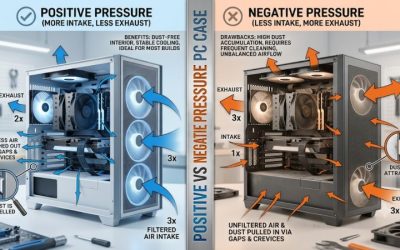
Dust management is another consideration. Slightly positive case pressure is a useful starting goal because it encourages excess air to escape through case gaps rather than drawing unfiltered air through them.
This requires more effective intake airflow than exhaust airflow, not necessarily a greater number of intake fans. Fan speed, filters, and radiator resistance all influence the final pressure balance.
How to Choose the Right Number and Position of Case Fans
The most practical way to determine how many case fans do i need is to begin with your existing configuration. Count the fans already installed, identify their airflow directions, and consider the cooling requirements of your components. Add fans only when the current arrangement cannot maintain acceptable temperatures and noise levels.
1. Two Fans: A Practical Minimum
A two-fan configuration is suitable for relatively modest systems and some entry-level gaming builds. The recommended arrangement is one front intake and one rear exhaust.
The front fan brings fresh air into the case, while the rear fan removes warmed air. This creates a basic front-to-back airflow path without requiring multiple mounting positions.
However, two fans may be insufficient for a powerful graphics card operating under sustained gaming loads, especially in a case with restricted ventilation.
If your case already includes one rear exhaust, adding a front intake is generally a more useful first upgrade than installing another exhaust fan.
2. Three to Four Fans: The General Gaming Sweet Spot
For most mainstream gaming computers, three or four fans provide a good balance between cooling, cost, and noise. A particularly useful three-fan arrangement consists of two front intakes and one rear exhaust.
A fourth fan can be added as another front intake or, depending on the case layout, as a top-rear exhaust. Noctua also recommends a three-intake, two-exhaust arrangement as a five-fan baseline for more demanding configurations.
The following table provides practical starting points rather than mandatory hardware requirements.
| PC configuration | Suggested case fans | Typical arrangement |
| Basic office PC | 1–2 | Rear exhaust or front intake and rear exhaust |
| Entry-level gaming PC | 2–3 | 1–2 front intake, 1 rear exhaust |
| Mainstream gaming PC | 3–4 | 2–3 front intake, 1 rear exhaust |
| High-performance gaming PC | 4–6 | 3 front intake, 1 rear and 1–2 top exhaust |
| High-performance liquid-cooled PC | 5–7 or more | Radiator fans plus additional intake and exhaust |
These recommendations assume a conventional case layout. Small-form-factor systems and cases with side-mounted intake positions may need different arrangements.
3. Five to Six Fans: For Hotter Gaming Systems
Five or six case fans can be useful when building a gaming PC with a powerful GPU, high-performance CPU, or substantial radiator cooling requirements.
One possible five-fan arrangement includes three front intakes, one rear exhaust, and one top-rear exhaust. The additional intake capacity helps deliver fresh air toward the graphics card, while the rear and top fans remove heated air.
A sixth fan can be installed at the bottom or another suitable intake position if the case supports it. Bottom intake can be particularly useful for delivering fresh air toward an open-air graphics card.
However, additional fans should be evaluated based on actual cooling requirements. If temperatures are already satisfactory, installing more fans may produce little practical improvement.
4. Six or More Fans: Specialized Configurations
Enthusiast gaming systems, large cases, and complex liquid-cooling configurations can accommodate six, eight, or more fans.
These setups may distribute airflow across multiple zones, including the graphics card, CPU radiator, storage devices, and motherboard components. However, the correct configuration depends heavily on case geometry and radiator placement.
An important distinction is that radiator fans also contribute to case airflow when they move air into or out of the chassis. Therefore, you should not automatically add a full set of case fans on top of every radiator fan.
A large fan count is not a requirement for an expensive gaming PC. Focus on maintaining an effective airflow path and reasonable fan speeds.
How to Set Up and Optimize Case Fans
Once you know how many fans do i need for your build, the next step is positioning them correctly. A sensible arrangement should bring cool air toward heat-producing components and provide an unobstructed route for warm air to leave. Check your case manual before installation, particularly when using radiators or unusual mounting positions.
1. Install Front Fans as Intake
Front-mounted fans are generally used as intake because they draw cooler room air into the chassis. In a traditional tower case, this air travels toward the graphics card, CPU cooler, and rear exhaust.
If your case has multiple front mounting positions, installing two or three intake fans can provide a useful airflow supply for gaming hardware.
Check that the front panel and dust filters are clean. A clogged filter can restrict incoming air and reduce the effectiveness of the entire cooling arrangement.
2. Use Rear and Top Fans as Exhaust
Rear fans normally operate as exhaust, removing warm air from the area around the CPU cooler and motherboard. This position works particularly well with tower-style CPU air coolers that direct air toward the rear of the case.
Top-mounted fans are also commonly configured as exhaust. When installing only one top exhaust fan, the rearward position is generally preferable to placing it directly above the front intake.
This arrangement helps avoid immediately exhausting fresh air before it travels through the chassis.
3. Check Fan Direction Before Installation
Most conventional case fans move air from their open side toward the side containing the supporting frame struts. Many models also include small directional arrows molded into the fan housing.
Before tightening the mounting screws, inspect these markings and confirm the intended airflow direction.
Noctua’s airflow guidance provides the same general distinction between intake and exhaust orientation. Some manufacturers also offer reverse-blade fans, so do not assume every model follows the same visual appearance.
After installation, verify airflow using a light piece of tissue held near the exterior of the case, keeping it away from fan blades. Never insert objects into a running fan.
4. Configure Fan Curves and Monitor Temperatures
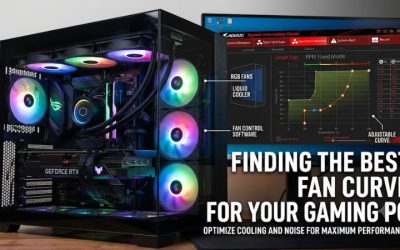
Fan curves determine how quickly your fans spin as temperatures change. Most modern motherboards allow users to configure these settings through BIOS or UEFI firmware.
You can also use motherboard manufacturer software when it supports your hardware. Depending on the system, separate controls may be available for CPU temperature, motherboard temperature, or other supported sensor readings.
Start with a moderate fan curve that keeps cooling responsive without unnecessarily increasing noise during light workloads.
Monitor CPU and GPU temperatures during an actual gaming session. If temperatures remain within the components’ operating limits and fan noise is acceptable, there may be no reason to purchase more fans.
Frequently Asked Questions
1. Are Three Fans Enough for a Gaming PC?
Yes, three fans are enough for many mainstream gaming PCs. Two front intake fans and one rear exhaust fan provide a practical starting configuration. However, powerful GPUs, restricted cases, and high ambient temperatures may justify additional cooling.
2. Is Four or Six Case Fans Better?
Six fans can provide more airflow capacity, but four may be sufficient for many gaming builds. The better configuration depends on fan quality, placement, speed, and case ventilation rather than the total number alone.
3. Should I Have More Intake or Exhaust Fans?
Slightly more effective intake airflow is a useful starting point for most gaming PCs. This can help maintain positive case pressure and reduce dust entering through unfiltered gaps. Remember that fan count alone does not determine pressure.
4. Do AIO Radiator Fans Count as Case Fans?
Yes, radiator fans count toward the total number of fans installed in your case. However, they also serve the radiator’s cooling requirements. Account for their airflow direction and placement when planning additional case fans.
Final Thoughts
Deciding how many case fans do i need comes down to your hardware, case ventilation, and cooling goals. Three or four fans are a sensible starting point for most gaming PCs, while hotter systems may benefit from five or six. Check temperatures before buying more, and prioritize balanced airflow over fan quantity.
More from Amazon
Programs that pair well with the guide above. Offers and eligibility are set by Amazon and may change.
Free shipping on eligible items, Prime Video and more. Eligible new members can start with a free trial.
Start a Prime free trialAd-free music streaming. Eligible new subscribers can start with a free trial.
Try Music Unlimited freeA Prime membership for ages 18-24 with a trial period. Eligibility is set by Amazon.
See Prime for Young AdultsAudiobooks and podcasts to listen to on the go. Eligible new members can start with a free trial.
Try Audible freeAs an Amazon Associate we earn from qualifying purchases.