
Key takeaways
- Matched vs. mixed panels: A matched three-pack guarantees identical color, size, and refresh rate for seamless alignment, while a mount lets you unite screens you already own.
- Mount weight and size rating: Verify the arm supports your monitors’ weight and size range, whether that’s 17-32 inches or up to 49 inches for larger panels.
- Desk attachment: Choose between a C-clamp for thick desktops and a grommet mount for a permanent, ultra-stable installation. Many kits include both.
- Adjustability: Look for swivel, tilt, rotation, and height adjustment so you can dial in ergonomics and reduce neck strain across all three screens.
- VESA compatibility: Confirm your monitors and mount share a VESA standard, typically 75x75mm or 100x100mm, before buying.
What's inside
A three-monitor setup is the ultimate productivity and gaming battlestation, giving you room to keep code, chat, and reference material all visible, or to wrap a racing sim across your entire field of view. But building one well means getting two things right: the panels themselves and the mount or stand that holds them in perfect alignment.
We assembled the best components for a triple-monitor rig, spanning matched panel three-packs and heavy-duty mounting arms, to help you build a clean, stable setup without guesswork. Whether you want a plug-and-play trio or a custom arrangement of your own screens, here’s how to choose and which products lead the pack.
As an Amazon Associate we earn from qualifying purchases at no extra cost to you.



🎮 Get More From Your Setup — Free
Prime Gaming gives you free PC games every month, in-game loot, and a free Twitch channel sub — plus fast free shipping on all the gear above. New members get a 30-day free trial.
Watch: Best Three Monitor Setup — Video Review
How to Choose a Three Monitor Setup
- Matched vs. mixed panels: A matched three-pack guarantees identical color, size, and refresh rate for seamless alignment, while a mount lets you unite screens you already own.
- Mount weight and size rating: Verify the arm supports your monitors’ weight and size range, whether that’s 17-32 inches or up to 49 inches for larger panels.
- Desk attachment: Choose between a C-clamp for thick desktops and a grommet mount for a permanent, ultra-stable installation. Many kits include both.
- Adjustability: Look for swivel, tilt, rotation, and height adjustment so you can dial in ergonomics and reduce neck strain across all three screens.
- VESA compatibility: Confirm your monitors and mount share a VESA standard, typically 75x75mm or 100x100mm, before buying.
The Best Three Monitor Setup Components Reviewed
HUANUO Triple Monitor Mount
Designed for 17 to 32-inch screens, the HUANUO triple mount offers full swivel, tilt, and rotation with both clamp and grommet mounting options. It’s an affordable, flexible way to unite three existing monitors into a clean, adjustable array, making it a great starting point for most desks.
Kado Triple 27-inch 3-Pack
For a turnkey solution, Kado’s 27-inch three-pack bundles three matched FHD panels at 75Hz with built-in speakers and VESA support. Identical color and size make alignment effortless, and it’s an excellent value for a cohesive productivity or office wall right out of the box.
Kado Curved Trio 27-inch 3-Pack
The curved 1500R version of Kado’s trio wraps the panoramic view slightly toward you, enhancing immersion for gaming and reducing edge distortion. With the same 75Hz FHD panels and built-in speakers, it’s the pick for those who want a more enveloping three-screen experience.
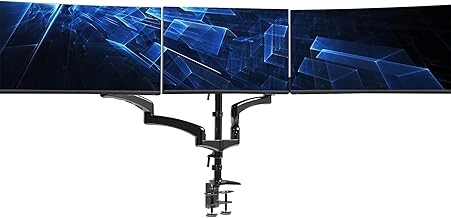
Heavy-Duty Triple Arm (up to 49 inches)
For larger or heavier monitors, this fully adjustable gas-spring arm supports screens up to 49 inches and holds up to 44 pounds, with C-clamp and grommet bases. The gas-spring mechanism makes repositioning effortless, ideal for demanding setups with big panels.
WALI Triple Monitor Mount
The WALI triple mount handles 13 to 32-inch screens at up to 17.6 pounds per arm, with swivel, tilt, and rotation across all three. It’s a dependable, well-priced choice for a standard triple setup and pairs nicely with mid-size productivity monitors.
Frequently Asked Questions
Do I need matched monitors for a triple setup?
Not necessarily, but matched panels like the Kado three-packs guarantee consistent color and alignment. A mount lets you combine different screens, though the result looks less uniform.
What graphics card do I need for three monitors?
Any modern GPU with three or more video outputs handles triple productivity displays. Gaming across all three simultaneously is more demanding and needs a stronger card.
Clamp or grommet mount, which is better?
Clamps are easier to install and reposition, while grommet mounts route through a desk hole for maximum stability. Many kits include both, so choose based on your desk and permanence needs.
Can a triple mount hold curved monitors?
Yes, provided the monitors match the mount’s VESA and weight specs. Curved panels align well on triple arms, and heavier or larger curved screens benefit from gas-spring mounts.
Final Thoughts
The best three-monitor setup depends on whether you’re starting fresh or unifying existing screens. For a turnkey trio, the Kado 27-inch three-pack, flat or curved, delivers matched panels and great value, while the HUANUO and WALI mounts are superb for arranging monitors you already own. If your panels are large or heavy, the gas-spring 49-inch arm is the sturdiest foundation. Match the mount to your monitors’ weight and VESA spec, and you’ll have a clean, ergonomic battlestation.









