Key takeaways
- GPU tier: The graphics chip drives frame rates more than anything else. An RTX 5060 handles 1080p and 1440p beautifully, while a 5070 Ti opens the door to high-refresh QHD.
- Cooling design: Sustained performance depends on thermals. Brands like ASUS ROG and Alienware invest heavily in vapor chambers and dual-fan layouts.
- Display quality: Prioritize a high refresh rate (165Hz or more) and a 16:10 panel for extra vertical workspace during both gaming and productivity.
- Build and warranty: A rigid chassis and a dependable support network matter over years of use. This is where established brands justify their premium.
- Upgradeability: Check whether RAM and storage are user-accessible. Extra DDR5 slots and a spare M.2 bay extend a laptop’s useful life.
What's inside
Picking a gaming laptop brand is really about picking a philosophy. Some manufacturers chase raw performance and aggressive thermals, others prioritize sleek chassis and refined build quality, and a few strike a balance that makes them safe recommendations for almost anyone. In 2026, the field is stronger than ever thanks to RTX 50-series graphics reaching mainstream price points.
To cut through the marketing, we compared laptops from the leading names and judged them on cooling, display quality, keyboard feel, and long-term reliability. Here are the machines and brands worth your money this year.
As an Amazon Associate we earn from qualifying purchases at no extra cost to you.


🎮 Get More From Your Setup — Free
Prime Gaming gives you free PC games every month, in-game loot, and a free Twitch channel sub — plus fast free shipping on all the gear above. New members get a 30-day free trial.
Watch: Best Gaming Brand Laptop — Video Review
How to Choose a Gaming Laptop Brand
- GPU tier: The graphics chip drives frame rates more than anything else. An RTX 5060 handles 1080p and 1440p beautifully, while a 5070 Ti opens the door to high-refresh QHD.
- Cooling design: Sustained performance depends on thermals. Brands like ASUS ROG and Alienware invest heavily in vapor chambers and dual-fan layouts.
- Display quality: Prioritize a high refresh rate (165Hz or more) and a 16:10 panel for extra vertical workspace during both gaming and productivity.
- Build and warranty: A rigid chassis and a dependable support network matter over years of use. This is where established brands justify their premium.
- Upgradeability: Check whether RAM and storage are user-accessible. Extra DDR5 slots and a spare M.2 bay extend a laptop’s useful life.
The Best Gaming Laptop Brands Reviewed
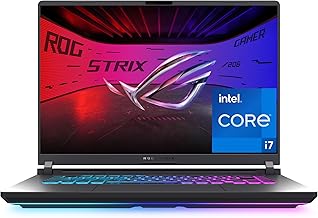
ASUS ROG Strix G16 (RTX 5060)
ROG remains the enthusiast benchmark. This Strix G16 pairs an Intel Core i7-14650HX with an RTX 5060 and a 165Hz display, delivering excellent thermals and a premium typing experience.
ASUS ROG Strix G16 (RTX 5070 Ti)
Stepping up to the Ryzen 9 9955HX3D and RTX 5070 Ti version unlocks serious 2.5K 240Hz gaming. It’s a powerhouse for players who refuse to compromise on frame rates.
Alienware 16 Aurora
Dell’s Alienware brand delivers a distinctive design, solid cooling, and a clean WQXGA 120Hz panel. The RTX 5050 and Core 7 240H combo suits gamers who value aesthetics and build.
ASUS TUF Gaming F16
The TUF line targets durability on a budget. With a Core i5-13450HX and RTX 5050, it offers military-grade toughness and dependable 165Hz gameplay at an accessible price.
Acer Nitro V 16S AI
Acer’s Nitro range consistently overdelivers on value. The Ryzen 7 260 and RTX 5060 configuration, backed by 32GB DDR5, is a genuine bargain for high-frame-rate 1440p play.
Frequently Asked Questions
Which brand has the best cooling?
ASUS ROG and Alienware generally lead on thermal engineering, but Acer’s Nitro line has closed the gap significantly with improved fan designs.
Is Acer reliable compared to ASUS or Alienware?
Yes. Acer’s Nitro and Predator lines have proven dependable, and they typically offer more performance per dollar, though premium brands feel more refined.
How much GPU power do I really need?
For 1080p and 1440p gaming, an RTX 5050 or 5060 is plenty. Choose a 5070 Ti only if you want high-refresh QHD or heavy creative workloads.
Should I prioritize RAM or storage?
Start with at least 16GB DDR5 and a 1TB SSD. Both are relatively cheap to upgrade later if the laptop allows access.
Final Thoughts
The ASUS ROG Strix G16 is our overall brand champion, blending elite cooling with top-tier displays. For premium design lean toward the Alienware 16 Aurora, and for unbeatable value the Acer Nitro V 16S AI is impossible to ignore.