Key takeaways
- DPI Range: Most players perform best between 800 and 1600 effective DPI; look for a mouse that offers a wide adjustable range rather than fixating on the maximum number.
- Sensor Quality: A high DPI figure means little if the optical sensor suffers from jitter or angle snapping — prioritize mice with proven, reputable sensors.
- Polling Rate: A 1000Hz polling rate ensures your DPI setting translates into smooth, consistent cursor tracking, especially in fast-paced FPS titles.
- Grip and Weight: DPI adjustments matter less if the mouse doesn’t suit your hand size or grip style, so check ergonomics and adjustable weight systems.
- On-the-Fly Adjustment: A dedicated DPI button lets you switch sensitivity instantly between sniping and general aiming without opening software mid-match.
What's inside
Chasing a bigger DPI number is one of the most common mistakes gamers make when shopping for a new mouse. High sensitivity numbers look impressive on a spec sheet, but DPI alone doesn’t determine whether your aim feels precise, your movements track smoothly, or your mouse actually fits your grip and playstyle. Without understanding how DPI interacts with sensor quality, polling rate, and in-game sensitivity settings, it’s easy to overspend on a mouse that doesn’t actually improve your performance.
This guide breaks down what DPI really means for gaming, how to choose the right range for your genre and monitor resolution, and which mice deliver the best combination of sensor accuracy, comfort, and value in 2026. We’ve rounded up six well-regarded gaming mice spanning budget-friendly options to premium esports-grade sensors, so you can pick the right fit without guesswork.
As an Amazon Associate we earn from qualifying purchases at no extra cost to you.


🎮 Get More From Your Setup — Free
Prime Gaming gives you free PC games every month, in-game loot, and a free Twitch channel sub — plus fast free shipping on all the gear above. New members get a 30-day free trial.
Watch: Best What Is The Best Dpi For Gaming — Video Review
How to Choose a Best DPI for Gaming (2026)
- DPI Range: Most players perform best between 800 and 1600 effective DPI; look for a mouse that offers a wide adjustable range rather than fixating on the maximum number.
- Sensor Quality: A high DPI figure means little if the optical sensor suffers from jitter or angle snapping — prioritize mice with proven, reputable sensors.
- Polling Rate: A 1000Hz polling rate ensures your DPI setting translates into smooth, consistent cursor tracking, especially in fast-paced FPS titles.
- Grip and Weight: DPI adjustments matter less if the mouse doesn’t suit your hand size or grip style, so check ergonomics and adjustable weight systems.
- On-the-Fly Adjustment: A dedicated DPI button lets you switch sensitivity instantly between sniping and general aiming without opening software mid-match.
The Best Best DPI for Gaming (2026)s Reviewed
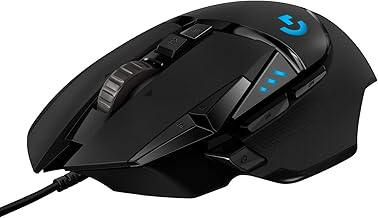
Logitech G502 Hero Wired Gaming Mouse
The G502 Hero remains a benchmark for good reason: its HERO 25K sensor delivers exceptional tracking accuracy across its full DPI range, and the adjustable weight system lets you fine-tune the feel to match your preferred sensitivity. With 11 programmable buttons and on-board memory, it’s a versatile pick for FPS and MMO players alike.
Acer Wired Gaming Mouse
Acer’s entry offers a surprisingly capable optical sensor and 12,800 DPI ceiling at a budget-friendly price, making it a solid choice for players who want DPI customization and RGB flair without a premium cost. The 8 programmable buttons and DIY keybind software add flexibility for casual and competitive use alike.
Redragon M801
The M801’s 16,000 DPI sensor and dedicated fire button cater well to MMO and MOBA players who rely on macro-heavy setups and rapid ability activation. Its 9 programmable buttons and solid build quality make it one of the better value picks for players juggling complex keybinds.
Logitech G305 Lightspeed Wireless Gaming Mouse
For players who want top-tier DPI precision without a cable, the G305 pairs the excellent HERO 12K sensor with Lightspeed wireless technology that rivals wired responsiveness. Its lightweight 99g frame and long battery life make it a favorite among competitive players who prioritize consistent, drift-free tracking.
Razer Basilisk V3
The Basilisk V3’s 26K DPI optical sensor is one of the most accurate on this list, and its HyperScroll tilt wheel and 11 programmable buttons add genuine utility beyond raw sensitivity. Its ergonomic shape and Chroma RGB lighting make it a strong all-rounder for FPS and general gaming.
Frequently Asked Questions
What DPI is actually best for gaming?
Most competitive gamers use effective sensitivities between 800 and 1600 DPI, since higher settings often introduce more hand movement error rather than improving precision. The “best” DPI ultimately depends on your monitor resolution, mouse pad size, and personal aiming style.
Does higher DPI mean better performance?
Not necessarily. DPI only measures sensor sensitivity, not accuracy — a mouse with a high maximum DPI but a mediocre sensor can still feel less precise than a lower-DPI mouse with excellent tracking.
Should I use a high DPI for FPS games?
Most FPS players prefer lower DPI settings combined with lower in-game sensitivity for finer aim control, especially for precision weapons like sniper rifles. Higher DPI is more commonly favored in fast-paced genres like MOBAs where quick cursor movement matters more.
Is wireless or wired better for DPI accuracy?
Modern wireless mice like the Logitech G305 use the same high-end sensors found in wired counterparts, so there’s no meaningful accuracy penalty as long as you choose a reputable, low-latency wireless mouse.
Final Thoughts
For most gamers, the Logitech G502 Hero offers the best balance of sensor precision, customization, and comfort, while the Razer Basilisk V3 is the top pick for players who want the highest-end sensor accuracy and extra scroll functionality. Budget-conscious buyers should look to the Redragon M801 for strong DPI range and programmable buttons without the premium price tag.