Key takeaways
- Position your monitor at eye level and an arm’s length away to reduce neck strain.
- Keep frequently used peripherals within easy reach on the desk surface.
- Ensure your chair supports good posture for long sessions.
- Leave airflow around your PC so it stays cool and quiet.
What's inside
A great gaming room is more than a powerful PC on a desk. It’s an environment tuned for comfort, focus, and atmosphere, where the right desk, lighting, and decor come together to make long sessions feel effortless and streams look professional. Whether you’re building from scratch or refining an existing space, the details add up to a setup you genuinely enjoy living in.
This guide walks through the core elements of a standout gaming room, from choosing the right desk to layering ambient lighting and personalizing the walls. Along the way we’ll reference practical pieces that make the ideas concrete.
As an Amazon Associate we earn from qualifying purchases at no extra cost to you.





🎮 Get More From Your Setup — Free
Prime Gaming gives you free PC games every month, in-game loot, and a free Twitch channel sub — plus fast free shipping on all the gear above. New members get a 30-day free trial.
Watch: Best Gaming Room Setup — Video Review
Start With the Right Gaming Desk
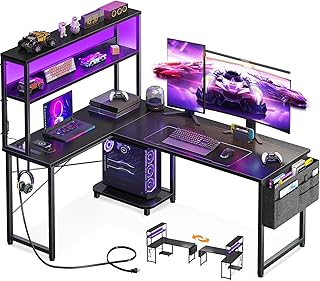
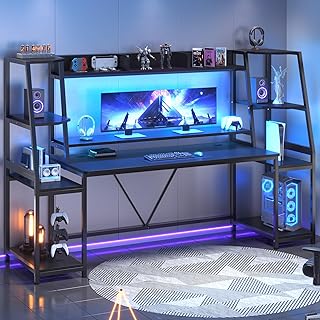
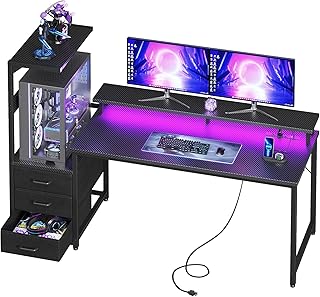
The desk is the foundation of your setup, and an L-shaped design like the SEDETA or AODK reversible desks gives you room for a monitor array plus peripherals and space to spread out. Look for built-in LED lighting, storage shelves, and cable management so your gear stays organized and your room stays tidy. A larger 79-inch SEDETA with a hutch suits multi-monitor streamers who need vertical space too.
Layer Your Lighting
Lighting sets the entire mood of a gaming room. Ambient RGB light bars like the Ledagic set behind your monitor or TV reduce eye strain and add depth, while under-desk and shelf lighting create a cohesive glow. The goal is layered, indirect light rather than a single harsh overhead source, which flatters both your eyes and your camera.
Personalize the Walls
Bare walls make a room feel unfinished. Decorative 3D wall panels, such as the Art3d black PVC set, add texture and a striking backdrop behind your desk or TV without a major renovation. They’re an easy way to give a stream or photo a polished, intentional look.
Show Off and Organize Your Hardware
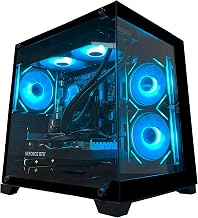
If you’ve invested in a good PC, put it on display. A desk with an integrated showcase stand, like the AODK RGB model designed to fit cases such as the Lian Li O11 or Hyte Y60, elevates your build while its drawers hide cables, controllers, and clutter. Keeping wires managed is one of the fastest ways to make a room look professional.
Prioritize Comfort and Ergonomics
- Position your monitor at eye level and an arm’s length away to reduce neck strain.
- Keep frequently used peripherals within easy reach on the desk surface.
- Ensure your chair supports good posture for long sessions.
- Leave airflow around your PC so it stays cool and quiet.
Tips
- Plan cable routing before placing gear, using a desk with grommets or a storage bag.
- Match your lighting color temperature across the room for a cohesive look.
- Choose a desk with a power outlet built in to cut down on visible cords.
- Add a few personal touches like art or figures so the space feels like yours.
Frequently Asked Questions
What size desk do I need for a gaming setup?
It depends on your gear, but an L-shaped or 53-to-79-inch desk gives comfortable room for one or more monitors plus peripherals. Bigger surfaces suit multi-monitor and streaming setups.
Is RGB lighting just for looks?
Mostly, but bias lighting behind a monitor also reduces eye strain in a dark room and improves perceived contrast, so it offers a mild practical benefit alongside the aesthetics.
How do I hide cables in my gaming room?
Use desks with built-in cable management, storage bags, and grommets, route cords along the desk frame, and consider a case-showcase desk with drawers to conceal the clutter.
Do wall panels really make a difference?
Yes. Textured 3D wall panels add depth and a finished backdrop that dramatically improves how a room looks in person and on camera, with minimal effort or cost.
Conclusion
A well-designed gaming room comes down to a spacious, organized desk, layered ambient lighting, personalized walls, and thoughtful ergonomics. Start with a solid L-shaped desk like the SEDETA or AODK, add RGB light bars and 3D panels, and you’ll have a space that’s as comfortable to game in as it is impressive to show off.