
Key takeaways
- Refresh rate: Aim for at least 144Hz, with 165Hz, 180Hz, or higher offering even smoother motion that helps you track and flick onto targets.
- Response time: A low response time, ideally 1ms, reduces motion blur so fast-moving enemies stay crisp and easy to hit.
- Resolution and size: 1080p on a 24- to 27-inch panel is the competitive standard, while QHD adds sharpness if your PC can drive the frame rates.
- Panel type: Fast IPS panels offer great color and viewing angles with quick response, ideal for a balance of clarity and speed.
- Adaptive sync: G-Sync or FreeSync support eliminates tearing for a smoother, more consistent competitive experience.
What's inside
Valorant rewards fast reactions and precise aim, and your monitor plays a bigger role in that than many players realize. A high refresh rate and low response time let you see enemies sooner and track them more smoothly, turning split-second peeks into confident kills. Because Valorant runs well on modest hardware, most players can push high frame rates, which makes a fast monitor one of the best upgrades for climbing the ranks.
To help you find the ideal display, we rounded up the best gaming monitors for Valorant in 2026. These picks emphasize high refresh rates, quick response times, and sharp image quality across a range of sizes and budgets. Whether you want a competitive 1080p speedster or a crisp QHD display, there is a monitor below to sharpen your game.
As an Amazon Associate we earn from qualifying purchases at no extra cost to you.





🎮 Get More From Your Setup — Free
Prime Gaming gives you free PC games every month, in-game loot, and a free Twitch channel sub — plus fast free shipping on all the gear above. New members get a 30-day free trial.
Watch: Best Gaming Monitor For Valorant — Video Review
How to Choose a Gaming Monitor for Valorant
- Refresh rate: Aim for at least 144Hz, with 165Hz, 180Hz, or higher offering even smoother motion that helps you track and flick onto targets.
- Response time: A low response time, ideally 1ms, reduces motion blur so fast-moving enemies stay crisp and easy to hit.
- Resolution and size: 1080p on a 24- to 27-inch panel is the competitive standard, while QHD adds sharpness if your PC can drive the frame rates.
- Panel type: Fast IPS panels offer great color and viewing angles with quick response, ideal for a balance of clarity and speed.
- Adaptive sync: G-Sync or FreeSync support eliminates tearing for a smoother, more consistent competitive experience.
The Best Gaming Monitors for Valorant Reviewed
Sceptre 22-Inch FHD 144Hz
The Sceptre 22-inch is a fantastic budget entry point, delivering 1080p at up to 144Hz with HDMI, DisplayPort, and built-in speakers. Its compact size and fast refresh rate make it a great value pick for competitive Valorant players who want smooth motion without spending much.
Samsung Odyssey G55C QHD 165Hz
The Samsung Odyssey G55C steps up to a sharp QHD resolution at 165Hz with a 1ms response and a curved 1000R panel. FreeSync and HDR10 support round out a immersive yet fast display, making it ideal for players who want crisp detail alongside competitive speed.
Alienware AW2725DM 27-Inch 180Hz
The Alienware AW2725DM combines a 27-inch WQHD fast IPS panel with a swift 180Hz refresh, G-Sync and FreeSync support, and vivid 95% DCI-P3 color. It is a premium all-rounder that pairs competitive responsiveness with excellent image quality for serious Valorant players.
CRUA 27-Inch FHD 180Hz
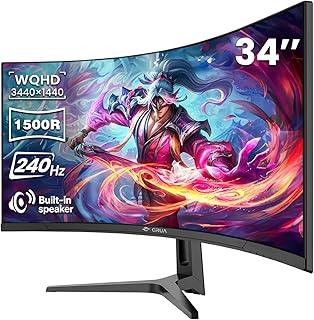
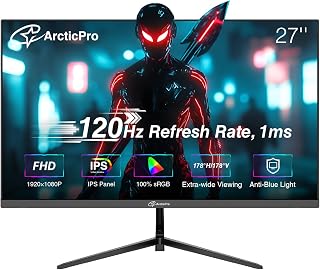
The CRUA 27-inch offers 1080p at a fast 180Hz with AMD FreeSync and low blue light, all at an approachable price. Its high refresh rate and smooth motion make it a strong value choice for competitive players who prioritize speed over resolution.
KTC 27-Inch QHD 144Hz
The KTC H27S5C brings QHD sharpness at 144Hz with adaptive sync, HDR400, and a high-contrast panel. It is a well-rounded pick for players who want the extra detail of 1440p while keeping the fast refresh rate that Valorant benefits from.
Frequently Asked Questions
What refresh rate is best for Valorant?
144Hz is the competitive minimum, and higher rates like 165Hz or 180Hz offer smoother motion. Since Valorant runs at high frame rates, a fast monitor is well worth it.
Is 1080p or 1440p better for Valorant?
1080p is the competitive standard, making enemies easy to track and pushing the highest frame rates. 1440p adds sharpness if your PC can sustain high frame rates at that resolution.
Does response time really matter?
Yes. A low response time, ideally 1ms, minimizes motion blur so fast-moving targets stay crisp, which directly helps your aim in a reaction-based shooter.
Do I need G-Sync or FreeSync?
Adaptive sync is not essential but helpful, eliminating screen tearing for smoother visuals. Most modern gaming monitors include FreeSync, and many are G-Sync compatible.
Final Thoughts
The right monitor gives you a real competitive edge in Valorant by letting you see and react to enemies faster. For pure competition, a fast 1080p panel like the Sceptre or CRUA delivers smooth motion on a budget, while the Alienware AW2725DM and Samsung Odyssey add premium image quality at high refresh rates. Prioritize refresh rate and response time, match the resolution to your PC’s power, and your aim will feel sharper every match.









