Key takeaways
- Enable XMP or EXPO first, test, then attempt manual tuning only if you want more.
- Change one variable at a time, frequency, one timing, or voltage, and retest after each.
- Keep DDR4 under about 1.45V and DDR5 under about 1.4V for safe daily voltages.
- Add a RAM heatsink or small fan if you run tight timings, since heat causes instability.
Overclocking your RAM is one of the cheapest ways to squeeze free performance out of a gaming PC, and on AMD Ryzen systems it can lift 1% low frame rates noticeably. Faster memory and tighter timings feed the CPU data quicker, which matters most in CPU-bound games and heavy multitasking. Best of all, you already own the hardware, no new parts required.
This guide walks you through overclocking DDR4 or DDR5 memory safely, from enabling the easy XMP/EXPO profile to manually tuning frequency, timings, and voltage. We will cover stability testing and keeping temperatures in check so you push performance without risking data corruption or crashes.
Our top picks


As an Amazon Associate we earn from qualifying purchases at no extra cost to you. Ratings are shown as listed on Amazon.
⚡ Save on Your Next PC — Amazon Prime
Prime members get fast free shipping on the systems above, plus early access to Prime Day & Black Friday PC deals. New members get a 30-day free trial.
Watch: How to Overclock Your RAM Safely — Video Review
Start With XMP or EXPO Before Manual Tuning
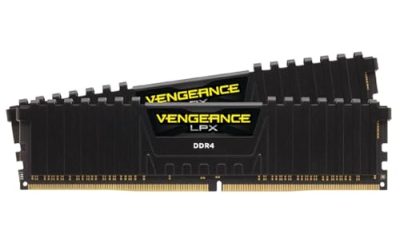
Your RAM ships rated at a slow JEDEC speed like DDR4-2133 or DDR5-4800 until you enable its rated profile. In the BIOS, turn on XMP (Intel) or EXPO (AMD) to jump a DDR4 kit like the Corsair Vengeance LPX straight to its advertised 3200MHz, or a DDR5 kit to 6000MT/s. This one toggle delivers most of the gains with zero manual work, so always start here and confirm stability before going further.
Understand Frequency vs Timings
RAM performance comes from two levers: frequency (MHz or MT/s) and timings (the CAS latency numbers like CL16). Higher frequency raises bandwidth; tighter timings lower latency. On Ryzen, memory frequency is also tied to the Infinity Fabric clock, so DDR4-3600 CL16 is often the sweet spot, while DDR5 systems favor 6000MT/s CL30. Chasing one at the expense of the other rarely helps, aim for balance.
Raise Frequency and Voltage Carefully
To push past your kit’s rating, raise the memory frequency one step at a time and increase DRAM voltage in small increments. DDR4 is generally safe up to about 1.45V for daily use; DDR5 typically stays under 1.4V. After each change, boot into Windows and run a quick stability check. If the system fails to POST, clear CMOS and step back. Never jump voltage in large amounts, small increments keep the modules safe.
Tighten Timings for Extra Latency Gains
Once your target frequency is stable, you can manually lower the primary timings (CAS Latency, tRCD, tRP, tRAS) by one at a time, testing after each. Tighter timings reduce latency and can add a few percent to gaming performance. This is where a memory cooler earns its keep: sustained tight-timing loads generate heat, and a heatsink like the Thermalright MC-2 ARGB or a JEYI RAM heatsink keeps modules cool during long stress tests.
Test Stability Thoroughly
An unstable RAM overclock corrupts data silently, so testing is non-negotiable. Run TestMem5 with an anta777 config or MemTest86 for at least an hour, plus a few passes of Karhu RAM Test if you have it. A single error means you must loosen a timing or add a touch of voltage. Only after a clean multi-hour run should you trust the overclock for daily gaming and work.
Tips
- Enable XMP or EXPO first, test, then attempt manual tuning only if you want more.
- Change one variable at a time, frequency, one timing, or voltage, and retest after each.
- Keep DDR4 under about 1.45V and DDR5 under about 1.4V for safe daily voltages.
- Add a RAM heatsink or small fan if you run tight timings, since heat causes instability.
Frequently Asked Questions
Is overclocking RAM safe?
Yes, when done gradually. Modern boards and modules tolerate modest overclocks well. The real risk is instability causing data corruption, which thorough stability testing prevents.
Does faster RAM improve gaming?
On CPU-bound titles and AMD Ryzen systems, yes. Faster memory and tighter timings lift 1% low frame rates and smooth stutters, though GPU-bound games see smaller gains.
XMP or EXPO, which do I use?
EXPO is AMD’s DDR5 profile standard and XMP is Intel’s; many DDR5 kits include both. Use whichever matches your platform, they do the same job of applying rated speeds.
Why won’t my PC boot after overclocking?
You likely pushed frequency or timings too far. Clear the CMOS (via the board jumper or by removing the battery), and the BIOS resets to safe defaults so you can try smaller steps.
Conclusion
RAM overclocking rewards patience: enable XMP or EXPO for instant gains, then tune frequency and timings one step at a time with careful voltage and thorough stability testing. Keep the modules cool, respect the voltage limits, and you will unlock real, free performance from hardware you already own.