
Key takeaways
- Frame pacing: 144Hz refreshes every 6.94ms; 240Hz every 4.17ms. That 2.8ms gap is small in isolation but compounds across flick shots and tracking.
- Motion clarity: 240Hz noticeably reduces perceived blur during fast horizontal panning, making enemy models easier to resolve mid-strafe.
- GPU demand: Sustaining 240 FPS requires a strong CPU and GPU; 144Hz is comfortably achievable on mid-range hardware in most titles.
- Diminishing returns: The jump from 60Hz to 144Hz is transformative. The jump from 144Hz to 240Hz is real but subtle — most players notice it within a week, not within a minute.
- Panel trade-offs: Budget 144Hz screens increasingly come at 1440p, while budget 240Hz screens are almost exclusively 1080p. You’re often choosing between resolution and refresh rate.
- Price parity: In 2026, entry-level 240Hz 1080p monitors frequently undercut 1440p 144Hz models, which flips the traditional value argument.
What's inside
For years the 144Hz monitor was the default recommendation for anyone building a gaming PC, and the 240Hz panel was a luxury reserved for sponsored esports players. That gap has narrowed dramatically. Heading into 2026, 240Hz has become the volume segment at 1080p, with mainstream brands shipping IPS and curved VA panels at prices that used to buy you a basic 144Hz screen. The question is no longer whether 240Hz is worth the premium — it’s whether the premium still exists at all, and whether your GPU and your games can actually feed that many frames.
This comparison breaks down what genuinely changes between 144Hz and 240Hz, where the returns start to flatten, and which panels are worth your money right now. The short version: 144Hz remains the smarter buy if you play graphically demanding single-player games on a mid-range GPU, while 240Hz is the clear pick for competitive shooters where every millisecond of motion clarity matters.
As an Amazon Associate we earn from qualifying purchases at no extra cost to you.




⚡ Save on Your Next PC — Amazon Prime
Prime members get fast free shipping on the systems above, plus early access to Prime Day & Black Friday PC deals. New members get a 30-day free trial.
Watch: 144Hz vs 240Hz Monitor: Worth It in 2026? — Video Review
Quick Verdict
Choose a 144Hz monitor if you split your time between AAA titles and competitive games, run a mid-tier GPU like an RTX 4060 or RX 7600, and would rather put the savings toward higher resolution or better panel quality. Choose 240Hz if you primarily play CS2, Valorant, Overwatch 2, Apex Legends, or Rocket League, and your system reliably pushes 200+ FPS at 1080p. For most 1080p esports players in 2026, the Dell SE2426HG and Dell SE2726HG are the safest all-round buys, while the SANSUI 27 Curved and Sceptre C255B-FWT240 deliver more immersion per dollar.
Key Differences
- Frame pacing: 144Hz refreshes every 6.94ms; 240Hz every 4.17ms. That 2.8ms gap is small in isolation but compounds across flick shots and tracking.
- Motion clarity: 240Hz noticeably reduces perceived blur during fast horizontal panning, making enemy models easier to resolve mid-strafe.
- GPU demand: Sustaining 240 FPS requires a strong CPU and GPU; 144Hz is comfortably achievable on mid-range hardware in most titles.
- Diminishing returns: The jump from 60Hz to 144Hz is transformative. The jump from 144Hz to 240Hz is real but subtle — most players notice it within a week, not within a minute.
- Panel trade-offs: Budget 144Hz screens increasingly come at 1440p, while budget 240Hz screens are almost exclusively 1080p. You’re often choosing between resolution and refresh rate.
- Price parity: In 2026, entry-level 240Hz 1080p monitors frequently undercut 1440p 144Hz models, which flips the traditional value argument.
144Hz Monitors: The Balanced All-Rounder
144Hz hits a genuine sweet spot. It eliminates the stutter and input lag of 60Hz, works well with adaptive sync across a wide frame rate range, and doesn’t demand that you disable settings to hit the cap. If you play Cyberpunk, Baldur’s Gate 3, Helldivers, or any modern AAA release, your GPU will spend most of its time between 70 and 130 FPS anyway — a 240Hz panel simply idles above your actual output.
The stronger argument for 144Hz in 2026 is what it lets you spend elsewhere. At the same budget as a 240Hz 1080p screen, you can usually step up to 1440p at 144Hz or 165Hz, which is a far more visible upgrade in text sharpness, texture detail, and desktop workspace. If you’re a mixed-genre player rather than a dedicated FPS competitor, resolution generally beats refresh rate.
240Hz Monitors: Built for Competitive Play
If your main games are esports titles, 240Hz earns its place. The Dell SE2426HG (23.8-inch) and Dell SE2726HG (27-inch) both pair 240Hz with IPS panels and AMD FreeSync Premium, which is a combination that was expensive as recently as 2023 — you get wide viewing angles and accurate color without giving up speed. The 24-inch model is the traditional esports size, keeping the entire playfield within your central vision; the 27-inch suits players who sit further back or want a more immersive desktop.
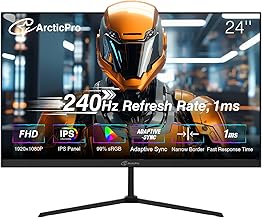
For immersion over pure precision, curved VA panels make a strong case. The SANSUI 27 Curved offers 1500R curvature, 130% sRGB coverage, and a 4000:1 contrast ratio, which produces noticeably deeper blacks than IPS in dark maps. The SANSUI 32 Curved scales that up for a cinematic feel at the cost of visible pixel density at 1080p. The Sceptre C255B-FWT240 splits the difference at 24.5 inches with dual DisplayPort and HDMI inputs plus built-in speakers, while the ArcticPro 24 delivers a frameless IPS design with adaptive sync for minimal-bezel dual-monitor setups.
Which Should You Buy?
- For competitive FPS players: pick 240Hz — the Dell SE2426HG at 24 inches is the standard-issue choice.
- For mixed AAA and multiplayer gaming: pick 144Hz, ideally at 1440p, so your GPU output matches the panel.
- For immersion and contrast: pick the SANSUI 27 Curved or SANSUI 32 Curved for deeper blacks and a wraparound feel.
- For console players: pick 144Hz — PS5 and Xbox Series X cap at 120Hz, so 240Hz is wasted headroom.
- For tight budgets: pick the ArcticPro 24 or Sceptre C255B-FWT240, both of which deliver 240Hz without a premium-brand markup.
Frequently Asked Questions
Can you actually see the difference between 144Hz and 240Hz?
Yes, though it’s subtler than the 60Hz-to-144Hz leap. Most players perceive it as smoother tracking and cleaner motion rather than a dramatic visual change. Competitive players tend to notice it more because they rely on fast crosshair movement.
What GPU do I need for 240Hz gaming?
For esports titles at 1080p, an RTX 4060 or RX 7600 class card will typically exceed 240 FPS. For AAA games, no consumer GPU reliably sustains 240 FPS at high settings, so treat 240Hz as an esports-focused feature.
Is IPS or curved VA better for 240Hz?
IPS panels like the Dell SE2726HG offer better color consistency and viewing angles. Curved VA panels such as the SANSUI 27 Curved deliver higher contrast and more immersion. Competitive players usually prefer IPS; immersion-focused players prefer VA.
Does a 240Hz monitor reduce input lag?
Marginally. The panel itself shaves roughly 2.8ms off frame delivery versus 144Hz. It won’t compensate for network latency or a slow mouse, but it does contribute to a more responsive overall feel.
Final Verdict
In 2026, 240Hz has quietly become the default for 1080p gaming, and panels like the Dell SE2426HG, Dell SE2726HG, and SANSUI 27 Curved make it affordable enough that competitive players have little reason to settle for less. That said, 144Hz is far from obsolete — if you play story-driven games on a mid-range GPU, spending the same money on a 1440p 144Hz display will improve your experience more than the extra 96Hz ever will. Match the panel to your library, not to the spec sheet.









